Back to deals

Backlsh Lifetime Deal: buy or skip?

A conditional option for small service teams that repeatedly reconstruct forgotten time. Try it on real workflows before committing: captured activity still needs context, and public pricing, platform and monitoring details need clarification.

Product overview

What Backlsh does

Backlsh combines background time collection, activity reports and attendance-oriented features. Its useful purpose is producing a better starting record for review, not automatically deciding which work deserves payment or which employee is productive.

This review is based on public sources checked October 24, 2026, not a hands-on benchmark. We separate documented claims from our proposed evaluation steps and do not treat vendor accuracy, savings or compliance language as independently verified results.

Read the full Backlsh review

Best for

  • Small agencies whose staff switch between clients and regularly forget manual timers
  • Consultants willing to review captured records before preparing client reports
  • Operations teams able to run a transparent pilot with clear monitoring limits

Why we picked it

  • Background activity collection can reduce reliance on end-of-week memory
  • Project and attendance records bring several review tasks into one product
  • Low entry pricing makes a limited trial more practical than an organization-wide commitment

Check before buying

  • Run a small authorized trial that includes shared apps, offline periods, meetings, idle reading and corrections before using the records operationally.
  • Obtain written confirmation of plan price, device support, screenshot defaults, retention, access and export behavior before purchasing multiple seats.
  • Compare completed reporting time and correction quality with the previous process, while retaining human approval of every consequential classification.

Buy if

A limited trial produces useful project records with less total administrative effort than your existing process.

Verify first

Run a small authorized trial that includes shared apps, offline periods, meetings, idle reading and corrections before using the records operationally.

Skip if

You expect activity percentages to determine employee quality, pay or client charges without context.

SoftScout sends you to the source after the risk checks, so you can verify live terms before buying instead of trusting stale coupon text.

Check Source Offer

Source transparency

Source
Source marketplace
Link type
Source page
Last checked
Oct 24, 2026

Buyer checklist

  • Run a small authorized trial that includes shared apps, offline periods, meetings, idle reading and corrections before using the records operationally.
  • Obtain written confirmation of plan price, device support, screenshot defaults, retention, access and export behavior before purchasing multiple seats.
  • Compare completed reporting time and correction quality with the previous process, while retaining human approval of every consequential classification.

Backlsh: the buying decision

Backlsh aims to turn an ordinary computer workday into a reviewable activity record without repeated timer starts. Its potential advantage is less reconstruction at the end of the week, especially for service teams, provided people retain control over classification, billing approval and appropriate monitoring boundaries.

Research-based review, not a hands-on test. Sources checked on 2026-10-24. The assessment below is our editorial judgment, not a customer rating. Editorial assessment: 70/100.

Consider it if

  • A limited trial produces useful project records with less total administrative effort than your existing process.
  • You can confirm the exact supported devices, license entitlements and monitoring controls before rollout.
  • Your team has a transparent policy and a human review process for billing, attendance and corrections.

Skip it if

  • You expect activity percentages to determine employee quality, pay or client charges without context.
  • You need verified platform support, privacy terms or enterprise guarantees that the vendor has not supplied.
  • Your work is mostly offline, field-based or confidential in ways that make desktop monitoring a poor fit.
Problem fit: 17/20
Forgotten timers and retrospective timesheet reconstruction are recognizable problems for small service teams with frequent project changes.
Capabilities: 15/20
Activity collection, project views, attendance and reports cover useful needs, though exact controls and platform parity require verification.
Workflow fit: 14/20
Background capture could reduce interruptions, but mapping, exceptions, corrections and approval still require a deliberately designed human process.
Evidence confidence: 9/20
The vendor publishes substantial explanations, yet inconsistent prices and compatibility statements weaken confidence in buying from public documentation alone.
Value: 15/20
The entry cost can be reasonable for a working pilot, provided support, correction effort and data governance do not outweigh the subscription savings.

Backlsh is most interesting when remembering time is the real problem

A familiar agency ritual happens near the end of the week: someone opens a timesheet, stares at Tuesday and tries to reconstruct a day from a calendar, three browser tabs and a vague memory of lunch. Backlsh targets that gap. Background collection is meant to leave a record that can be reviewed later, reducing the need to interrupt work with a timer every time attention moves to another task.

That is a useful problem to solve. It is also narrower than proving how productive a person was. A computer can record activity without understanding the quality of the decision made during it. The buying question should therefore be whether Backlsh helps your team produce a more complete, understandable account of its work with less effort. Asking it to become an objective judge of effort creates expectations that the underlying data cannot reasonably support.

Our recommendation is conditional rather than enthusiastic by default. The feature combination is relevant to small service businesses, and the price makes exploration accessible. However, the public documentation contains inconsistencies that deserve answers before deployment. A low-cost license is not a reason to skip checking what will be collected from employee machines or how the resulting information will be used.

We researched the public offer, feature pages, policy and dated guidance on October 24, 2026. We have not installed the agent across a team, measured capture accuracy or audited its infrastructure. The examples below are our proposed tests and interpretations, not invented customer results. The aim is to help a buyer distinguish a promising administrative tool from a promise that software can understand an entire working day without asking anyone about it.

Sources: Automatic activity collection and idle-time handling; Vendor comparison of manual and automatic tracking

Compare the actual seat economics, not the largest discount label

The checked lifetime offer lists one user for $79, five for $169 and ten for $299, with code redemption within sixty days and a thirty-day refund period. Those are the terms associated with this source listing, not a universal price for every promotion carrying the Backlsh name. Record the purchased tier and its entitlements rather than combining the cheapest price from one page with the most generous allowance from another.

Direct pricing is internally inconsistent: the page shows $2.99 per user monthly in one place and $2.90 elsewhere. It also advertises a fourteen-day trial without a card. The difference is small, but it means a buyer should obtain a current quote rather than treating the comparison table as authoritative. For illustration, fifteen seats at $2.99 would be $44.85 monthly; that is arithmetic, not a confirmed invoice amount.

If one eligible seat really costs $2.99 monthly with comparable features, $79 is about twenty-six and a half months of subscription charges. At five fully used seats, $169 is about eleven and a third months. These rough comparisons exclude tax, plan differences, future changes and service risk. Unused seats do not create savings merely because the bundle looks efficient when divided by its maximum capacity.

Choose a license around people who will actually use it and an expected useful period you can defend. Include setup, training, corrections and support in the decision. A lifetime purchase can be sensible after a successful trial; before that, it is a wager on fit. The refund window is a chance to finish a realistic evaluation, not an invitation to postpone installation until the day after the window closes.

Sources: Current lifetime license tiers and redemption terms; Direct subscription prices, platform claims and enterprise scope

Check compatibility with a working installer and your real routine

The pricing page includes a Windows and Mac desktop-app label while its technical FAQ still says Windows. That conflict is enough to require clarification, especially for a mixed-device team. We would not interpret a broad platform badge as proof of feature parity. Ask for the current supported build, operating-system requirements and any limitations that affect capture, permissions or reporting on the machines you use.

Start on one representative device with harmless sample work. Check installation, sign-in, startup behavior and recovery after a restart. Then repeat the routine after sleep, an application update and a change of network. These are not exotic tests. A background utility has to survive ordinary interruptions if its output is supposed to help reconstruct a day that nobody remembered to record manually.

For shared computers, determine how identity is established and what happens when users switch. For a person with two machines, investigate whether overlapping records are merged, duplicated or kept separate. Do not assume that the word user implies an unlimited number of devices or a particular method of reconciling them. The practical entitlement is what your account permits and the product can demonstrate.

Avoid rolling the tracker out to everyone simply because the first installation finishes quickly. Installation success answers only whether an application can run, not whether its records are useful or its boundaries appropriate. A good compatibility check ends with a reviewed sample report from the actual device and a clear way to stop collection. That is a stronger foundation than a slide promising that setup takes fewer minutes than making coffee.

Sources: Direct subscription prices, platform claims and enterprise scope; Automatic activity collection and idle-time handling

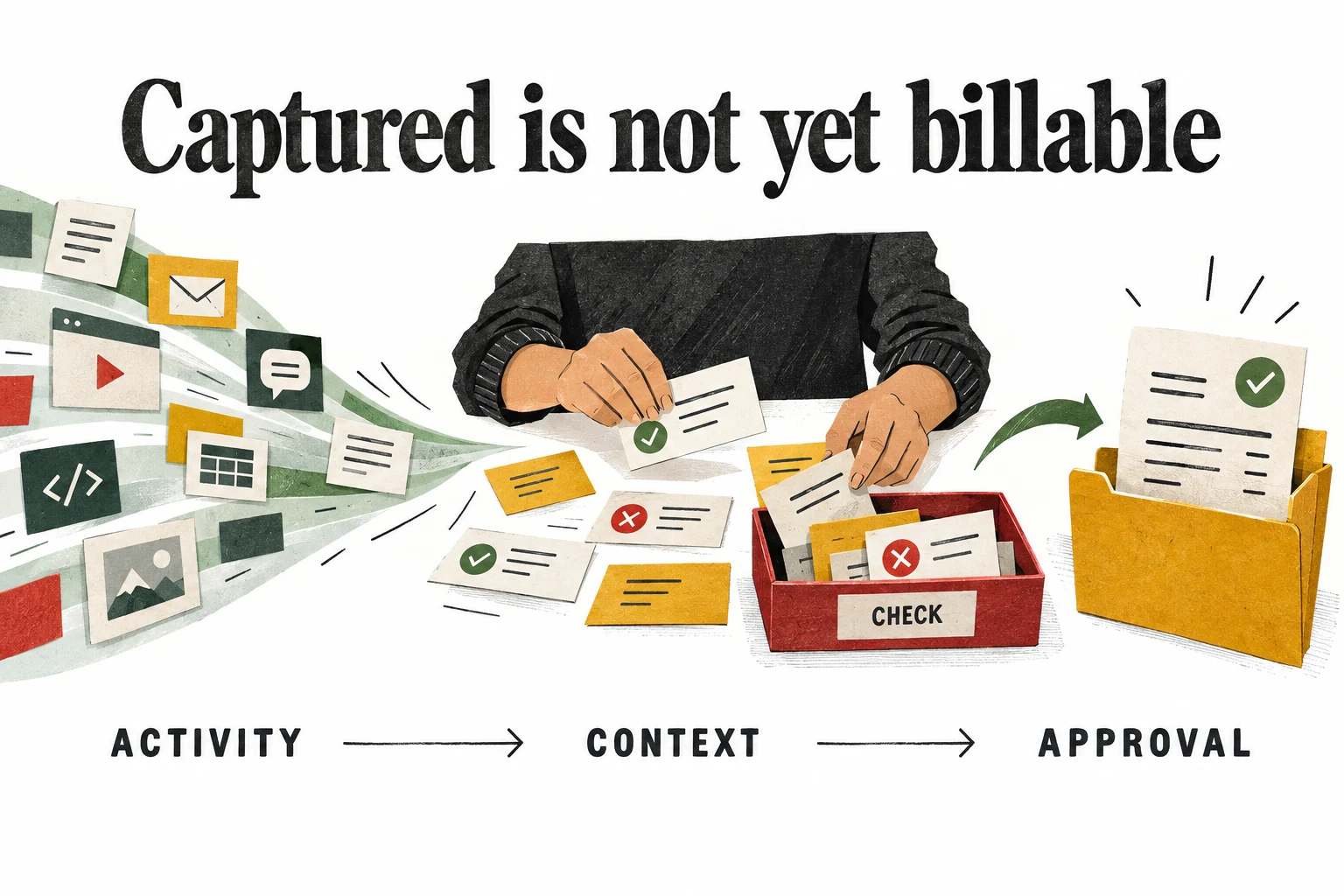
Build a review step between captured activity and a finished record

Backlsh's activity-oriented approach can provide a trail of computer use. That trail should be treated as a draft source of evidence. An application event, a window title and a duration each answer a limited question. They do not automatically establish the purpose of the work, whether the client requested it or whether another simultaneous record describes the same interval.

Our suggested workflow has three stages: capture, interpretation and approval. The first stage collects the available record. The second adds the person and project context needed to understand it. The third checks the proposed use, such as a client report or internal capacity calculation. Keeping these stages distinct makes it easier to locate mistakes without blaming every discrepancy on either the employee or the software.

Consider an illustrative afternoon containing a client call while a document remains open, followed by revisions in the same application. A simplistic interpretation could count the call and document as two independent blocks, or assign everything to whichever project owns the application. A careful review recognizes the overlap and separates the tasks. The useful outcome is a defensible account of elapsed work, not the largest total the available records can produce.

Make uncertainty visible. An unresolved interval can carry a note and wait for clarification instead of being forced into a confident category. If the system does not support the exact review state you need, maintain it in the surrounding process. Automation is valuable when it makes the evidence easier to handle. It becomes counterproductive when it encourages people to mistake a tidy row for a settled fact.

Sources: Application and website activity monitoring; October 23 guidance on recovering and reviewing missed time

A person reviews captured application activity and routes approved task cards to an invoice while leaving uncertain cards for checking
Our conceptual workflow: collection is evidence to review, not automatic authorization to invoice. This is not a product screenshot.

Project mapping needs rules that survive shared applications

The vendor describes project assignment through work context and configured rules. That can be useful when an application or domain reliably identifies a project. The difficulty is that many service teams use the same browser, document editor and chat tool for nearly every client. A rule that recognizes the application but not the task can distribute time with great consistency and still be consistently wrong.

Build a small map of the work that is genuinely distinguishable. A dedicated client portal may be a better signal than a general browser process. A stable project label may be more useful than a vague document title. Treat these as candidate identifiers to test, not as a claim that every described rule type is available in your account. Ask the vendor to demonstrate the exact matching controls you intend to rely on.

Use deliberately ambiguous examples during the pilot. Open two clients in the same tool, switch between a client task and internal administration, and rename a working document. Inspect what the system records and how a user corrects it. A product can be useful even when it leaves some time unassigned, provided that uncertainty is obvious and inexpensive to resolve.

Keep a rule owner and a change record outside the product if necessary. When a project ends, a folder is renamed or a client moves platforms, old assumptions can quietly become wrong. The goal is not to create an elaborate rule collection for its own sake. Start with the few distinctions that remove real review work, and let unresolved cases remain reviewable instead of granting every broad rule permanent authority.

Sources: Project tracking guide and rule-based assignment discussion; Application and website activity monitoring

Idle detection cannot tell the difference between thinking and leaving

Automatic tracking includes idle-time handling, which can help prevent an unattended computer from looking like uninterrupted activity. The interpretation still matters. Reading a long document, taking a phone call, sketching a solution on paper and considering a difficult decision may involve little keyboard or mouse input. A quiet input device is not an employment finding, and the software should not be asked to make one.

During a trial, create a harmless sample routine containing focused reading, a short walk away, a call and ordinary typing. Ask the participant to note the real transitions. Compare those notes with the captured result to understand the threshold behavior. The purpose is to learn what the record means, not to train people to keep a mouse moving so a chart looks healthier.

Decide how legitimate non-computer work will enter the final account. That may require a correction mechanism, a separate note or an existing timesheet process. Verify what Backlsh actually supports before removing the old method. If an employee needs ten awkward edits to represent a normal afternoon, the tool may be well suited to another kind of work but poorly suited to yours.

Keep pay and attendance decisions in the appropriate human process. We are not providing a payroll rule or a legal conclusion from software behavior. A system-generated gap should trigger a question about context and data quality, not an automatic penalty. Otherwise the team quickly learns that the easiest way to satisfy the dashboard is to optimize visible activity rather than useful results, which is an expensive way to decorate a spreadsheet.

Sources: Automatic activity collection and idle-time handling; Automatic attendance and schedule-based records

Client billing requires scope and approval as well as duration

The vendor's recent agency guidance makes an important distinction: an activity name alone does not decide whether work can be charged. That is a more useful starting point than broad promises about recovering every billable minute. Backlsh may help reconstruct what happened; your agreement and approval process determine how the business treats it. Keep those responsibilities separate when evaluating the reporting workflow.

Imagine a designer spends ninety minutes revising a deliverable. Some revisions may be included in the original scope, some may be an approved extra request and some may correct the agency's own mistake. All three involve real work in the same application. They should not become identical invoice lines merely because the tracker captured them with the same level of detail.

For fixed-fee projects, time can still be useful without creating an additional charge. It helps reveal the effort consumed by a deliverable and whether estimates were realistic. For hourly work, approved durations may feed billing. For retainers, the relevant question may be how work relates to an agreed allowance. Use consistent definitions so comparisons across projects do not mix fundamentally different commercial models.

Before sending a client report, review project assignment, overlaps, descriptions and scope decisions. Remove unrelated internal information from the client-facing version. An activity trail containing private browser titles is not automatically a professional deliverable. The strongest report communicates the agreed work clearly and gives the client a way to understand it, without asking them to audit a raw stream of everything that happened on someone's screen.

Sources: October 23 guidance on billable and non-billable agency work; October 23 guidance on recovering and reviewing missed time

Useful work and visible application activity are different measures

Application-level monitoring can reveal patterns worth investigating. A team may discover that a recurring handoff fragments focus or that an administrative system absorbs surprising amounts of time. Those observations can support process improvement. They do not establish that one person is better than another, because role, task complexity, experience and the quality of the outcome all affect what a working day looks like.

The same browser may host client research, mandatory training, documentation, recruiting or an unrelated personal task. Even a correct record of the active site leaves the purpose unresolved. Our second illustration deliberately shows two useful activities using the same application. It avoids a red-versus-green judgment of the people because that is exactly the shortcut a responsible evaluation should resist.

Review patterns with the people doing the work. If a reporting tool shows many interruptions, ask whether those interruptions come from customer needs, unclear ownership or an internal process that can be improved. Do not begin by assuming the employee is the problem. A useful intervention might be a clearer briefing template or fewer approval steps, not a more elaborate monitoring configuration.

Choose measures that connect to the actual service: completed work, quality checks, response reliability and realistic capacity. Activity records can add context to those measures, but should not replace them. A person who solves a difficult issue in twenty thoughtful minutes should not need to spend another forty clicking around to make the day look respectable. Buy a time tool to understand work better, not to make work resemble a time tool.

Sources: Application and website activity monitoring; Productivity insights and work-pattern reporting

Two people use the same browser for client research and team learning while a central task note emphasizes different work contexts
The same application can support different kinds of useful work. Neither the app name nor its activity duration determines an employee's value.

Attendance records need an exception path

Backlsh describes attendance records derived from schedules and tracked duration, including present, absent and partial-day classifications. This can reduce repetitive preparation when a team's work is predominantly computer-based and the schedule rules are well understood. The value depends on how the system handles exceptions, because an ordinary workplace contains more variation than a neat recurring block on a calendar.

Test a late start approved in advance, a meeting away from the computer and a day split between two locations. For distributed teams, check the reporting timezone and what happens to a shift that crosses midnight. These are questions for the pilot, not features we have verified in a live account. A total that looks sensible in one timezone can become confusing when another person reviews the same day.

Keep the original record and the reason for a correction distinguishable wherever the workflow allows. If a manager adjusts an attendance label, the organization should be able to understand why. Confirm the available history and permissions rather than assuming an exported table provides an audit trail. For consequential uses, involve the people responsible for payroll and employment processes before replacing an established system.

Attendance automation is strongest when it removes routine preparation while preserving review for unusual cases. It is weakest when an unexamined label silently determines an outcome. The test is therefore not only whether the dashboard fills itself in, but whether a legitimate exception can be recognized and resolved without a confusing chain of screenshots, messages and manual corrections in several different places.

Sources: Automatic attendance and schedule-based records

Treat screenshots as a separate collection decision

The screenshot feature is described as periodic capture rather than continuous video, and the source offer presents screenshots as optional. Neither statement establishes the defaults in a newly created workspace. Before enabling real users, inspect the actual controls and ask how collection can be disabled, limited or stopped. A feature being available is not the same thing as a reason to use it.

Start by identifying the question that screenshots would answer. If the goal is basic project costing, a reviewed time record may be enough. Adding images can expose unrelated messages, confidential documents or personal content without improving that calculation. Our preference is to begin with the least intrusive information that addresses the operational need and expand only when there is a specific, justified requirement.

Ask about multi-monitor behavior, capture frequency, exclusion options, employee visibility and removal of an accidental sensitive capture. Do not infer the existence of blurring or application exclusions from a general article about the category. Require a demonstration of the controls in the exact product and plan. If the necessary boundary cannot be enforced, that is a reason to omit the feature or choose a different approach.

The vendor states that it does not log keystrokes. That is a useful distinction, but it does not make screenshot collection harmless by definition. A single image can contain information that a long activity summary would not reveal. Evaluate the content being collected, the access it creates and the purpose it serves rather than treating one absent monitoring method as blanket approval for every other one.

Sources: Periodic screenshot monitoring and vendor privacy positioning; Current lifetime license tiers and redemption terms

Get a data-specific answer beyond a general privacy page

The published privacy policy we checked is dated May 14, 2024 and defines the service in website-oriented terms. It is not, by itself, a detailed operational description of employee telemetry and screenshot handling. That limitation does not prove the product lacks appropriate controls. It means a buyer should obtain information that addresses the actual data the desktop agent would collect.

Prepare a short data map before the trial. List the possible categories, such as application names, page titles, timestamps and images, then ask where each category is processed and stored. Identify who within the organization and vendor can access it, how long it remains available and how deletion works. Leave an unanswered question marked unanswered instead of filling it with an assumption because the sales page uses reassuring language.

Request the agreements and security information appropriate to your organization's requirements. We have not verified encryption implementation, independent audit reports, detailed retention controls or a particular regulatory status. Do not place sensitive employee or client material into a trial in order to find out later whether the arrangement was suitable. Use non-sensitive samples until the responsible people have reviewed the intended setup.

Our illustration presents three open questions, not three verified promises: what is collected, who can see it and when it is deleted. Those questions should have clear answers that the participants understand. A transparent policy is more useful than a long document nobody can connect to the software on their machine. The product becomes easier to evaluate when the collection boundaries are concrete enough to test.

Sources: Published privacy policy and its website-oriented scope

Three unanswered checklists ask what is collected who can see it and when it is deleted before a shared pilot policy is agreed
Questions to resolve before collection, not confirmed Backlsh settings, retention periods or security assurances.

Offline capture deserves a reconciliation test

The lifetime listing advertises tracking without an internet connection followed by synchronization when connectivity returns. That can matter for travel, unreliable home connections or temporary network interruptions. It should not be confused with a fully local-only product. Recording while disconnected and later sending data to a service are different behaviors with different implications for storage and access.

Use a controlled test containing ordinary sample tasks before disconnecting, during the offline interval and after reconnection. Compare the eventual report with a simple independent note of those transitions. Look for missing periods, duplicate entries, changed timestamps and incorrect project assignments. Repeat after sleep if that is part of the team's normal routine. These checks reveal recovery behavior that a steady online demonstration cannot show.

Ask what is retained locally, for how long, and what happens if the user signs out or the device fails before synchronization. We have not verified local encryption or recovery guarantees. A promise that offline tracking exists does not answer those questions. If losing a local interval would create a serious reporting problem, retain an appropriate backup method until the behavior is understood.

Do not fill every unexplained gap with estimated activity merely to make the totals reconcile. The vendor's recent missed-time guidance correctly distinguishes evidence of an event from evidence of its duration. Preserve that distinction in your own process. A smaller record with clearly identified uncertainty is more useful than an exact-looking account built from assumptions that nobody will remember when the report is questioned later.

Sources: Current lifetime license tiers and redemption terms; October 23 guidance on recovering and reviewing missed time

Reports must be useful to someone who does not know the dashboard

The feature material describes reports across periods, people and projects. The important buying test is whether a recipient can understand the resulting report without also receiving a guided tour of the product. An attractive dashboard is helpful for exploration, but a finance colleague or client may need a stable file with clear definitions, consistent dates and the right level of detail.

Prepare a sample export during the trial and inspect it in the software your team already uses. Check date formats, timezone labels, decimal versus hours-and-minutes notation, project names and rounding. Verify whether a duration that appears in the interface matches the exported total. Small differences in representation can cause surprisingly large arguments when one person reads 1.30 as one hour thirty minutes and another reads it as a decimal.

Decide which information belongs in each audience's report. Internal operations may need unresolved entries and correction notes. A client may need approved tasks and durations without unrelated application titles. Managers may need aggregate capacity rather than individual screenshots. Do not assume that one export is appropriate for every recipient simply because the product offers a button labeled report.

Test the full handoff through one reporting cycle. Record how much time it takes to review, correct, export and explain the result. If the process still requires substantial rebuilding in a spreadsheet, include that work in the value calculation. A tool has not eliminated administration when it has merely moved it from the beginning of the week to a more colorful screen at the end.

Sources: Automatic activity collection and idle-time handling; Application and website activity monitoring

AI insights should generate questions, not personnel verdicts

Backlsh markets work-pattern analysis and productivity insights. Such summaries may help a manager notice recurring interruptions, concentration windows or an unexpected concentration of time in one workflow. Treat those outputs as hypotheses to investigate. We have not benchmarked the recommendations, established how they are generated or verified that a suggested change improves results for a particular type of team.

A useful insight should be traceable to understandable evidence and lead to a reasonable experiment. For example, if a team repeatedly loses time switching between approval systems, try simplifying one handoff and observe whether completion improves. That is different from accepting a generated statement that a person is underperforming. The first tests a process; the second risks turning incomplete activity data into an unsupported judgment.

Avoid comparing people whose roles require different rhythms. A support specialist, researcher and developer may all use the same tools in very different ways. Even within one role, a difficult assignment can produce less visible activity than routine work. Ask what changed in the task and environment before interpreting a percentage change as a change in effort.

Set limits on how insights may be used during the pilot and communicate them in advance. Keep human review for decisions affecting people, clients or money. If the product helps the team ask better questions about its process, that is a legitimate benefit. It does not need to become an automated performance tribunal to justify its price, and we would consider that expectation a reason not to buy it.

Sources: Productivity insights and work-pattern reporting; Vendor comparison of manual and automatic tracking

Enterprise language does not automatically belong to a small lifetime license

The direct site lists on-premise deployment, dedicated support and an SLA within a custom Enterprise offering. General deal descriptions also mention deployment flexibility, which can make the scope easy to misread. Do not assume that buying a low-cost seat bundle includes installation on your infrastructure, custom features or a particular service commitment. Get those entitlements stated explicitly before they become part of the purchase rationale.

On-premise deployment changes the questions rather than removing them. Someone still needs to maintain the application, apply updates, manage access, back up records and recover from failures. Ask which party owns each responsibility and what support is available when a dependency breaks. Hosting data yourself is not a substitute for an operational plan, and a deployment label is not independent evidence of compliance.

For a small business that only needs a simple hosted time record, enterprise options may be irrelevant. Do not pay for complexity you cannot operate merely because it sounds more secure. Conversely, if a client contract or internal policy requires specific controls, a standard hosted license should not be adopted on the assumption that the same vendor offers a compliant arrangement somewhere else in its product range.

Evaluate the arrangement you will actually receive. That means the plan, deployment, agreement, support channel and responsibilities, not the most reassuring sentence on the broadest feature page. A clear answer that a capability requires a different contract is more useful than an ambiguous promise that everything is included. Good purchasing discipline keeps the inexpensive experiment separate from a larger infrastructure commitment.

Sources: Direct subscription prices, platform claims and enterprise scope; Published privacy policy and its website-oriented scope

Measure administrative savings without borrowing the vendor's percentages

Some vendor material presents very strong accuracy and time-saving claims. We have not independently reproduced those figures, and they are not the basis of our score. A business should compare its own completed workflow before and after a limited trial. The relevant cost includes entry, review, correction, export and the time spent resolving questions, not just how quickly a background agent starts collecting events.

Here is an illustrative calculation rather than a product result. Suppose five people each save six minutes per working day, across twenty days. That is ten hours monthly before considering the manager's extra work. If review and maintenance consume four hours, the net time reduction is six hours. If they consume twelve, the new process costs time despite appearing to eliminate manual entries.

Attach a realistic internal value to saved time only when it can be used productively. A few scattered minutes do not automatically become additional revenue. Look for practical outcomes such as fewer Friday corrections, faster project reporting or more reliable estimates. Keep quality and employee acceptance alongside the time measure, because a small administrative saving can be outweighed by a process that people do not trust.

Also compare with improving the existing method. A clearer project list or a short daily review might solve much of the problem without a new monitoring tool. Backlsh should win because it produces a better overall routine, not because the alternative is deliberately left disorganized. This is the most useful way to judge a low-priced product: against a competent version of the process you already have.

Sources: Vendor comparison of manual and automatic tracking; Project tracking guide and rule-based assignment discussion

Run a small pilot that includes the awkward cases

Choose a few willing participants whose work represents the intended rollout. Explain the purpose, information collected, review access and stopping procedure before installation. Use non-sensitive examples initially and keep the existing reporting method available. A pilot should reduce uncertainty for both the buyer and the people using the software; it should not quietly become a permanent monitoring arrangement because nobody specified an end date.

Include routine work and the cases most likely to confuse collection: shared applications, project switching, reading without input, meetings, a brief disconnection and a device restart. Have participants note a few known transitions so the result can be compared with something other than memory. Review mistakes together and distinguish missing data, incorrect interpretation and a process rule that was never clearly defined.

Set acceptance criteria before seeing the report. Decide what level of correction effort is tolerable, which export fields are essential and which unanswered privacy or compatibility questions prevent rollout. These thresholds should reflect the business's needs, not a generic benchmark invented for the review. A successful pilot might support only one team or one use case, and that is still useful information.

Finish with a deliberate decision: adopt within the tested scope, extend a specific investigation or stop. Export the necessary records and confirm the handling of trial data. Avoid expanding because the dashboard is interesting or because the bundle includes spare seats. The product deserves wider use when the evidence shows that it makes the reporting process clearer and easier while preserving appropriate boundaries.

Sources: Automatic activity collection and idle-time handling; Periodic screenshot monitoring and vendor privacy positioning; October 23 guidance on recovering and reviewing missed time

Our verdict: promising time reconstruction, with conditions attached

Backlsh earns 70 out of 100 in our source-researched assessment. The strongest point is a recognizable problem: service teams often need a better record of fragmented computer work. The combination of collection, project views and reporting could reduce the burden of rebuilding that record later. The low entry cost helps, but it is not enough to outweigh unanswered questions about a workflow that touches employee and client information.

The score is deliberately restrained on evidence. Public inconsistencies make it harder to determine the exact product a buyer will receive without asking for clarification. We also do not accept broad claims that automation removes human error or captures every meaningful aspect of work. An activity record can be valuable while still being incomplete, and an honest buying decision should allow both statements to be true.

Consider it when your team has a genuine reconstruction problem, a mostly desktop-based routine and someone prepared to own the review process. Pass when the main goal is to rank people automatically, replace contextual payroll decisions or avoid speaking with the team about how work happens. Those are not merely difficult implementations; they are the wrong expectations for this kind of evidence.

The best outcome is unremarkable in a good way: fewer forgotten entries, clearer project discussions and less administrative detective work on Friday. Nobody needs to become a professional mouse mover, and nobody needs to read an entire browsing history to understand an invoice. Buy after the product demonstrates that practical improvement in your environment, with its collection and correction rules understood. Until then, the right next step is a careful trial, not a larger seat count.

Sources: Application and website activity monitoring; Productivity insights and work-pattern reporting; October 23 guidance on billable and non-billable agency work

Frequently asked questions

Does automatic capture make every recorded minute billable?

No. A record of computer activity does not establish the client's agreement, project ownership or approved scope. Review the task and its commercial treatment before using it in an invoice.

Is Backlsh definitely available for every desktop platform?

The public pricing page contains conflicting platform descriptions. Confirm a current installer and the features you need on your exact operating system rather than assuming compatibility from a general marketing label.

Are screenshots necessary for a useful time-tracking pilot?

Not necessarily. Begin with the least intrusive information that answers your reporting question, and verify whether the product lets you disable or limit screenshots before collecting real employee data.

Does the lifetime license include an on-premise deployment?

Do not assume that from general feature marketing. The direct site places on-premise deployment and an SLA in a separately quoted Enterprise plan, so any entitlement needs written confirmation.

Should an idle interval automatically reduce pay or mark someone absent?

No. Quiet reading, calls, thinking and work away from the computer can be legitimate work. A software label needs contextual review and the organization's appropriate payroll process, not an automatic adverse conclusion.

More productivity & collaboration deals

Productivity & Collaboration

Acti

A promising fit for people who repeatedly draft, rewrite and move information between phone and Mac. Start with a few frequent tasks, measure corrections and credits, and keep connected actions under deliberate review. Windows-dependent buyers should wait.

$59 · checked Nov 14, 2026

Productivity & Collaboration

Voicina

Voicina translates videos into over 125 languages, offering branded subtitles, voice cloning, and studio voiceovers. It provides a unified workspace for transcription, subtitling, translation, and dubbing. The product is designed for teams that need a repeatable productivity & collaboration process and want clearer control over the core task. It fits best when the buyer has a defined use case, realistic input data, and a way to judge output quality before rolling it out across a wider workflow.

$69 · checked Nov 7, 2026

Productivity & Collaboration

ProductBridge

ProductBridge centralizes customer feedback from various sources, helping product teams identify user needs and prioritize feature development. It enables the creation of transparent roadmaps and automates user notifications about new releases. This tool is designed for organizations seeking to improve their product development cycle by making data-driven decisions based on consolidated user input.

$69 · checked Jul 6, 2026

Productivity & Collaboration

Formwise

Promising for consultants and small agencies with a repeatable method customers already value. Budget for ongoing model usage, verify your exact tier and test the customer journey. A branded chatbot alone is not a business model.

$49 · checked Nov 12, 2026

Deal alerts

Get productivity & collaboration deal alerts by email.

SoftScout will send short buying notes when offers like Backlsh look worth checking or worth skipping.

Short buyer verdicts

Useful offers before checkout

Editorial note

Our 70/100 assessment rewards a concrete workflow and accessible cost, while reducing the evidence score for inconsistent public documentation and unresolved monitoring details. Buy only after a pilot demonstrates useful records with acceptable correction and privacy requirements.

For vendors

Have a better deal for Backlsh?

Send current partner terms, coupon limits, refund rules, and the best buyer fit. We review offers before adding them to SoftScout pages or Telegram alerts.

Submit terms