Back to deals
Developer ToolsExclusive Discount

Get 25% off Context.dev with SoftScout

Context.dev combines web scraping, search, structured extraction and brand profiles behind one API. It makes sense for developers building research assistants, knowledge imports or company-aware onboarding. The catch is familiar: clean output is not automatically correct output. This review explains where the service can save engineering work, which limits matter, and how to evaluate it before committing to a subscription.

Product overview

What Context.dev does

Context.dev can retrieve website text, structured fields and images, discover pages, run background jobs and watch for changes. Its brand lookup adds company details and visual assets to the same toolkit. That combination suits applications that need both content and company context, such as a customer onboarding flow that identifies a business and imports its public documentation.

The buying decision depends on accepted results, not impressive request counts. Schema extraction costs more than a basic scrape; cached content may be older than your task permits; and a successful response can still omit fields. Start with a small sample of your actual websites, inspect the output and measure the full cost of the workflow before choosing a paid plan.

Read the full Context.dev review

Best for

  • Developers importing public documentation into AI tools
  • SaaS teams building company-aware onboarding
  • Operators maintaining source-checked web datasets

Why we picked it

  • Scraping, discovery and brand lookup in one API
  • Schema-based extraction with explicit missing-data handling
  • Background batches and scheduled change monitoring

Check before buying

  • Count credits for the complete workflow, including extraction and enrichment, rather than assuming every task costs one credit.
  • Test freshness, missing fields and partial output on your own target pages before expanding the integration.
  • Confirm coupon acceptance and eligible charges at checkout; check retention support for every endpoint you intend to use.

Use it if

Your product needs reliable website context and you do not want to build the crawler, parser, and enrichment layer yourself.

SoftScout perk

Use code SOFTSCOUT25OFF and new users get 25% off the first 6 months.

Skip it if

You only need a one-time scrape or already have crawler infrastructure that your team is happy maintaining.

SoftScout readers get a direct discount. Use code SOFTSCOUT25OFF after opening the deal.

Open Context.dev Deal

Source transparency

Source
context.dev
Link type
Discount link
Last checked
Oct 24, 2026

Buyer checklist

  • Use code SOFTSCOUT25OFF at checkout to get the extra SoftScout discount.
  • Test it with one real workflow first: crawler, markdown extraction, screenshots, logos, or company data.
  • Check your expected API volume before moving a production workflow over.

Context.dev: the buying decision

Context.dev is most useful when a small engineering team needs both readable website content and company context inside the same application. Its distinctive appeal is the combination of scraping, structured extraction, discovery, brand profiles and monitoring, rather than another isolated scraper to maintain.

Research-based review, not a hands-on test. Sources checked on 2026-10-24. The assessment below is our editorial judgment, not a customer rating. Editorial assessment: 83/100.

Consider it if

  • Your application needs several web-data operations and maintaining separate collection code is slowing delivery.
  • A pilot on representative websites meets your accuracy, freshness and response-time requirements.
  • You can assign ownership for budgets, failed jobs and ongoing source validation.

Skip it if

  • An official source API or export already provides the precise fields you need with less uncertainty.
  • You need a finished no-code research application rather than an API to integrate.
  • Required retention controls are unavailable on the particular endpoints your workflow needs.
Problem fit: 18/20
The combined collection and enrichment workflow addresses a concrete engineering burden for small teams building applications around external website data.
Capabilities: 18/20
Documented scraping formats, schema extraction, discovery, batches, brand profiles and monitoring cover several connected stages of a web data pipeline.
Workflow fit: 16/20
SDKs and operational controls ease integration, but partial results, asynchronous work and source-specific validation still require deliberate application engineering.
Evidence confidence: 15/20
Detailed current documentation supports the feature assessment, but this review contains no independent workload benchmark or firsthand reliability test.
Value: 16/20
The free allowance makes evaluation practical, while mixed endpoint costs and overage settings mean savings depend on the actual workload.

Context.dev review: useful infrastructure, not instant intelligence

A website is easy to read until you ask software to read it reliably. Navigation repeats on every page. A pricing table changes shape on mobile. The useful paragraph arrives after the initial HTML. Suddenly your small feature has acquired a browser fleet and a maintenance calendar. Context.dev targets that collection problem: getting web information into an application without making the application team own every detail of retrieval.

Its current product spans more than basic scraping. The official materials describe web search, structured extraction, site discovery, background collection, brand profiles and change monitoring. The practical attraction is having related operations under one integration. A founder building an AI onboarding assistant might need a company's identity, a few public pages and occasional refreshes. That is a more convincing fit than buying a broad toolkit simply because its feature list occupies an entire screen.

Our recommendation is conditional: shortlist Context.dev when collecting and maintaining web context is already part of a real product. Do not subscribe merely to give an otherwise undefined AI idea an impressive accessory. An API can remove plumbing work; it cannot choose your customers, define a trustworthy answer or decide whether the source is worth reading. Those jobs remain stubbornly resistant to being solved by a checkout button.

This is a research-based buying guide, not a firsthand performance test. Features and limits were checked against current product documentation; the workflow examples and buying judgments are our analysis. No speed, accuracy or reliability benchmark has been independently reproduced here. That distinction matters because a service can be well designed on paper and still perform differently on your specific collection of websites. Treat the review as a way to design a useful trial, not a replacement for one.

Sources: Context.dev product overview; API introduction

What the scraping API actually gives your application

The central Scrape workflow starts with a URL and the formats your application needs. Context.dev documents text-oriented and visual outputs, including Markdown, HTML and screenshots. Rendering and managed retrieval infrastructure are part of its proposition. For an engineering buyer, the important question is less whether many formats exist and more whether the right one arrives in a form that your next processing step can use without extensive repair.

For example, imagine a support assistant importing a public help article. Markdown may be the useful input because the downstream system wants headings and explanatory text, not a faithful reproduction of the navigation bar. By contrast, a person checking a changed pricing display may benefit from a screenshot alongside the extracted values. Requesting every output for every task creates transfer and storage work without necessarily improving the customer's answer. A screenshot of a paragraph is a particularly expensive way to obtain something you intended to search as text.

A valuable detail in the response contract is that output success is separate from overall HTTP success. One format can fail while another succeeds in the same response. Your integration should therefore decide what counts as an acceptable result for each task. If the job requires a screenshot and only Markdown succeeded, the job is incomplete even though the HTTP status looks cheerful. Conversely, a failed optional image output need not discard perfectly usable article text.

Our suggested acceptance test has three parts: the expected main content is present, essential fields are not silently missing, and the result belongs to the requested page rather than a redirect or access message. Record those checks separately. That makes failures actionable: retrieval failure, extraction failure and unsuitable source content are different problems. The purchase becomes easier to justify when Context.dev reduces the first two enough to free your team for product work, not when a dashboard merely reports a growing number of requests.

Sources: Scrape outputs and response handling; API introduction

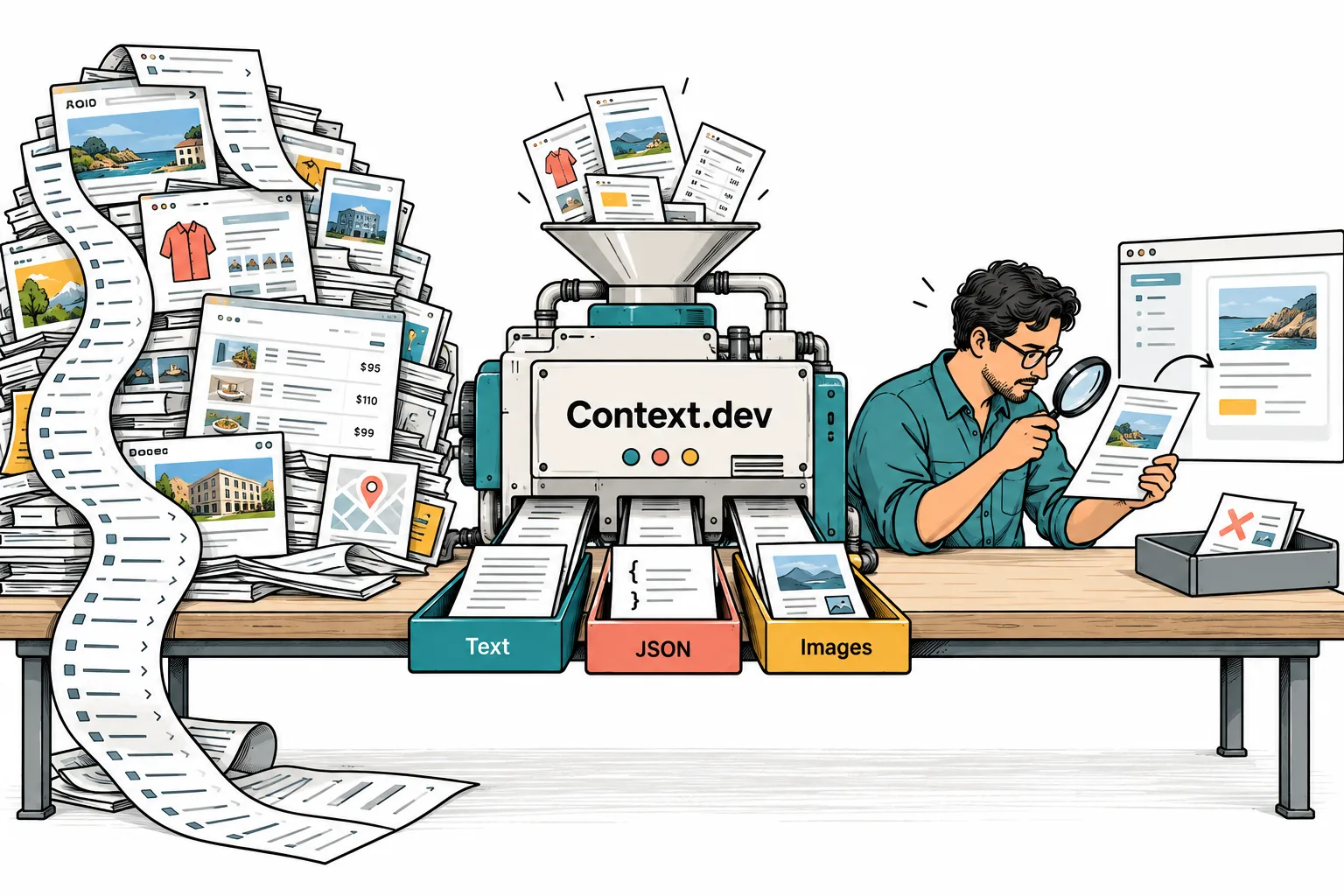
Website pages pass through Context.dev into text, JSON and images before a person checks the results
Original SoftScout illustration, not a product screenshot: collection converts pages into useful outputs; validation still decides what belongs in your application.

Structured extraction: a neat JSON object can still be wrong

Context.dev's JSON extraction accepts a schema and uses an AI model to interpret page information into that structure. The documentation explicitly discusses missing facts and warns that required, non-nullable fields can produce best-effort guesses. This is an important buying detail, not a footnote. A tidy object is easier to process than a web page, but tidiness is not evidence. A very orderly mistake is still a mistake; it has simply dressed for the meeting.

Consider collecting software plan details. A sensible record distinguishes a monthly price from an annual equivalent, identifies the currency and permits an unknown expiration date. A brittle schema demands one price and one deadline regardless of whether the page provides them. The latter may be easier to display in a table, but it encourages your pipeline to conceal uncertainty. For purchase-related information, an explicit unknown is far more useful than an invented number that looks comfortably machine-readable.

Your evaluation should include pages with missing fields, contradictory sections and multiple product variants. Manually label a small sample before running it through any extractor. Compare each required fact against the page rather than checking only whether the object matches the schema. An extracted price of 49 can pass a numeric type check while referring to the wrong plan. The difference between syntactic validity and factual validity is where a surprising amount of review work lives.

There are also situations where AI extraction is unnecessary. If you control the source or have a stable, documented field, a deterministic mapping may be simpler to explain and maintain. Use schema interpretation where layouts genuinely vary or the information needs semantic interpretation. That is a narrower and more defensible buying reason than replacing every small parser with a language-model step. Before expanding the integration, decide which fields can tolerate uncertainty, which need confirmation, and which should stop the workflow when absent. Context.dev supplies a useful extraction mechanism; your acceptance rules make it trustworthy enough for your own application.

Sources: Structured JSON extraction

Fresh web data requires an explicit freshness policy

The cache documentation makes an easy-to-miss distinction: retrieving information now does not necessarily mean the underlying page was fetched now. Scrape's documented default accepts cached outputs up to three days old. Setting the maximum age to zero requests a fresh capture. Outputs are cached independently, so a multi-format response can otherwise contain pieces captured on different visits. These are useful controls, but they require a deliberate choice from the buyer.

For a company description, yesterday's text may be completely adequate. For a limited promotion ending this afternoon, the same age may be unacceptable. A pricing monitor and a documentation importer should not inherit one global freshness setting just because that was the first example copied into the codebase. Write down how old each kind of information may be and what the interface should show when a fresh result is unavailable. This is a product decision before it is an API parameter.

A concrete example is a buying assistant that presents a price together with an image of the offer. If the two are meant to support the same claim, request them as a coordinated fresh capture. Otherwise the text might reflect one version while the image shows another. The customer does not care that both pieces are individually valid cache entries. They see conflicting evidence and reasonably wonder which part of the recommendation to trust.

For the trial, use a page you are authorized to modify. Record the initial result, change one visible fact, then compare the behavior under your intended freshness settings. This suggested test does not establish a universal refresh guarantee; it checks whether your integration handles the documented controls correctly. Also preserve the observation time with the data. Without that timestamp, even a perfectly fresh response eventually becomes an old fact with an unnecessarily confident presentation. The best refresh policy is the one your product can explain to a user in plain language.

Sources: Freshness and caching

Importing a knowledge base without importing the entire internet

Context.dev separates finding URLs from reading them. Map produces an inventory, while Crawl follows links and returns page content. The documented synchronous crawl supports up to 500 pages; larger or longer-running collection can use background batches. Map is not a guarantee of complete site coverage, and a completed batch does not mean every individual page succeeded. Those distinctions make a useful foundation for an import screen that tells the truth.

Suppose your customer wants to import a product's public documentation. Start with the documentation section, not the entire company domain. Product announcements, hiring pages and legal notices may all be perfectly legitimate pages while being poor answers to a support question. A narrow initial scope reduces irrelevant content before it reaches retrieval. It also makes the pilot reviewable by a person who knows what the knowledge base should contain.

We would judge this workflow by useful coverage rather than raw page count. Create a short list of questions the imported material should answer, then identify the relevant source pages. Check whether those pages were discovered, retrieved and retained with their headings intact. Investigate failures individually instead of celebrating a large total. A thousand imported pages do not compensate for the one setup instruction your customers ask about every morning.

The downstream responsibilities remain substantial: splitting text, handling duplicates, updating records, removing obsolete material and deciding how answers cite their evidence. Context.dev should be evaluated as the collection layer of that system, not as proof that the resulting assistant is accurate. Its combination of discovery and background processing can reduce the collection burden. Your benefit comes from a smaller amount of reliable, relevant material reaching the application, not from achieving the largest possible pile of Markdown. An import progress bar should ultimately distinguish attempted, accepted, failed and excluded pages; a single green completion message is rarely enough.

Sources: Map URL discovery; Crawl scope and results; Background batches

Search and Answers solve different research problems

Search is appropriate when the application needs candidate pages to inspect. Answers is a separate research operation that returns a structured answer with source URLs. The distinction matters because a list of potentially relevant documents and a synthesized conclusion carry different review burdens. The current Answers documentation also distinguishes faster and deeper modes. Neither a source list nor a more intensive mode removes the need to check whether the evidence actually supports the conclusion.

Imagine a research assistant looking for a company's current pricing page. Search can help locate the page, after which your application reads the primary source. That is a relatively bounded task. Asking which subscription offers the best value requires additional assumptions about usage, included features and billing. The second task needs a stated comparison method, not merely a bigger search response. A buyer should evaluate the two workflows separately instead of measuring both with one generic accuracy score.

For a practical pilot, prepare questions with known answers and questions whose answers are genuinely unavailable. The second group is particularly revealing. An honest unknown is a successful outcome when the information does not exist publicly. Also include a source with an old announcement and a newer update. Check whether the resulting answer distinguishes historical facts from current ones, and whether a reviewer can follow its citations without reconstructing the whole research process.

Our view is that Search is easier to justify when you already have application logic for selecting and reading sources. Answers may be attractive when the task genuinely benefits from combining evidence into a specified result. Do not pay for a research workflow to retrieve a value from a URL you already know. Equally, do not assume a search snippet provides enough evidence for a consequential recommendation. The useful boundary is the complexity of the question. A small, testable question beats a grand request to understand an entire market, especially when someone eventually has to explain the answer to a customer.

Sources: Web search; Answers research modes

Brand data is a practical advantage for onboarding

Brand lookup is one of the clearest reasons to consider Context.dev beyond a standalone scraping workflow. It can return company information and visual assets from supported identifiers such as a domain or work email. The documentation is appropriately cautious: collections may be empty, partial results can omit fields, and users should be able to correct uncertain details. That makes the feature more convincing as an onboarding assistant than as an unquestionable company database.

Consider a SaaS signup flow where the customer enters a work email. A possible implementation suggests the company name and logo, then asks the customer to confirm them. The advantage is not simply fewer keystrokes. It is that the first screen can already feel relevant to the customer's business. However, the application should remain fully usable when no suitable logo or profile is returned. Missing enrichment must not turn a simple registration into a customer-support ticket.

There are identity problems worth testing. An agency might register on behalf of a client. A large company can operate several brands. A personal email may not identify a business at all. In each case, the correct answer depends on what the user is trying to create, not only on which company record matches an input. Keep the entered identifier, the suggested match and the user's confirmed choice conceptually separate. That preserves the ability to explain and correct a result later.

We would also inspect returned images as actual interface assets. A pale logo on a transparent background may disappear against your application theme; a tiny image may be unsuitable for a large report. Provide fallbacks and avoid silently overwriting a manually corrected brand choice during the next refresh. Context.dev's attraction here is a connected content-and-identity workflow. The buying case becomes weaker if you only need one static logo that the customer could upload once, and stronger when accurate suggestions reduce repeated setup effort across many organizations.

Sources: Brand lookup and missing fields

Monitoring should report meaningful changes, not every twitch

The monitoring workflow establishes an initial baseline and compares later runs against it. The documentation describes scheduled checks and webhook delivery, with options to focus on relevant page content. An initial successful setup is therefore not the same as a successfully detected change. Your evaluation needs both stages. A monitor that exists in an account but has never produced a valid baseline is more administrative achievement than operational protection.

A useful hypothetical case is watching a vendor's pricing page. Define which changes deserve attention: a plan disappearing, a quota shrinking, a billing interval changing or an advertised discount ending. A rotating testimonial or updated footer date should not wake the person responsible for buying software. Begin with one concrete decision that the alert will support. Otherwise your new monitoring system risks becoming another place to dismiss notifications while feeling vaguely productive.

The receiving application needs its own rules. Store enough context to compare the observation with the current record, handle repeated deliveries safely, and separate an inaccessible source from a confirmed change. If a page cannot be read, that does not prove the product is discontinued. If a number changes, first confirm its currency, billing interval and plan identity. These are our implementation recommendations, not claims that Context.dev performs your business-specific checks automatically.

We would keep a small event log with the observed source, time, relevant old and new values, and the resulting decision. This makes a bad alert diagnosable and a useful alert auditable. For buying purposes, measure how many meaningful changes were detected and how much review noise they created. Monitoring is valuable when it reduces missed changes without forcing staff to inspect every incidental page edit. The goal is not a dramatic stream of alerts. It is fewer unpleasant surprises, with enough evidence to understand why an alert deserved your attention.

Sources: Change monitoring; Production integration checklist

Context.dev pricing: choose by workload, not plan names

At the research date, the public monthly plans were Free with 1,000 credits, Developer at $19 with 7,500, Pro at $99 with 125,000, Growth at $299 with 500,000, and Scale at $499 with 1,000,000. Enterprise terms were custom. These are public list prices, not a promise about your existing account, taxes, negotiated agreement or checkout. Recheck the current plan before paying, especially if your account was created under an earlier pricing model.

The word credit deserves more attention than the word Pro. A base scrape uses one credit, while a successful schema extraction adds four. Other operations have their own costs, including brand retrieval and research. That means a thousand business tasks may represent considerably more than a thousand credits. Counting tasks without counting the operations inside them is the software-budget equivalent of pricing a restaurant meal by the number of plates.

Start with the smallest plan that can support a representative evaluation, not an idealized demonstration. The free allowance is useful for learning whether the output fits your application. A paid plan becomes relevant when you have measured usage, need its effective limits and can justify the recurring cost. Do not upgrade only because a future traffic forecast has several exciting zeros. Forecasts are inexpensive; subscriptions arrive on schedule.

The SoftScout offer shown on this page is kept separate from public list pricing. Confirm that the coupon is accepted and read the duration and eligible charges in the actual checkout before committing. This review has not redeemed the offer during research, so it does not claim that a discount applies to every add-on, overage or billing arrangement. Evaluate the undiscounted economics first, then treat a valid discount as an improvement. A temporary saving should not be the only reason an ongoing integration makes financial sense.
Sources: Current subscription plans; Operation costs and credit accounting

Estimate the cost of a completed task, not one API call

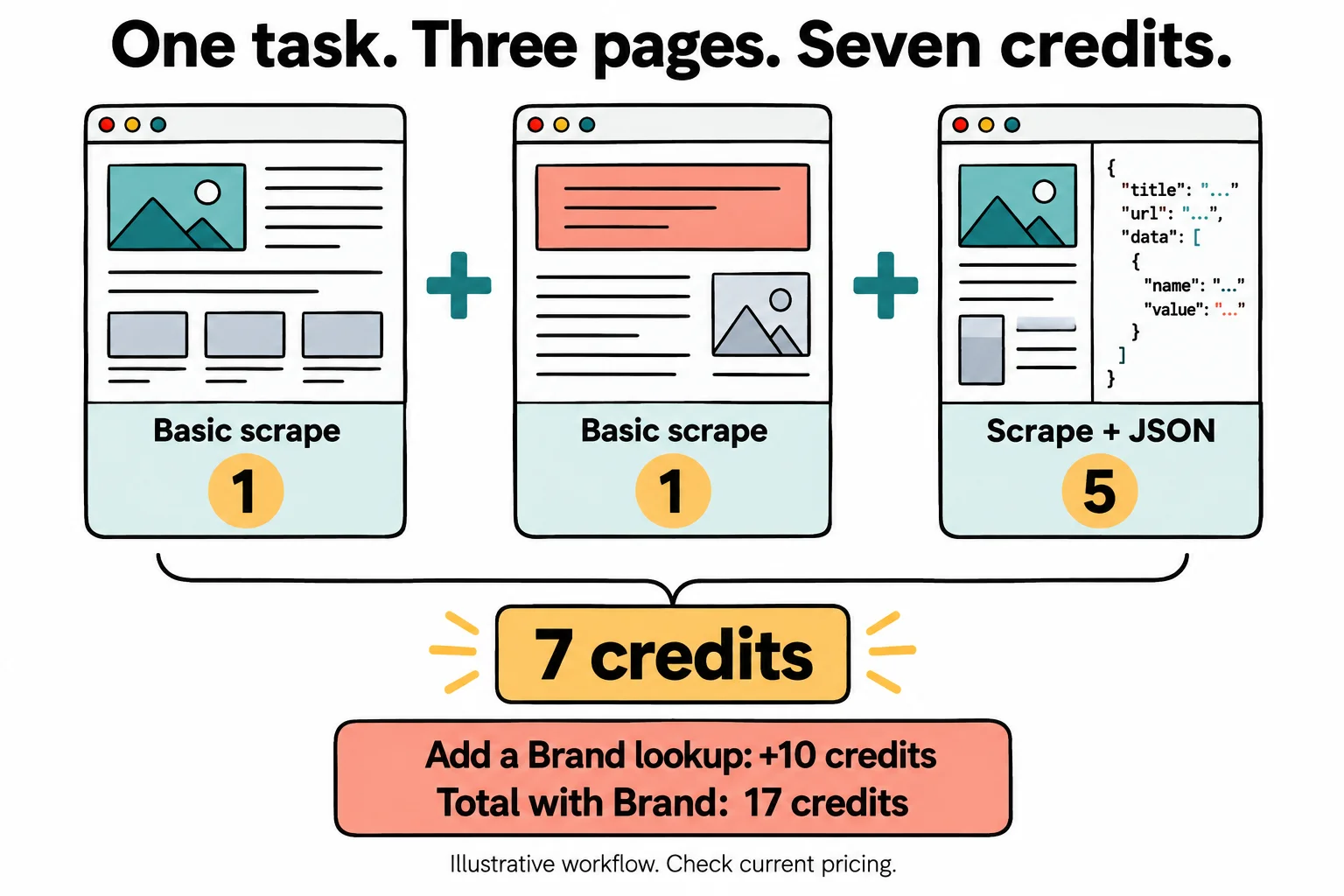
Here is an illustrative calculation, not measured usage. Suppose one business task reads three pages: two basic scrapes and one scrape with successful JSON extraction. At the documented base costs, that is seven credits rather than three. One hundred such tasks would consume about 700 credits before additional operations. If every task also needs a ten-credit brand lookup, the same hundred-task workflow reaches 1,700 credits. The point is the composition of the task, not a universal forecast for your application.

Now add quality. If ten of those hundred results require manual repair, the relevant output is ninety accepted tasks plus a repair queue. Track the API cost alongside the time spent resolving incomplete results. A cheaper request is not necessarily a cheaper customer outcome when it produces more review work. Conversely, a more expensive extraction can be worthwhile if it removes substantial manual interpretation. The pilot should make that tradeoff visible instead of hiding it inside a monthly total.

Our suggested worksheet has one row per workflow: number of runs, operations used, observed credits, accepted outcomes and human repair minutes. Keep experimental research separate from recurring production activity. That prevents a week of exploratory prompts from being mistaken for the steady-state cost of your feature. It also helps identify unnecessary steps, such as repeating a company lookup for a record whose confirmed identity has not changed.

Set a budget ceiling before increasing traffic and decide what happens when it is reached. A graceful pause with a clear explanation is preferable to an integration that keeps spending because nobody assigned an owner to its limits. Also examine the cost after an introductory offer ends. The useful purchase question is whether the service reduces the total effort of delivering a reliable feature, including engineering maintenance and review, rather than whether one individual request appears impressively cheap. That broader calculation is where a managed API either earns its place or becomes another quietly renewing line item.

Sources: Operation costs and credit accounting; Current subscription plans

Two one-credit scrapes and a five-credit JSON extraction total seven credits, or seventeen with a brand lookup
Illustrative calculation using documented base costs, not measured usage: 1 + 1 + 5 = 7 credits; an additional 10-credit Brand lookup makes 17. Other options can change the total.

Concurrency limits are part of the customer experience

Current rate-limit documentation distinguishes organization-level concurrency from older per-minute arrangements. Multiple keys do not automatically create independent capacity on a concurrency-based account. A request occupies a slot until it finishes, and rate-limit responses provide retry information. Background jobs and management operations also have separate limits. Before selecting a plan, inspect the effective allowances in your own account rather than assuming every account follows a single number from a marketing table.

This becomes a user-experience issue when several customers start imports at once. A service can have ample monthly credits while still requiring a queue for simultaneous work. The application should distinguish waiting, collecting, processing and finished states. Otherwise users may resubmit a task that merely looked stuck, turning one slow import into several duplicate imports. More requests are not a reliable treatment for uncertainty about the first request.

For a batch workflow, keep the job identifier and reconcile its final results before deciding what to repeat. The documented idempotency mechanism is relevant when a submission may have succeeded but the caller did not receive its response. Retrying a submission and retrying a failed individual page are different operations. Your trial should include a deliberate interruption so you can see whether the application recovers without creating duplicate work or losing completed results.

Our buying criterion is predictable behavior at the traffic pattern you actually expect. Test a short burst, a slow source and an interrupted client connection, not only a sequence of convenient requests to easy pages. Record waiting time separately from retrieval time. A higher allowance can help when capacity is genuinely the bottleneck; it will not fix an application that handles retries badly. Context.dev provides operational building blocks, but the integration still needs a queueing and recovery strategy that treats customer time and credit usage as real constraints.

Sources: Concurrency and rate limits; Background batches

Privacy and retention: read the endpoint exceptions

Zero data retention is documented as an organization entitlement requested for supported calls, not a universal property of every operation. The current guide excludes Brand retrieval, Batches and Monitors from that request mode. It also describes confirmation signals that the caller should check. This is the sort of detail that can decide a purchase before anyone debates interface polish. A broad security heading is not enough when one required endpoint has a different retention boundary.

Separate public website collection from tasks involving private documents, authenticated sessions or customer-provided information. Those workflows do not necessarily have the same requirements. Before including sensitive material, establish which endpoints are used, what information passes through them, which controls apply and what your own application stores afterward. A provider-side retention option cannot remove a copy that your team has already placed in its logs or database.

For a procurement review, write the actual data path in plain language. Identify the input, the processing operation, the returned fields, the storage location and the person responsible for deletion or correction. Ask the vendor about any unanswered requirement instead of inferring it from a feature name. This review does not certify compliance or replace a review of contractual terms. It identifies a practical buying boundary: if the required control is unavailable for your intended operation, a discount does not solve that mismatch.

The integration should also treat collected content as external data. Do not turn page text into trusted instructions for an agent merely because it arrived through a useful API. Keep credentials on the server, restrict what downstream tools may do, and separate reading information from acting on it. These recommendations are especially relevant for AI applications that combine retrieval with other capabilities. Buying reliable transport for web data is valuable; granting the transported text authority over your application is an entirely different decision.

Sources: Zero data retention boundaries; Production integration checklist

A pilot that answers whether you should pay

A useful pilot begins with a real task and an explicit pass condition. For a documentation importer, that might be retrieving the pages required to answer twenty known support questions. For onboarding, it might be proposing accurate company details while allowing corrections. For a pricing dataset, it might be extracting the right plan, amount, currency and billing period. The pass condition should describe a result a customer can use, not simply a request that returns without throwing an exception.

Choose a small but representative sample. Include clean pages, awkward layouts, a page missing a required fact, a redirected URL and an inaccessible source. Add one example that should legitimately produce no answer. Keep a manually checked reference record for each. This prevents the trial from becoming a tour of the easiest available pages, which is pleasant but not particularly informative about the work you intend to ship.

Then evaluate the entire path. Can the application identify partial results? Does it preserve the source and observation time? Does a retry repeat finished work? Can the reviewer distinguish a missing fact from an extraction error? Which cases require a person, and how long does that review take? Measure credits and elapsed time, but also record accepted outputs. If the integration saves collection effort while creating an equally large cleanup task, the initial convenience has simply moved work to a less visible corner.

Write down the decision before expanding the pilot: proceed, narrow the scope or stop. Proceed when the important cases meet your requirements at an acceptable total cost. Narrow the scope when one workflow works well but another remains unreliable. Stop when the required evidence, control or economics are missing. There is no obligation to convert a trial into a subscription because an API key now exists in your environment. A well-run evaluation that avoids the wrong purchase is a successful evaluation, even if it produces less exciting screenshots for the team chat.

Sources: Production integration checklist; Scrape outputs and response handling; Structured JSON extraction

Context.dev versus a direct API, an export or your own collector

The most useful alternative is not always another vendor. If the source already offers a documented API or an export containing the exact fields you need, start by evaluating that path. Structured source data may remove the need to interpret a visual page at all. Context.dev becomes more interesting when the workflow spans varied public websites, needs multiple kinds of context or would otherwise require substantial collection infrastructure. The choice depends on the source and task, not on which category has the most fashionable name.

A small collector you maintain yourself can be reasonable for a narrow, stable source you understand. Its apparent simplicity should be evaluated over time, including layout changes, failed runs and the person responsible for fixes. Managed collection can shift part of that burden to a service, but adds an external dependency and a usage bill. Neither option is automatically cheaper. Compare them using the same accepted-output definition and the same maintenance horizon, rather than comparing a managed monthly price with an optimistic estimate of initial coding time.

A manual export is also a legitimate option for infrequent work. If a person needs to collect a short list once a quarter, building a continuous pipeline may be unnecessary. At the other end, a customer-facing application with repeated imports and company-aware personalization may benefit from a unified API much sooner. The combined scraping and brand workflow is a more specific differentiator here than a generic promise to automate research.

Our bottom line: Context.dev merits a trial for technical teams whose product genuinely depends on web context. Its breadth is useful when several documented capabilities serve one coherent workflow. It is less compelling when the requirement is a single easy lookup, a finished end-user tool or a control that the needed endpoint does not support. Buy the reduction in ongoing work that your pilot demonstrates. Do not buy a feature collection in the hope that a suitable problem will eventually arrive to keep it occupied.

Sources: API introduction; Map URL discovery; Brand lookup and missing fields

Frequently asked questions

Is Context.dev a finished no-code research app?

Its core offering is an API and developer tooling for collecting web context. It can supply an application with data, but you still need an integration and rules for validating and presenting the result. Do not buy it expecting a complete end-user research workflow.

Can I evaluate Context.dev without buying a plan?

The public Free plan currently includes 1,000 monthly API credits. Use those on representative tasks, remembering that different operations consume different amounts. Check the current account terms and allowance before starting a larger evaluation.

Does schema-based extraction guarantee correct facts?

No. A result can match a JSON schema while containing an incorrect interpretation or a value from the wrong plan. The documentation warns about guesses in mandatory non-nullable fields. Allow unknown values and compare important outputs against the original source.

Is the SoftScout offer a lifetime subscription?

No. The offer displayed here is a discount with a limited duration, not lifetime access. Verify that the code is accepted and inspect the eligible plan, billing period and charges in checkout. This review did not redeem the coupon during research.

Does zero data retention cover every Context.dev endpoint?

No. The current documentation requires an organization entitlement and limits the option to supported calls. Brand retrieval, Batches and Monitors do not support that request mode. Confirm the requirements of your exact workflow before processing sensitive information.

More developer tools deals

Developer Tools

Headroom

Slash Claude Code and Codex token usage with local compression, project learnings, and add-ons. The product is designed for teams that need a repeatable developer tools process and want clearer control over the core task. It fits best when the buyer has a defined use case, realistic input data, and a way to judge output quality before rolling it out across a wider workflow.

Free · checked Nov 13, 2026

Developer Tools

PlugThis AI

PlugThis AI enables users to build, iterate, and ship Manifest V3 Chrome extensions directly from plain-English prompts. It generates full source code, allowing refinement through chat and direct editing. The product is designed for teams that need a repeatable developer tools process and want clearer control over the core task. It fits best when the buyer has a defined use case, realistic input data, and a way to judge output quality before rolling it out across a wider workflow.

$39 · checked Nov 14, 2026

Developer Tools

Agentica

Agentica addresses the challenge of launching new business ideas without extensive teams or technical expertise. It provides an AI-powered workforce with specialized agents for research, planning, building, marketing, and deployment. This tool is designed for founders, developers, and freelancers aiming to accelerate product validation and launch, offering an autonomous workflow from concept to live application.

$59 · checked Oct 23, 2026

Developer Tools

Architecto

A promising workspace for engineers who repeatedly explain and review cloud systems. Evaluate it on a familiar small project, confirm plan access and credit accounting, and keep generated diagrams, cost estimates and security findings subject to normal engineering review.

$249 · checked Oct 24, 2026

Deal alerts

Get developer tools deal alerts by email.

SoftScout will send short buying notes when offers like Context.dev look worth checking or worth skipping.

Short buyer verdicts

Useful offers before checkout

Editorial note

Strong candidate when web collection is consuming engineering time across several workflows. Start with the free allowance and measure accepted outputs, freshness and credits per completed task. Skip a paid plan when a direct source API already provides the exact data, or when your retention requirements conflict with the endpoints you need.

For vendors

Have a better deal for Context.dev?

Send current partner terms, coupon limits, refund rules, and the best buyer fit. We review offers before adding them to SoftScout pages or Telegram alerts.

Submit terms