Back to deals

Hedy AI Lifetime Deal: buy or skip?

Worth a trial when you need help noticing useful questions during meetings and reviewing the discussion afterward. Treat generated notes as a draft, verify both sides of the audio, and check every privacy path rather than relying on one cloud-sync switch.

Product overview

What Hedy AI does

Hedy combines live suggestions and on-demand questions with transcripts, summaries, action items and related-session Topics. Its strongest distinction is assistance while a conversation is still happening, not simply a transcript delivered later.

This source-researched assessment covers real plan boundaries, platform differences, privacy settings, exports and the work needed to turn generated output into a reliable follow-up. No meeting accuracy, time saving or sales result is claimed from hands-on testing.

Read the full Hedy AI review

Best for

  • Consultants and project leads who can use a timely clarification prompt without losing focus
  • Individuals maintaining context across recurring, appropriately consented meetings
  • Users willing to test audio capture and choose privacy settings for their actual devices

Why we picked it

  • Live suggestions can surface a missing question before the conversation ends
  • Topics and post-session questions can connect related discussions
  • Local processing options provide control when supported hardware and all data-path settings align

Check before buying

  • Run a consented test with your microphone and remote audio, then compare names, numbers, qualifications and speaker attribution with the actual discussion.
  • Inspect speech recognition, AI processing, sync, saved audio, recap recipients and sharing independently on every device used for capture.
  • Correct the transcript before reviewing summaries and action items, then export the transcript separately and test access to the intended shared content.

Buy if

Your recurring meetings would benefit from timely clarification prompts as well as a reviewable record afterward.

Verify first

Run a consented test with your microphone and remote audio, then compare names, numbers, qualifications and speaker attribution with the actual discussion.

Skip if

You only need occasional basic notes that your existing meeting software already provides adequately.

SoftScout sends you to the source after the risk checks, so you can verify live terms before buying instead of trusting stale coupon text.

Check Source Offer

Source transparency

Source
Source marketplace
Link type
Source page
Last checked
Nov 11, 2026

Buyer checklist

  • Run a consented test with your microphone and remote audio, then compare names, numbers, qualifications and speaker attribution with the actual discussion.
  • Inspect speech recognition, AI processing, sync, saved audio, recap recipients and sharing independently on every device used for capture.
  • Correct the transcript before reviewing summaries and action items, then export the transcript separately and test access to the intended shared content.

Hedy AI: the buying decision

Hedy combines in-conversation prompts with a searchable record after the discussion, so a participant can notice a missing question while there is still time to ask it and then verify the follow-up later. That is more useful than transcription alone when the user can manage attention, audio capture and the separate privacy settings responsibly.

Research-based review, not a hands-on test. Sources checked on 2026-10-24. The assessment below is our editorial judgment, not a customer rating. Editorial assessment: 81/100.

Consider it if

  • Your recurring meetings would benefit from timely clarification prompts as well as a reviewable record afterward.
  • A consented trial on your actual devices captures both sides accurately enough and does not distract you from listening.
  • The selected plan, processing configuration and sharing policy meet your real requirements without relying on unsupported guarantees.

Skip it if

  • You only need occasional basic notes that your existing meeting software already provides adequately.
  • Your environment does not permit conversation capture or the required external processing and your hardware cannot support an acceptable local setup.
  • You expect instant infallible answers, unlimited automatic suggestions per session or an unreviewed task list that can be treated as agreed fact.
Problem fit: 18/20
Participants often need both timely clarification and a reliable follow-up record, making in-conversation assistance a meaningful distinction from transcription alone.
Capabilities: 18/20
Live prompts, contextual sessions, Topics, exports and local processing cover a broad workflow, though platform and plan limits matter.
Workflow fit: 16/20
The connected meeting record is useful, but audio routing, attention management, permission checks and verification remain necessary parts of daily use.
Evidence confidence: 15/20
Detailed current documentation explains important limitations, while outdated offer wording and the lack of our own measured trial constrain confidence.
Value: 14/20
Regular users may justify the price after a successful free trial, but occasional note-taking and existing meeting tools can make another purchase unnecessary.

Hedy AI review: useful help while the question can still be asked

Most meeting tools become useful after everyone has left. Hedy's more interesting promise is help during the conversation: a prompt to clarify an assumption, ask about a missing dependency or return to an unresolved point. It also produces a transcript and follow-up material, but the live component changes the buying question. You are not only purchasing a record. You are considering a second stream of information while you are already trying to listen to real people.

That can be valuable for a consultant gathering requirements or a project lead coordinating several moving parts. A timely question may prevent an ambiguous decision from becoming an expensive misunderstanding. It can also be distracting if the user spends the meeting reading suggestions instead of noticing the answer in front of them. A helpful assistant should improve attention, not create a second meeting in a smaller window that also demands to be attended.

This review uses current Hedy documentation and pricing, together with the available offer, checked on October 24, 2026. We have not recorded a private meeting, benchmarked transcription accuracy or measured productivity gains. The examples are our proposed evaluation methods and hypothetical situations. Vendor descriptions establish what the product is designed to do; they do not establish how well it will handle your speakers, room, hardware or organization policies.

The strongest fit is someone with recurring conversations, a concrete reason to ask better follow-up questions and enough discipline to verify the resulting notes. The weakest fit is someone seeking an infallible voice in their ear. Hedy can suggest and organize. The participant still owns the judgment, the permission to capture the discussion and the responsibility for what is sent afterward. A polished recap is useful, but it is not automatically the meeting's official truth.

Sources: Automatic suggestions, frequency and session limits; Current free, Pro and team plan comparison

Price the useful limits, not just the word unlimited

The checked offer lists Hedy Pro lifetime access at $179, with a stated sixty-day refund window and redemption requirement. The current direct pricing page shows Pro at $99.99 per year and a free allowance of five session hours per month. Prices and terms can change, so confirm the final checkout and license scope. A personal Pro license should not be assumed to include separately sold team administration or enterprise controls merely because the features appear elsewhere on the same website.

The important usage distinction is between session length and automatic suggestions. The current plan comparison allows unlimited Pro sessions and meeting length, while live automatic suggestions apply to the first 120 minutes of each Pro session. Free sessions receive the first 30 minutes of suggestions. If your main use is a long workshop, evaluate the point where the live coaching stops separately from whether the transcript can continue. The two promises answer different questions.

At unchanged annual pricing, $179 is roughly 1.79 times $99.99. That simple arithmetic is a comparison, not a prediction about how long the service or its present terms will last. A lifetime purchase front-loads the cost and depends on continued usefulness. An annual subscription preserves more flexibility. The free allowance is therefore valuable as a decision tool: use it to establish whether the live assistance and follow-up workflow fit before making a longer commitment.

Count other costs honestly. Optional cloud speech providers can involve separate usage charges, and local models can require more capable hardware. Your own review time also matters. If a transcript takes longer to correct than the notes you would otherwise write, the apparent bargain needs reconsideration. Conversely, a tool that reliably helps with recurring complex discussions may justify itself without an extravagant time-saving claim. Buy the demonstrated workflow, not the most optimistic interpretation of a pricing headline.

Sources: Current Pro lifetime offer and conditions; Current free, Pro and team plan comparison

Verify the actual device and both sides of the audio

Date-check platform descriptions. The offer still includes older wording about Windows beta status and stricter Mac requirements, while the current system guide says Windows is a full release and supports macOS 14.2 or later, including Intel Macs for the app's supported functions. Local AI has stricter requirements of its own. The web companion is described as a place to manage existing sessions, while capture and transcription require a supported native app. Test the current application on your device rather than combining old and new claims.

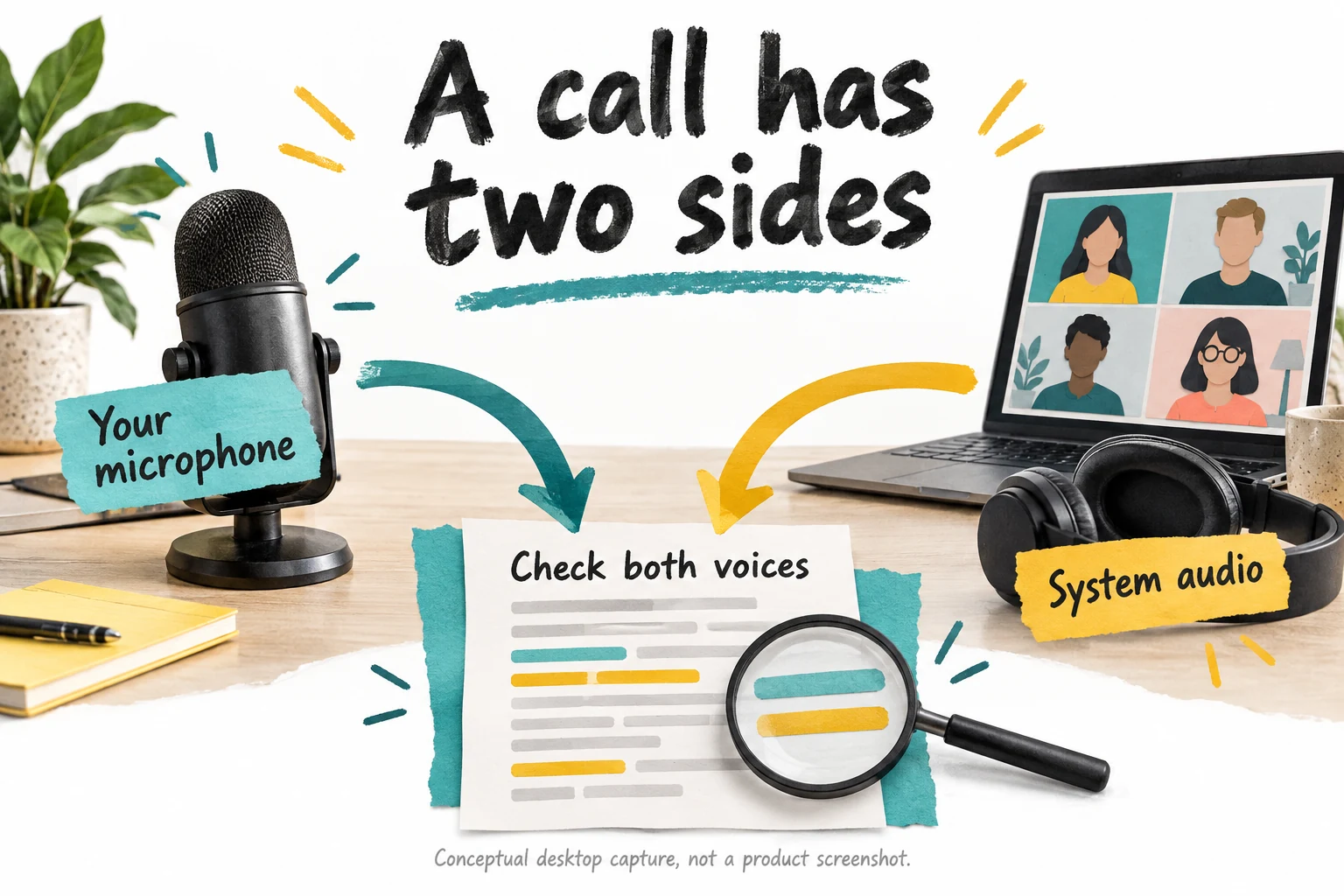
Desktop meetings involve at least two audio paths: your selected microphone and the system audio carrying other participants. Hedy's troubleshooting guide explains that missing system audio can leave a transcript containing only your voice. On Mac, the relevant system-audio permission matters; on Windows, the default playback or communications device and routing can matter. A moving microphone meter proves only that one input exists. It does not prove that the whole discussion is reaching the transcript.

Before an important call, run a short, permitted test with another participant or a recording you are allowed to use. Speak a distinct sentence locally and have the other side say something different. Confirm both appear. Repeat after changing a headset, conference speaker or audio-routing configuration. A transcript of your half of a negotiation is not a summary; it is an unusually confident monologue with several unexplained pauses.

Include the conditions you actually use: headphones, a second monitor, a corporate network and the ordinary collection of open applications. Check whether capture continues when the meeting app is in front. If a permission or device change is required, follow the vendor's documented procedure and your organization's policy. Do not improvise by disabling security controls. A reliable first minute is a prerequisite for evaluating the clever features that depend on the remaining forty minutes being heard.

Sources: Supported systems and native versus web capabilities; Microphone and system-audio capture troubleshooting

A microphone and remote meeting system audio converge into a transcript that must contain both voices
Conceptual desktop capture illustration, not a Hedy screenshot. A working microphone alone does not verify that the remote participants are being transcribed.

Give context that helps without overwhelming the session

Hedy distinguishes reusable session context, engagement-specific Topic context and notes for the current conversation. The practical idea is straightforward: your role may stay constant, a client's project has its own background, and today's agenda adds a temporary layer. Supplying those details can make a suggested question more relevant. It also creates a maintenance responsibility, because an old assumption placed in a persistent context can influence later output after the real situation has changed.

For a project meeting, begin with a short explanation of your role, the decision being discussed and the constraints that matter. Identify unfamiliar names and terms clearly. Keep verified facts separate from your interpretation of the other party's motives. A note saying that a deadline has not been confirmed is more useful than a confident story about why the client is probably delaying. The assistant should work from usable context, not inherit your speculation as a hidden fact.

Avoid filling every available field simply because there is room. Long background can make the relevant point harder to distinguish and can include information that does not belong in the selected processing environment. Use the minimum context needed for the conversation. Remove stale project details when they stop applying, and check which saved context is selected before starting a different engagement. Reusing a profile is convenient only when it is the right profile.

Evaluate context with a concrete comparison during a harmless trial. Does a concise agenda produce more relevant questions than the default session? Does the assistant preserve a constraint you explicitly supplied? Does it confuse a tentative assumption with an agreed decision? These observations are more useful than judging the prose by how professional it sounds. The goal is better orientation in a real discussion, not a remarkably articulate summary of the wrong project.

Sources: Session, topic and conversation-specific context

Use live suggestions selectively and keep listening

Automatic Suggestions are not instant answers to every question. Hedy's guide describes periodic proactive tips and distinguishes them from on-demand chat or Quick Prompts. It provides frequency settings, with suggestions typically beginning after meaningful conversation has accumulated. That makes the feature better understood as an occasional second perspective. If you need a specific clarification, the correct action may be to ask the person directly rather than wait for a notification to interpret the moment.

Start with a restrained frequency and observe your attention. A useful suggestion identifies something you would otherwise miss without making you lose the next sentence. A less useful one repeats the obvious or arrives after the topic has moved on. Record those differences during the trial. Do not equate a busy stream of prompts with better assistance. The meeting already has enough participants capable of adding words; the software needs to earn its contribution.

Treat generated wording as an option, not a script that must be recited. Check whether the proposed question fits the relationship and what has already been answered. In a sensitive or high-stakes discussion, use your own judgment and appropriate professional advice. The assistant may not understand tone, an off-record instruction or the significance of an earlier conversation outside its context. A confident suggestion can still be the wrong thing to say.

Also inspect screen sharing. The documentation warns that Hedy's window and notifications can be visible when they are on the screen you share; it does not hide itself from capture. Choose the intended presentation surface and verify it before showing a client. This is ordinary confidentiality hygiene, not a reason to conceal the fact that assistance is being used. Participants should understand the agreed capture process even when the tool does not join as a visible meeting bot.

Sources: Automatic suggestions, frequency and session limits

Agree on capture before starting the assistant

A tool that does not join as a bot can be less disruptive, but that does not remove the need to address permission. Hedy's own guidance recommends informing participants and obtaining agreement before capture. Applicable laws, contracts and workplace rules vary, so this review does not provide a jurisdiction-by-jurisdiction legal conclusion. For an uncertain or regulated use, check the relevant requirements with the responsible professional rather than relying on a product slogan.

Explain the actual configuration plainly. Are you keeping audio, retaining a transcript, using cloud AI, emailing a recap or sharing the result? A statement that everything stays on the device is misleading if a separate setting sends transcript text for analysis. Ask before starting and respect a refusal. Manual notes remain a perfectly functional technology, despite their regrettable lack of a subscription dashboard.

Do not confuse the absence of a permanent recording with the absence of processing. Current privacy materials describe temporary on-device audio caching for some speaker-detection workflows, separate from an optional recording retained for playback. The important question is the real data flow and retention behavior, not whether a visible audio file appears in a folder. Explain what you know accurately and verify settings when the distinction matters to participants.

Keep the scope proportionate. Stop or pause when the agreed conversation ends, and avoid capturing unrelated room discussion or a private exchange after the formal call. Revisit permission before reusing the transcript for another purpose. An internal meeting note and a public quotation are not the same use. A trustworthy workflow makes these boundaries clear enough that people can participate without wondering what a background application is doing with their words.

Sources: Vendor guidance on permission before capturing conversations; Conversation storage, AI processing and temporary audio cache

Cloud Sync is only one part of the privacy decision

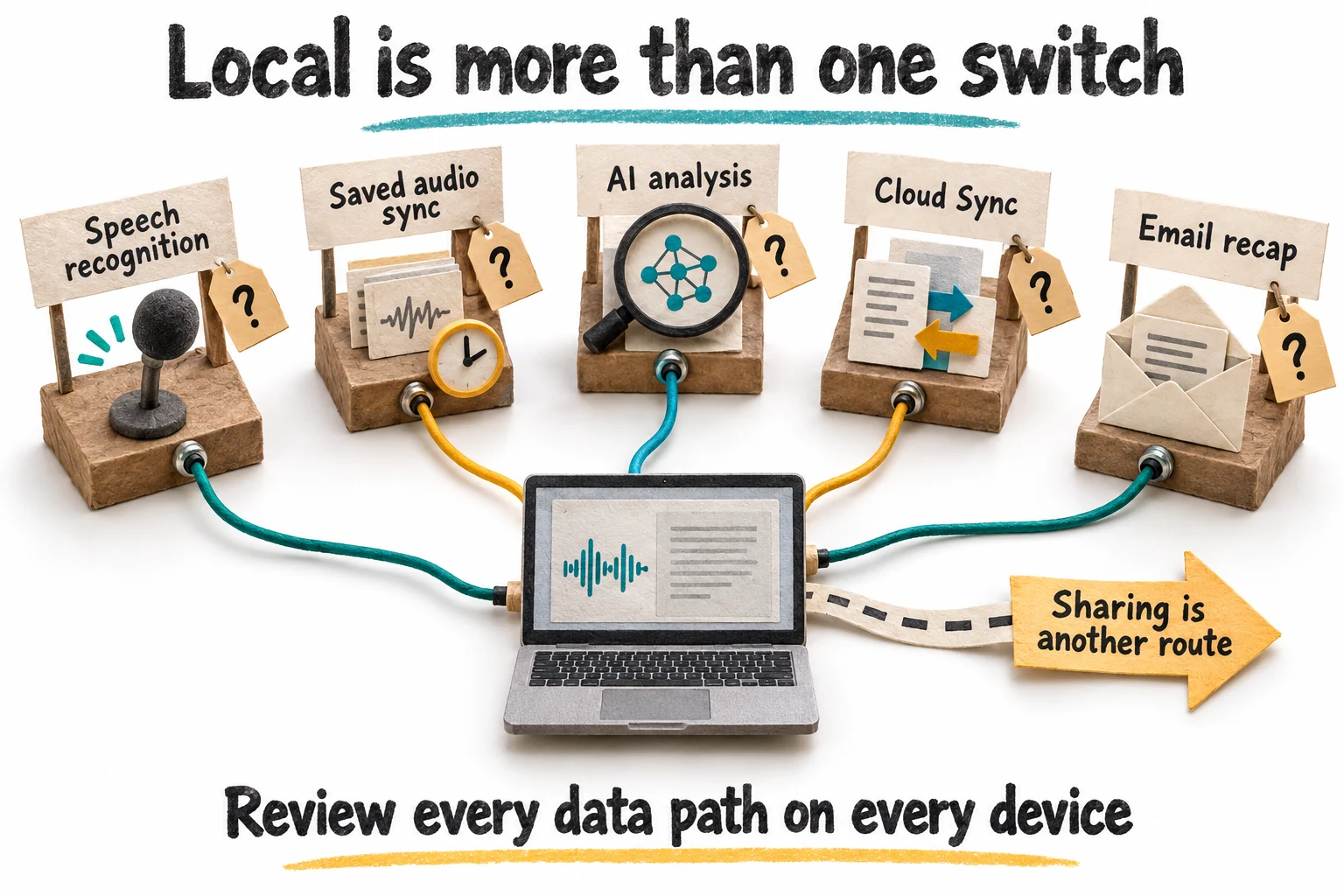
The most important privacy distinction in Hedy is that storage and analysis are separate. Turning Cloud Sync off does not itself disable cloud AI analysis. The vendor's guide identifies separate controls for speech recognition, saved-audio sync, AI processing, session sync and email recaps. Explicit sharing creates another route. Review each path on every device used for capture. A single reassuring switch cannot describe a system with several independently useful ways to move information.

In the default cloud-analysis mode, transcript text is sent for AI requests according to the vendor's privacy overview. The vendor states its provider handling commitments, but we have not independently audited those claims. For a business decision, inspect the current privacy terms, subprocessors and required agreements through the vendor's trust materials. A privacy feature is not automatically a compliance certification for your organization or a guarantee that every intended use is permitted.

Think through an example before changing settings. A user may choose local transcription and disable session sync, then still enable automatic recap email to several addresses. The transcript storage choice has not prevented the generated content from leaving through email. Similarly, local AI analysis can coexist with cloud sync. Both combinations may be appropriate for some users, but they should be deliberate rather than discovered after a confidential meeting has already been processed.

Record the intended configuration in a short operational checklist and verify it after significant app or device changes. Include existing shares and previously synced material, because changing a future setting does not necessarily remove earlier copies. Decide who is allowed to receive content and how long it should be retained. The useful outcome is an understandable data policy that matches the team's work, not a screenshot of a privacy screen whose implications nobody has traced.

Sources: Separate settings that govern conversation data leaving a device; Conversation storage, AI processing and temporary audio cache

Five separate conversation data paths surround a laptop with explicit sharing shown as another route
Conceptual settings map. Speech recognition, saved-audio sync, AI analysis, Cloud Sync, recap email and explicit sharing need separate review; no secure default is implied by the illustration.

Local AI trades cloud dependence for hardware responsibility

Local AI Processing is an opt-in feature with device-specific requirements and an initial model download. The guide identifies supported Apple hardware, Windows machines with suitable Vulkan-capable graphics, and supported Android devices; the web companion does not offer the same local model execution. A device capable of running the general app is not necessarily capable of running every local model. Check the actual model fit and available memory rather than assuming that the word local means lightweight.

Speech recognition is another separate choice. Local engines can transcribe on the device, while supported cloud speech services use their own credentials and may create additional charges. Selecting local AI analysis does not automatically change a cloud transcription provider. For a strict on-device conversation workflow, both stages and the other data paths need to align. Do not buy the product on the assumption that one menu selection retroactively changes every component.

The vendor acknowledges quality and speed tradeoffs for smaller local models and warns about resource use during long sessions. Evaluate those tradeoffs on the hardware you will actually carry into meetings. A model that fits while the laptop is otherwise idle may compete with video calling, a browser and a presentation. Monitor responsiveness, heat and battery use during a representative session. We have not benchmarked these results, so no performance number here should be treated as a measured promise.

Choose the processing mode around a requirement, not a fashion. If local processing is essential, prove the complete workflow before relying on it. If approved cloud processing is acceptable, compare its practical usefulness without assuming that a local model must be better because it is closer to the keyboard. Either choice still needs human verification of the output. Moving inference onto your own device changes where an error is produced, not whether an error is possible.

Sources: Local AI hardware requirements and processing tradeoffs; Local and cloud speech-recognition providers

Correct the record before trusting the summary

Transcription quality depends on the audio and the selected engine, and speaker attribution can differ by platform and provider. Do not judge reliability only from a smooth paragraph. Check the items with consequences: who said something, whether a number was fifteen or fifty, whether a proposal was accepted, and whether a negative word survived. A transcript can be mostly correct while getting the one detail that drives the follow-up wrong.

Hedy supports transcript editing and, for Pro, regeneration of summaries, notes and tasks with documented limitations. Its guide makes an important point: regenerating a summary does not transcribe missing audio again. If a segment was never captured in the text, asking for another summary cannot recover it by magic. A saved, authorized recording may need to be imported separately; without a source, the honest response is to identify the gap and confirm it with participants.

Use corrections to restore meaning, not to rewrite the meeting into the version you wish had happened. Keep your later clarification distinguishable from the original discussion. If a speaker label is wrong, inspect the available correction method rather than changing a name in prose and assuming every derived artifact has updated. Review regenerated content as well. A second pass can improve consistency without becoming proof that all remaining details are accurate.

For an important decision, maintain a short verified record separate from the raw volume of notes. State what was agreed, what remains open and what needs confirmation. Link back to the relevant session for context when access is appropriate. This is where the assistant can save retrieval effort while the team retains responsibility for the decision. A transcript is a useful source, but it should not become an unquestionable authority simply because it contains timestamps.
Sources: Local and cloud speech-recognition providers; Editing transcripts and regenerating notes

An extracted task is not yet an agreed commitment

Hedy can identify to-dos, let users edit them and send them to connected tools. The documentation distinguishes manual export from automatic export after session completion. That is convenient, but the distinction between a suggestion and a commitment must survive the automation. In a hypothetical meeting, 'maybe Friday' is not the same as 'I will deliver this Friday.' The task list should not resolve uncertainty by silently choosing the more decisive version.

Before an action becomes operational, confirm the owner, due date and scope. Include dependencies and whether the date is a target or a firm agreement. A useful action might be to confirm feasibility, not to deliver the full project. Review the wording with the responsible person when it matters. Otherwise a meeting assistant can become a very efficient machine for assigning work that nobody remembers accepting.

Start integrations with manual export and a low-impact destination. Check the payload, duplicate behavior and mapping of dates or owners. The vendor documents identifiers and task details that can support a controlled workflow, but the receiving system still needs appropriate handling. Do not assume that every destination interprets the same text or date in the same way. A task created twice in two tools has not become twice as achievable.

Only expand automatic routing after the team has a stable review policy. For example, generated items could enter a review list before becoming assigned work. That is our suggested process, not a claim that a particular approval system is built into Hedy. Keep a reference to the source session and correct downstream tasks when the underlying record changes. The purpose is a clearer handoff, not merely proof that an integration fired successfully.

Sources: Action-item review, editing and export

A tentative Friday suggestion is reviewed before an agreed action receives an owner due date and scope
Hypothetical example: a tentative date is not a commitment. Confirm the owner, deadline and scope before treating an extracted task as an agreed action.

Topics can connect meetings without erasing their differences

Topics group related sessions so Hedy can answer questions using a broader engagement history. This is potentially more useful than searching a long list of isolated recaps. A project lead can ask what remains unresolved across several discussions, or a consultant can revisit how a requirement evolved. The value comes from relevant grouping and maintained context, not from putting every conversation into one enormous container and hoping the assistant discovers the organization chart.

Use boundaries that match real work. Separate clients, projects and personal conversations. Give a Topic a clear purpose and review which sessions belong there. An early exploratory discussion may contain assumptions that were later rejected, so ask questions that distinguish chronology and decision status. A cross-session answer should not flatten three stages of negotiation into one timeless statement that appears to have been agreed all along.

When an answer matters, return to the source session. Check the date and the surrounding exchange, and compare any contradictory account. The assistant may help locate the relevant material faster, but that retrieval aid is not a substitute for verifying a consequential claim. Keep explicit decisions and open questions in a maintained project record. This gives the team a concise reference rather than requiring everyone to interrogate a conversational archive before doing ordinary work.

Maintain the context as the project changes. Remove obsolete assumptions from reusable background and mark replaced plans clearly in your own process. Avoid importing unrelated confidential material simply to make the Topic feel comprehensive. More context can create more opportunity for confusion or inappropriate access. The best library is not the largest one; it is the one that lets the right person find the relevant discussion and understand what it meant at that time.

Sources: Grouping sessions and asking questions across related discussions; Session, topic and conversation-specific context

Sharing needs a recipient decision, not just a link

Hedy distinguishes named invitations from public session links. The latter open without an account for anyone with the address; being unlisted does not make them private. The sharing guide lets the sender choose content and expiry, and says audio is not included. It also warns that sharing a Topic can include future sessions added to it. Check the scope before sending, especially when the destination is outside your organization.

A named invitation and a selected public excerpt solve different problems. A colleague may need the complete record, while a client may need only a reviewed recap. Choose the least material that serves the purpose and confirm the intended audience. Revocation can stop future access through a link, but it cannot retrieve copies already saved by a recipient. Treat a share as a disclosure decision, not merely a convenient alternative to an attachment.

Team administration adds another distinction. The current team privacy guide says administrators manage people and billing without a general view into private sessions, while organizational sync rules and team Topics affect storage and shared access. Do not assume either that a manager sees everything or that a personal-looking session is outside all organization policy. Confirm the actual account and Topic settings with the responsible administrator before using the tool for sensitive work.

During the trial, share a harmless test session with the intended method and inspect what the recipient can see. Check whether chat, notes or the transcript are included beyond what you expected. Revoke the test and verify the access change. Repeat this check when moving from individual use to team use. Clear access boundaries make the archive more useful because people can trust that the convenient sharing button will not surprise them later.

Sources: Named invitations, public links and topic access; Team administrators, private sessions and organization sync rules

Automatic recap emails should follow the meeting's boundaries

Auto Email Recap can send a session's summary to configured addresses after processing. The guide allows multiple recipients and says they receive the same content; imported recordings can also trigger delivery when the option is enabled. This is a useful convenience for a stable, appropriate audience. It is also a reason to inspect recipients before a different kind of meeting. An address list suitable for one project may be entirely wrong for the next conversation.

For a first trial, keep automatic external delivery disabled and review the recap in the app. Check factual accuracy and whether private details have entered the summary. Decide which parts belong in a follow-up message and which are internal notes. Do not assume that a short recap is harmless simply because it is shorter than the transcript. A single sentence about an unannounced decision can be more sensitive than several pages of routine discussion.

Separate internal convenience from a client-facing commitment. An automatically extracted action or deadline should not be emailed as a final agreement before the responsible people have confirmed it. Where an organization wants automatic delivery, establish the audience and review rules first. A preview or approval process in a connected workflow may be appropriate. That is a design choice for the team, not evidence that every Hedy email path includes a manual approval stage.

Test imported material as well as live sessions. A batch of old recordings should not unexpectedly send historical recaps to a current distribution list. Keep an operational note of what triggers delivery and how to turn it off. Review the list when staff or clients change. Automation works best when the audience stays intentional; otherwise the meeting may end on time while the information continues traveling to people who were never meant to attend.

Sources: Automatic recap delivery and configured recipients

Export a usable archive, including the transcript separately

The current download guide provides document formats for summaries, detailed notes and a combined session document. It explicitly says Download All Data does not include the transcript. The separate Download Transcript action produces plain text. This is a small naming detail with a large practical consequence: somebody preparing an independent archive could reasonably believe they saved the source record when they only saved its derived artifacts.

Define the archive you need before relying on it. For a project decision, that might include a reviewed summary, the transcript, your own corrections and an appropriate reference to any retained recording. Save only material you are allowed to keep, and apply the organization's retention policy. Check the exported files by opening them outside Hedy. A successful download notification is not proof that the document contains the part you will need six months later.

For non-Latin text or unusual symbols, the guide notes that PDF export can encounter font coverage limits and points users toward Word. Inspect names and formatting rather than treating the file extension as a quality guarantee. Make the archive understandable with dates, project identifiers and a distinction between raw and reviewed material. Do not depend on a collection of generically named files that only the original meeting organizer can decipher.

Local-only operation also requires a recovery plan. The vendor warns that locally retained sessions can be lost if the app or its data is removed, and disabling sync does not delete earlier cloud copies. Privacy and recoverability are separate requirements that need a deliberate balance. Test an export and retrieval process before the first important session, not after changing devices. The right setup lets you explain both where the information is and how you would recover it.

Sources: Document download formats and separate transcript export; Separate settings that govern conversation data leaving a device

A useful trial measures attention and correction work

Use the free allowance for a small set of consented, representative conversations rather than a single staged demonstration. Include a routine status meeting, a discussion with unfamiliar terminology and a call using your usual headset. Establish the settings and permissions beforehand. Record what you hoped the assistant would improve: noticing missing questions, reducing manual note-taking or retrieving decisions later. Without a specific goal, almost any fluent output can look like success.

Compare the transcript with the actual conversation where a permitted source or participant confirmation is available. Count consequential corrections rather than only total words. Note whether names, figures, dates and uncertainty survive. Then evaluate live assistance separately: which prompts helped, which were late, and whether reading them distracted you. A product can generate useful notes while its live feature is a poor fit for your working style, or the reverse.

Finish the trial by producing a real, reviewed follow-up. Correct the source, inspect the summary, confirm actions, export the needed files and use the intended sharing method. Include the time spent on all those steps. This gives you a more honest comparison with your current process than timing only the automatic summary generation. The useful result is a reliable record delivered to the right audience with less total effort or better discussion quality.

Decide before the trial what would make you stop. Examples include unacceptable capture gaps, a processing configuration that cannot meet policy, or attention costs that outweigh the suggestions. A narrower use may still work: perhaps post-session review is useful while live notifications remain off. The purchasing decision does not need to be a dramatic yes or no to every feature. It should reflect the part of the workflow you have actually shown to be helpful.

Sources: Current free, Pro and team plan comparison; Microphone and system-audio capture troubleshooting; Editing transcripts and regenerating notes

Our verdict: a capable meeting assistant that still needs an editor

Our editorial assessment is 81 out of 100: 18 for problem fit, 18 for capabilities, 16 for workflow, 15 for evidence and 14 for value. This is a source-based judgment, not a converted customer rating. Live accuracy remains unmeasured in this review. Hedy's strongest idea is connecting a timely question during the discussion with a reviewable record afterward. That can be more meaningful than producing another transcript nobody opens.

The product deserves consideration for regular meeting participants who can manage the live prompts and maintain a verification habit. The detailed current documentation is a positive sign because it explains many limits instead of leaving the buyer to infer them. Local processing options, separate contexts and varied sharing routes offer useful control, but they also create decisions that must be understood. Flexibility is valuable when the user can tell which configuration is active.

The main reasons to hesitate are not a lack of features. They are the risk of distraction, incomplete audio, mistaken commitments and assumptions about privacy. Older offer wording also needs to be checked against current platform guidance. The free plan provides a reasonable way to investigate these issues before committing to a paid license. A lifetime price is attractive only after the product has proved useful on your devices and within your actual obligations.

Choose Hedy when it helps you listen better, ask a missing question and leave with a more reliable follow-up. Pass when basic notes already solve the problem or the required data handling cannot be made acceptable. Above all, keep a human editor between generated output and consequential action. The assistant can help you remember the meeting; it should not be allowed to quietly improve the meeting's certainty after everyone has gone home.

Sources: Current free, Pro and team plan comparison; Supported systems and native versus web capabilities; Automatic suggestions, frequency and session limits

Frequently asked questions

Are Hedy Pro's live suggestions unlimited?

No. The current documentation distinguishes unlimited session length from automatic suggestions, which run for the first 120 minutes of a Pro session. The free plan provides suggestions for the first 30 minutes and has a monthly session allowance.

Does disabling Cloud Sync keep all processing on my device?

No. Speech recognition, AI analysis, saved-audio sync, recap emails and explicit sharing are separate paths. Review each setting. Cloud AI can still process transcript text when session storage sync is off.

Why does a desktop transcript contain only my voice?

The microphone may be working while system-audio capture is not. The vendor documents platform permissions and playback-device routing as things to check. Test both voices before relying on the recording for an important meeting.

Is a public session link private because it is unlisted?

No. Anyone with that address can open it without signing in and can forward it. Named invitations, selected content, expiry and revocation have different implications; choose the appropriate access method for the material.

Does Download All Data include the transcript?

The current document-download guide says it does not. It collects several other session artifacts into a document, while Download Transcript separately saves the transcript as plain text. Verify both files when creating an archive.

More productivity & collaboration deals

Productivity & Collaboration

Acti

A promising fit for people who repeatedly draft, rewrite and move information between phone and Mac. Start with a few frequent tasks, measure corrections and credits, and keep connected actions under deliberate review. Windows-dependent buyers should wait.

$59 · checked Nov 14, 2026

Productivity & Collaboration

Voicina

Voicina translates videos into over 125 languages, offering branded subtitles, voice cloning, and studio voiceovers. It provides a unified workspace for transcription, subtitling, translation, and dubbing. The product is designed for teams that need a repeatable productivity & collaboration process and want clearer control over the core task. It fits best when the buyer has a defined use case, realistic input data, and a way to judge output quality before rolling it out across a wider workflow.

$69 · checked Nov 7, 2026

Productivity & Collaboration

ProductBridge

ProductBridge centralizes customer feedback from various sources, helping product teams identify user needs and prioritize feature development. It enables the creation of transparent roadmaps and automates user notifications about new releases. This tool is designed for organizations seeking to improve their product development cycle by making data-driven decisions based on consolidated user input.

$69 · checked Jul 6, 2026

Productivity & Collaboration

Formwise

Promising for consultants and small agencies with a repeatable method customers already value. Budget for ongoing model usage, verify your exact tier and test the customer journey. A branded chatbot alone is not a business model.

$49 · checked Nov 12, 2026

Deal alerts

Get productivity & collaboration deal alerts by email.

SoftScout will send short buying notes when offers like Hedy AI look worth checking or worth skipping.

Short buyer verdicts

Useful offers before checkout

Editorial note

Check consent, audio inputs, suggestion limits and sharing before the first important meeting. Review names, figures, owners and dates before sending recaps or exporting tasks.

For vendors

Have a better deal for Hedy AI?

Send current partner terms, coupon limits, refund rules, and the best buyer fit. We review offers before adding them to SoftScout pages or Telegram alerts.

Submit terms