Back to deals
Marketing & SEOArchived deal

HeySummit deal archive

Useful for a multi-session event with several speakers, ticket tiers and a replay plan. Less compelling for a single uncomplicated meeting. Verify the current subscription, separate video capacity and the full attendee journey before selling access. This page is kept as a historical SoftScout archive entry, so readers can compare past terms, category positioning, and buyer-fit notes.

Product overview

What HeySummit does

HeySummit organizes event pages, registrations, content access, speaker participation and reporting around connected delivery and payment services. The appeal is a coordinated attendee experience rather than another isolated webinar link.

SoftScout's historical $89 offer remains archived; the checked source is sold out and displays a later $99 listing. This source-based review evaluates the product and its operational tradeoffs without claiming a live purchase, hosted event or measured conversion improvement.

Read the full HeySummit review

Best for

  • Creators running a multi-speaker summit or recurring workshop series
  • Small event teams selling clearly defined live and replay access
  • Organizations that can rehearse ticket, video, email and refund workflows before launch

Why we picked it

  • Ticket rules connect registration with session and replay access
  • Speaker dashboards and affiliate tools can organize distributed promotion
  • Current documentation exposes practical capacity, reporting and integration limits for a realistic launch plan

Check before buying

  • This offer is archived and may no longer be available at the original price.
  • Use this page as historical research for marketing & seo buying context.
  • Check the vendor's current pricing, limits, and refund terms before making any purchase.

Archived offer

This page preserves the deal context for research and SEO, but the original discount may be closed.

Use it for

Compare historical marketing & seo pricing, positioning, and buyer fit before choosing a current tool.

Next step

Browse active SoftScout deals or check the vendor's current terms before spending money.

This archive page stays live for research. Use active SoftScout listings when you are ready to buy.

Check Source History

Source transparency

Source
Source marketplace
Link type
Source page
Last checked
Oct 24, 2026

Buyer checklist

  • Treat this as a historical deal page, not a live checkout recommendation.
  • Use the notes to compare the old offer against the vendor's current pricing.
  • If the original source still opens, verify all terms before buying.

HeySummit: the buying decision

HeySummit brings the commercial and organizational layers of a multi-session event together: event pages, registration, ticket access, speakers, promotion and reporting can share a coordinated experience while video and payment services handle their own roles. That is most useful when the event has outgrown a single meeting link but does not justify a custom event platform.

Research-based review, not a hands-on test. Sources checked on 2026-10-24. The assessment below is our editorial judgment, not a customer rating. Editorial assessment: 82/100.

Consider it if

  • Your event has enough sessions, speakers and access tiers to benefit from a coordinated platform.
  • A representative rehearsal proves registration, ticket permissions, video delivery, reminders and replay access for ordinary attendees.
  • Current account allowances and all delivery, payment and staffing costs fit a realistic event budget.

Skip it if

  • A simple meeting link and existing registration tool already cover the complete attendee experience.
  • The budget assumes unlimited live video, included third-party subscriptions or guaranteed audience acquisition.
  • Essential access, recording or reporting behavior remains unresolved close to the event date.
Problem fit: 18/20
Multi-session events benefit from coordinated pages, tickets, speakers and replays more than from another disconnected meeting link and spreadsheet.
Capabilities: 18/20
The documented event lifecycle is broad, with access control, promotion, reporting and integrations, while provider services and plan entitlements remain separate.
Workflow fit: 16/20
Central coordination can reduce repetitive administration, but ticket changes, recordings, refunds and speaker roles still require a careful rehearsal.
Evidence confidence: 15/20
Detailed and recently updated help material supports evaluation, though conflicting speaker-access wording and untested account behavior limit certainty.
Value: 15/20
Value can be strong for a recurring summit business, but archived pricing, annual commitments, transaction fees and video costs weaken a universal bargain claim.

HeySummit review: the event around the video is the product

A virtual summit is not just a video call with a more ambitious name. It involves people finding the right session, understanding their ticket, receiving a reminder, entering without a support request and finding the recording afterward. HeySummit is designed to coordinate those surrounding jobs. Its strongest argument is that the event can feel like one organized experience instead of a collection of links distributed through increasingly urgent emails with subjects such as Final Final Joining Instructions.

That makes it relevant to creators, educators and small teams running several sessions or speakers, especially when live and replay access have different prices. It may be excessive for a single informal workshop already served by a simple registration form and meeting link. Complexity is not automatically a sign of professionalism. The platform earns its place when the relationships between people, content and paid access would otherwise require substantial manual coordination.

This review is based on public product information checked on October 24, 2026. No paid event was launched, no checkout was completed and no conversion or streaming benchmark was performed for this assessment. The proposed rehearsal is a buying test, not a report of results obtained here. Where official documentation gives different answers, the uncertainty is identified so an organizer can resolve it before promising an experience to paying attendees.

Our overall assessment is 82 out of 100 for a broad event-management product with meaningful operating boundaries. The important distinction is between what HeySummit coordinates and what the connected video, payment and communication services actually deliver. It can reduce administrative fragmentation, but it cannot supply a compelling topic, a reliable speaker or an audience simply because the event homepage is finished. Those remain the organizer's work, preferably completed before the countdown timer becomes the most active member of the team.

Sources: What HeySummit manages for an event

The archived $89 card is historical, not today's purchase price

SoftScout preserves an archived $89 starting offer. The source listing checked for this review is sold out and shows a later $99 entry listing, so the old card should not be read as an available checkout. Historical campaigns can have different prices and allowances. Existing license holders should inspect their own activated account, while new buyers should obtain current terms. An archived discount is useful context, not a reason to assume the software itself has stopped operating.

The current direct pricing page displays annual billing totals of $390 for Starter, $790 for Growth and $1,890 for Success, excluding VAT. The accompanying monthly figures are annualized presentation, not proof that those totals can be purchased month by month at the same rate. Compare the actual billing interval and checkout terms. A page that says $66 per month alongside $790 billed yearly is describing a materially different cash commitment from an ordinary monthly subscription.

Use the feature set required by the event rather than the cheapest plan name. The displayed plans differ in attendee allowance, event count, team access and transaction fee, among other controls. A historical lifetime entitlement should not be assumed to inherit every current subscription allowance merely because the products share a familiar label. Retain the purchased terms and confirm the exact account capabilities before advertising a custom domain, advanced ticket rule or reporting feature to a client.

Budget for the event lifecycle, including replay access after the live date. A platform that is affordable for launch week may still require an ongoing arrangement to honor a longer access promise. Decide how long the recordings will remain available, which service hosts them and who owns the resulting costs. The best purchase is the one that supports the promise you intend to make, not the one whose smallest visible number wins a screenshot comparison.

Sources: Sold-out offer and historical license terms; Current annual subscription prices and allowances

Choose video delivery before designing the ticket page

HeySummit's native-host guide distinguishes managed webinar connections from external links and embedded streams. Native integrations still require your own provider account and appropriate license; the event platform does not include that third-party subscription or its live-participant allowance. An external destination can be useful, but may not provide the same registration synchronization or attendee journey. Choose the delivery route from the experience you need, then verify it with the actual provider plan.

For a hypothetical two-hour workshop, decide whether attendees need to speak, remain view-only or move into smaller discussions. Those requirements determine the delivery service and its settings more directly than the visual design of the registration page. Also check recording, captioning and device behavior at the provider level. A successful embedded preview does not establish that every participant can enter from a locked-down work laptop or that the recording will be available in the format you promised.

Pre-recorded sessions ordinarily use a supported hosted video URL, identifier or embed rather than a video file uploaded directly into HeySummit. Check the host's privacy and embedding permissions with an attendee account. A video visible to the organizer may remain unavailable to a paid customer. Conversely, a public video URL can weaken the exclusivity implied by a paid event page. Ticket rules and video-host access should be evaluated together rather than assumed to provide identical protection.

Keep a fallback plan that matches the same audience permissions. An emergency replacement link should not expose private content to everyone or leave paid attendees trying several incompatible passwords. Record who can update the session, where attendees will see the notice and how the speaker will continue. This is ordinary event preparation, not pessimism. The most useful time to discover that two services disagree about a guest's login is during a rehearsal without a hundred people watching the help inbox.

Sources: Native webinar hosts versus external streams; Hosted pre-recorded content and attendee checks

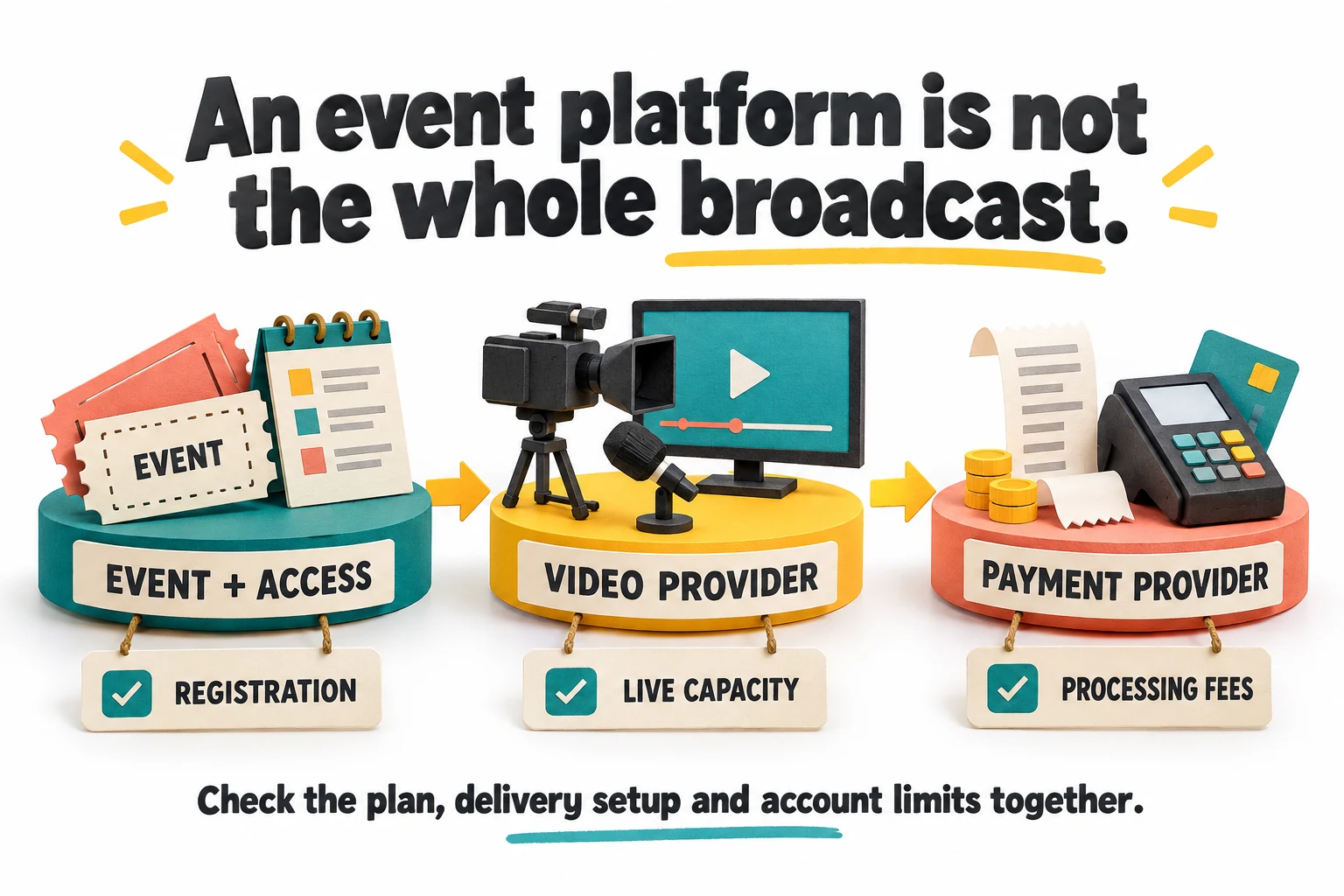
Event registration video delivery and payment processing appear as three separate dependencies to check
Conceptual dependency checklist, not a screenshot. Native webinar accounts and payment-provider requirements remain separate from the event-management subscription.

Count event registrations separately from people and live viewers

The capacity guide defines usage across completed registrations in active events. One person registered for two qualifying events can count twice, because each registration belongs to an event. This is different from a unique-contact total, and also different from the number of people watching a live session at once. Keep all three quantities separate in the budget. A large event-registration allowance does not override a smaller live capacity imposed by the video provider.

Suppose a fictional program has 400 registrations for a current summit and 250 for an upcoming workshop. Those records can use 650 places even if many of the same people joined both. The calculation is illustrative, not a statement about your account. Check the actual capacity summary and any purchased additions, then allow room for the next campaign before launching it. Discovering a quota at the end of a successful promotion is a particularly inconvenient way to learn how the quota works.

Distinguish the number of active events from the registration allowance. Several small events may fit the attendee budget while reaching the event limit, or one successful event may exhaust registrations while using only a single event slot. These constraints affect different business models. A rolling training calendar, an annual summit and a permanent library can have similar content but very different capacity patterns, so a plan should be evaluated against the actual operating calendar.

Do not delete attendee records as a casual capacity-management technique. Access, history and communication records may be important to the service already sold. Use the documented lifecycle controls and verify their effect before changing a live event. The purpose of capacity planning is to preserve a predictable experience as the program grows, not to make the dashboard number look smaller by removing the people who gave the event a reason to exist.

Sources: Account-level attendee capacity and event limits

Closing registration and archiving are not interchangeable

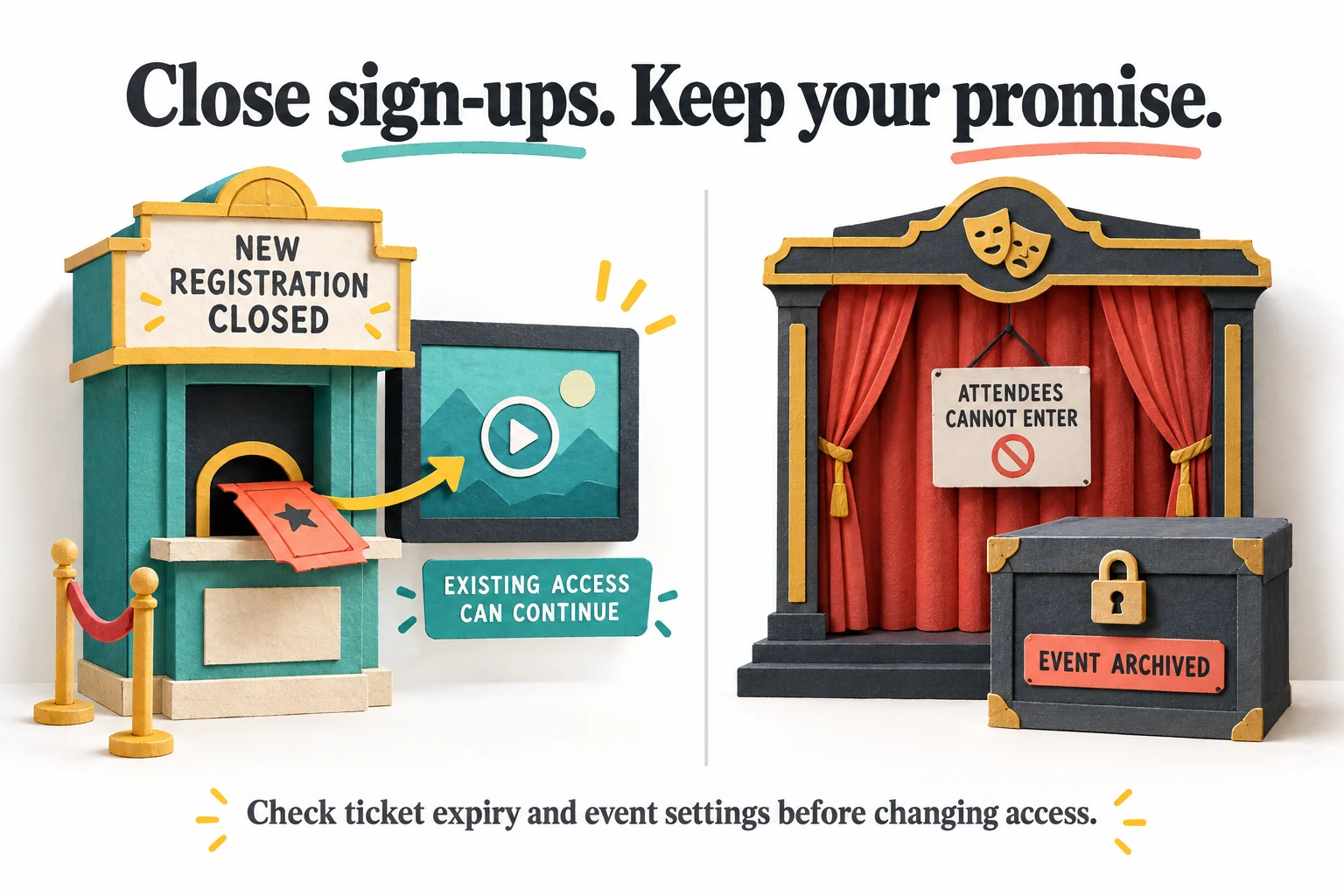
The documentation provides a useful distinction: closing new registrations can leave the event available to existing eligible attendees, while archiving makes it inaccessible. That matters when an organizer wants to free capacity after the live date but has promised replay access. Treat the access promise as the starting point. A cleanup action should not become an accidental cancellation of a product that customers reasonably believe they still own the right to watch.

Before closing registration, check how new customers are meant to buy recordings. If the plan is to keep selling a replay pass to brand-new attendees, the published event needs an appropriate registration path. Closing it is suitable for a different goal: serving existing attendees while stopping new signups. These are legitimate but distinct commercial states. Write the intended state in ordinary language before changing settings, rather than trying to infer the business outcome from a button labeled active or archived.

Review ticket expiry and the replay source as well. Leaving the event page accessible does not guarantee every ticket remains valid indefinitely or that a video host will retain the file. Test a current ticket and an expired ticket with separate ordinary attendee sessions. Explain the access period clearly in the sales copy and confirmation email. A precise promise such as access through a stated date is easier to operate than a casual use of forever that nobody has costed.

Keep a post-event checklist with an owner and a date: recordings verified, customers notified, new-registration policy chosen and future hosting costs reviewed. Do not make archival decisions solely because the live event is over. For the organizer, the stage may be packed away; for a customer in another time zone, the replay may be the main thing purchased. The platform is most valuable when its lifecycle settings support that reality instead of treating the last live session as the end of every obligation.

Sources: Closing registrations while retaining existing access; Keeping replay sales open after the live event

Closed new registrations still allow eligible existing tickets while an archived event blocks attendee entry
Closing registrations and archiving have different consequences. Existing access still depends on valid tickets, replay availability and event settings.

Design tickets as promises about access

HeySummit tickets can connect pricing and availability with live, replay and more specific access rules, subject to plan features. Begin with a small number of understandable choices. A free live pass and a paid replay pass may be easier to explain than six tiers whose differences require a spreadsheet. Name each ticket after the outcome the attendee receives, and state exclusions plainly. The checkout should answer what can I watch and for how long without asking the buyer to decode internal product strategy.

An important documented behavior is that existing purchases keep the access settings copied at checkout unless later ticket changes are deliberately synchronized. This helps distinguish a new offer from an earlier promise, but it also creates a testing responsibility. Verify both a newly claimed ticket and an existing purchase after an edit. A change that appears correct in the ticket editor may not describe what an earlier customer can currently access.

Synchronizing changes can reduce access, so treat it as a consequential operation. If an event changes dates or a replay period is extended, decide which existing customers should receive the update and communicate it clearly. Avoid a broad synchronization merely to make all records look tidy. The correct result is consistent with the intended customer entitlement, not necessarily identical settings on every purchase ever made.

Test a simple access matrix before promotion: visitor without a ticket, free attendee, paid attendee and someone whose access has expired. Check a direct session link as well as the event homepage. Include the confirmation email and the login return path. An organizer preview can show a polished page while bypassing the very restrictions that determine whether a customer receives the promised product. Selling access is a user journey, not only a price field with a currency symbol.

Sources: Ticket prices, availability and access rules; Changing purchased-ticket access settings

Build a replay workflow before promising recordings

The replay guide supports using a compatible broadcast recording or supplying a separate hosted recording. Availability depends on the source and configuration, so do not promise that every live session becomes a replay automatically. Decide who records, who checks the file and who attaches the final source. A session that streamed successfully can still produce an incomplete recording, missing audio or a link restricted to the organizer's account.

For a paid event, inspect the beginning, a middle section and the ending of each recording before announcing it. Confirm that the intended content is present and that any private preparation conversation is not included. Check captions or transcripts where they are part of the promise, and retain a suitable original under the event's policy. This is an editorial and operational review, not something a working play button can establish on its own.

Test the replay using an eligible attendee account on a phone as well as a desktop. Look for unwanted provider login requirements, blocked embedding, missing audio controls and unclear navigation to the next session. If a recording is temporarily unavailable, provide a specific status and expected update rather than leaving a blank space beneath an enthusiastic session title. The attendee should not have to decide whether the problem is their ticket, their browser or a recording that does not yet exist.

Separate a scheduled first showing from an on-demand library. A prerecorded session can have a broadcast time, and the organizer can support interaction around that showing, but it should not be misrepresented as a live performance by a speaker who is absent. Choose a format honestly and staff the promised interaction. Good recordings can be a valuable product; they do not need theatrical claims of live presence to justify a place in an event.

Sources: Supplying and checking a talk replay; Hosted pre-recorded content and attendee checks

Evergreen sessions need fresh content and deliberate repetition

The evergreen guide describes recurring sessions with configurable frequency and related options. This can support a repeatable introduction or training program, but repeating the schedule does not maintain the content. Assign a review date for prices, examples, links and time-sensitive claims in the recording. A session may be technically evergreen while recommending an offer that expired months ago, which is a less botanical and more commercial problem.

Consider how attendance and replay records should behave between occurrences. Review the actual options before clearing registrations or retaining every repeated recording. A learner returning for a second session should receive a coherent experience, and the organizer should understand what counts toward capacity. Do not turn on recurrence simply because it is available. A fixed library may be more suitable when viewers want immediate access rather than another scheduled appearance of the same content.

The documentation also warns that an already-generated event giveaway does not automatically restart with recurring sessions. Treat promotion rules as separate from the content schedule. If a recurring program includes a time-limited bonus or prize, review the current eligibility and applicable requirements before advertising it again. The fact that a session repeats does not renew every associated promise, commercial term or promotional obligation.

Cloning can help prepare another event, but the clone guide says attendee registrations and purchase history are not copied, and the new event begins unpublished. Review dates, providers, tickets, email senders and integrations before launch. Reusing a structure is helpful; blindly reusing last season's operational assumptions is not. The most efficient repeat event starts with a known foundation and an explicit review of what changed, rather than a copied page that still welcomes everyone to last April.

Sources: Recurring evergreen sessions and giveaway limitations; Event cloning and settings that require review

Speaker dashboards reduce chasing, not the need for a rehearsal

A speaker dashboard can centralize profile updates, session details and promotional materials, depending on the organizer's permissions. That is a practical benefit when several presenters would otherwise send biographies, photos and corrected titles through separate email threads. Define what speakers may edit and establish a deadline for the public schedule. The organizer still needs a consistent program, even when each contributor has a convenient place to update their own corner of it.

Do not confuse editing rights with access to watch the rest of the event. The current help pages disagree on that detail: the speaker dashboard guide describes broader viewing access, while the permissions guide says other ticket-restricted content may require an appropriate ticket. This review does not resolve the discrepancy by guessing. Test the actual speaker role in the intended event and obtain clarification before promising a guest full access or relying on it for private-content separation.

Give speakers a short operating brief with their time zone, entry route, technical check and the person to contact. Distinguish the speaker join link from the attendee link and keep privileged links out of public promotional copy. Rehearse the actual microphone, screen share and presentation format. A beautifully completed biography is not evidence that the speaker can share audio from the device they will use on the day.

Prepare a fallback for absence or a connection failure, and decide who can modify the schedule. A small event may need only a backup host and a prepared message, while a larger program needs clearer roles. The platform can organize the information, but it cannot appoint a responsible person by inference. The valuable outcome is fewer last-minute questions, not merely a larger number of fields that everyone has successfully filled in.

Sources: Speaker dashboard, promotion and stated viewing access; Speaker management permissions versus ticket access

Event email should help people attend, not become extra noise

The custom-sender guide says HeySummit uses a managed event address until a custom sender has both inbox verification and the required domain authentication. A familiar From name alone is not the same as an authenticated sending domain. Check the plan entitlement, the reply destination and a real test message before launch. Complete domain changes carefully within the existing mail configuration rather than replacing unrelated records that support the rest of the business.

Review the enabled email sequence from the attendee's perspective. Confirmation, a useful reminder and a clear replay notice can each serve a distinct purpose. Several overlapping reminders from HeySummit, the webinar host and an external mailing tool can instead make the event feel disorganized. Map which system sends each message and turn unnecessary duplication into an explicit configuration decision. More messages do not automatically produce more attendance, especially when they disagree about the joining link.

Use concrete subject lines and visible local-time information where the workflow supports it. Put the important action near the beginning, and include a support route that someone monitors. Test what happens when an attendee replies, loses the original confirmation or changes devices. The event's most important email may be the one that lets a confused customer enter five minutes before the session, not the promotional message with the most carefully polished headline.

Keep service communications separate from unrelated marketing permission. A person registering for a workshop has not necessarily agreed to every later campaign or every speaker's mailing list. Configure consent and preference handling for the actual use, and review integrations that copy data elsewhere. The product can make communication convenient; the organizer still decides what is appropriate to send. A smaller, relevant sequence is often easier to operate and more respectful than treating every registration as permission for an indefinite conversation.

Sources: Custom event sender verification and domain authentication; Launch checklist and organizer-preview limitations

Affiliate tools support distribution, but do not manufacture an audience

HeySummit can give speakers affiliate links and a dashboard for referred registrations and sales. That can align promotion around a multi-speaker event, but it does not guarantee anyone will share the link or that their audience wants the topic. Agree on a practical promotion plan: what the speaker will share, when, with which assets and what the audience receives. A dashboard full of unused referral links is technically an affiliate program and commercially a quiet room.

The speaker guide distinguishes bookings into a talk from registrations attributed to that speaker's referral link. Use those measures for different questions. Session demand can reflect the topic or schedule, while referrals describe one source of event acquisition. Do not treat every person attending a speaker's talk as a customer they recruited. Clear attribution helps the organizer discuss results without rewarding or blaming people based on a metric that measures something else.

The affiliate setup documentation explicitly leaves payment responsibility with the organizer. Establish the rate, eligible purchases, refund treatment and payout timing before promoting the program. Reconcile actual records before paying, and distinguish a recorded payout from money actually transferred through the chosen payment method. Tracking software is useful bookkeeping support, not an invisible finance department that settles obligations while everyone else watches the registration graph.

Evaluate audience fit before adding more partners. A relevant niche speaker with a modest engaged audience may be more useful than a broad list of names with no reason to promote this event. Give contributors specific, honest copy and meaningful session material rather than asking them to broadcast a generic announcement. The platform's contribution is coordination and measurement. The commercial work remains choosing a worthwhile event and making a credible invitation to people who can benefit from it.

Sources: Speaker affiliates and organizer payout responsibility; Speaker dashboard, promotion and stated viewing access

A refund has payment, access and commission consequences

The refund guide describes eligible purchase refunds and distinguishes a full selected item from a partial amount handled through a payment provider. It also says refunded tickets normally stop granting access, unless the event's cancellation setting leaves that access open. Check the intended policy before acting. Refunding money, revoking an entitlement and communicating with the customer are related decisions, but they should not be assumed to occur identically in every payment route.

The webhook documentation adds an important boundary: refunds made directly in a provider such as Stripe are not observed by HeySummit's dashboard refund actions in the same way. An external system waiting for that notification may therefore need separate reconciliation. Test the supported path in a safe test setup, and document what must be checked when someone handles a refund outside the event platform. A successful payment-provider screen is not proof that every connected record has changed.

Review affiliate commission separately, particularly if a payout has already been recorded or transferred. Keep the event's agreed refund and commission rules explicit, and do not assume returning a ticket payment automatically recovers money already sent to an affiliate. The organizer needs a complete transaction history and an agreed way to resolve adjustments. This is an operating consideration rather than individualized accounting or legal advice; consequential policies should receive the appropriate professional review.

Build the support response around the customer's actual outcome: amount returned, timing described by the payment provider and what happens to access. Do not delete the attendee as a shortcut to resolving a financial issue. Keep enough records to reconcile the event while respecting the applicable data policy. A smooth refund process can preserve trust even when the original purchase was not a fit, whereas a customer who receives money back but conflicting access messages is likely to contact support again.

Sources: Eligible refunds and ticket-access consequences; Event webhooks, account subscriptions and refund notifications; Speaker affiliates and organizer payout responsibility

A refund checklist separately verifies money returned ticket access updated and affiliate commission reconciled
Our reconciliation checklist: confirm the payment result, access state and commission record separately, especially when a refund happens outside HeySummit.

Shared conversation and private video are different boundaries

An October 13, 2026 update adds the option for alternative broadcasts of a session to share the main conversation, including enabled chat, questions and polls. This can be useful when viewers choose different language streams but should participate together. The update also warns that ticket-restricted video does not make a shared conversation private. Keep that distinction explicit when planning VIP discussions, separate client groups or any session where audience separation is part of the promise.

Decide the conversation model before enabling interaction. A shared multilingual discussion may need moderators who can handle the participating languages and explain how questions will be selected. A private workshop may instead require separate rooms even when the general keynote is shared. Test with ordinary accounts assigned different tickets. An organizer who can see all streams is not the right role for proving that an attendee cannot see a conversation intended for someone else.

Choose moderation responsibilities that match the event size. Someone should know how to respond to technical questions, remove inappropriate content where authorized and bring useful questions to the presenter. Enabling a chat box does not guarantee a constructive discussion any more than placing a microphone on a stage guarantees a good talk. Give attendees a short, clear expectation for interaction and make the support route distinct from the public conversation when private details are involved.

Check the chosen session format as well as the plan. The prerecorded guide notes that public-access configurations do not expose the same HeySummit interaction tools. Do not infer feature availability solely from another event's screenshot. The useful buying question is whether the intended audience, ticket rules and delivery format support the conversation you want. That combination determines the experience more reliably than a general feature list saying chat, Q&A and polls are available somewhere in the product.

Sources: October 13 update: shared alternative-broadcast conversations; Hosted pre-recorded content and attendee checks

Read analytics as evidence, not as an attendance trophy

Session bookings, unique attendees, live attendance and replay viewing answer different questions. The reporting guide says total session bookings includes registrations across sessions, so one person can contribute several bookings. A strong-looking total may therefore reflect an interested smaller group rather than a large new audience. Keep the definition beside the number when reporting results to a sponsor or deciding whether the event met its acquisition goal.

Watch-duration availability depends on the plan and delivery source. For some external webinar paths, HeySummit may know that a person joined without knowing how long they stayed. Do not translate a join event into completed learning or sustained attention. Use the provider's own reporting when appropriate and reconcile definitions before combining data. Missing duration is an information limit, not evidence that everyone watched the entire session or that nobody did.

Build a small evaluation funnel: completed registration, actual attendance where observed, relevant engagement, paid conversion and retained revenue after refunds. Compare the stages rather than celebrating a single large count. A fictional event with many free registrations but few viewers may need a better topic promise or reminder journey, while a smaller event with strong attendance and useful follow-up may be commercially healthier. The platform can expose signals, but interpreting them still requires the organizer's objective.

Handle exports carefully. The attendee report can contain contact details, preference fields and other information not needed by every speaker or sponsor. Share a relevant aggregate or a deliberately limited authorized dataset instead of the entire export by default. Reporting is valuable when it supports a decision without creating unnecessary exposure. The best post-event report explains what happened, what remains uncertain and what the next event should change, rather than presenting every available column as proof of success.

Sources: Bookings, attendance and watch-duration reporting; Session registration rows and exported attendee data

Use integrations and MCP to reduce repetition without surrendering control

HeySummit's webhook documentation distinguishes event-dashboard webhooks from account-level API subscriptions. It also separates registration started from checkout completed. That difference matters when adding people to a CRM or triggering a service message: entering a signup flow is not the same as becoming a confirmed attendee. Select the event that matches the business action and inspect a harmless sample payload before connecting a live campaign or fulfillment process.

Design the receiving system to tolerate duplicate or delayed notifications according to the supported contract, and keep a reconciliation route for missed updates. The reviewed guide does not establish an exactly-once delivery guarantee, so this review does not invent one. Use stable purchase or attendee identifiers where provided and verify final state before repeating consequential actions. Preference changes also need a deliberate synchronization path if communication data is copied to another system.

The current MCP guide supports scoped event access and distinguishes read, write and destructive permissions. It describes previews and explicit confirmation for supported changes. Start with the minimum access necessary to inspect an event, and review what the connected client actually requests. Being able to sign in is not proof that the connection is read-only. Attendee data remains sensitive even when an assistant cannot change it, so use an appropriate trusted environment and avoid exposing tokens in prompts.

Use AI assistance for concrete tasks such as identifying missing session details or drafting a setup checklist, then inspect the proposed changes before applying them. Keep ticket restrictions, deletions, public publication and outbound messages under deliberate control. The benefit should be fewer repetitive editing steps, not a faster route from an ambiguous sentence to a changed customer entitlement. A useful assistant knows which event and record it is working on and leaves the organizer able to explain the resulting state.

Sources: Event webhooks, account subscriptions and refund notifications; Scoped AI-assistant access and previewed changes

Model event economics with real fees and a modest forecast

The fee guide says a wholly free event has no platform transaction fee against nonexistent event revenue, but subscription and capacity costs still apply. Paid items can introduce the plan's transaction fee, while the payment provider can charge separately. Keep these costs distinct from speaker fees, production, moderation and promotion. A free ticket is a pricing decision for attendees, not a guarantee that the organizer's event costs nothing to operate.

Use a conservative scenario before buying. Imagine 100 paid tickets at $50: gross revenue is $5,000. A hypothetical two-percent platform fee would be $100 before payment processing, refunds, affiliate commissions and other costs. This is simple illustrative arithmetic, not a forecast or a claim about every HeySummit account. Substitute the actual purchased terms and realistic sales volume. The useful figure is contribution after the costs required to deliver the event, not gross checkout revenue.

Compare the incremental cost of a richer plan with the benefit it enables. A lower percentage fee alone may not justify a larger annual commitment at modest sales volume, while a required access or collaboration feature might. Also compare the platform with the tools already owned. For one simple session, existing services may be sufficient. For repeated multi-speaker events, reducing manual coordination can matter more than a small difference in the per-ticket fee.

Avoid financing the purchase with an imaginary audience. Validate demand through an appropriate small event, a waitlist or conversations with likely attendees before building a huge program. HeySummit can organize sales and delivery, but the quality of the topic, speaker fit and invitation determines whether people care. A sensible platform decision follows a credible event proposition. It should not be asked to create that proposition after the team has already spent its budget on the infrastructure for a crowd that has not been invited.

Sources: Platform revenue fees versus other event costs; Current annual subscription prices and allowances

Rehearse the complete attendee journey, then decide

Build a small unpublished rehearsal with one live session, one recording and the ticket choices you actually intend to sell. Use separate organizer, speaker and ordinary attendee roles. Check registration, confirmation, login, the direct session link and replay availability. Include an ineligible ticket so the test proves denial as well as successful entry. A page that works for the organizer is useful progress, but it is not the same thing as a working customer experience.

Inspect mobile navigation and the content people need when they are in a hurry: current session, start time, joining action and support contact. Check the actual video host, sender and payment test configuration rather than placeholders. Avoid real charges unless a separately authorized transaction is needed; use supported test mechanisms and keep the evaluation isolated. Record any provider-specific limitations while they are still inexpensive to solve, not during the first paid session.

Our 82-point score combines 18 for problem fit, 18 for capabilities, 16 for workflow, 15 for evidence and 15 for value. It reflects the breadth of the documented event lifecycle and the practical benefit of coordinating it, balanced against separate delivery costs, careful access management and unresolved speaker-access wording. It is neither a copied review average nor a guarantee that your event will sell. Those are different claims requiring different evidence.

Choose HeySummit when the rehearsal shows that it makes a genuinely multi-part event easier to deliver and the full cost fits a realistic business case. Choose a simpler setup when the event does not need the additional coordination. Above all, buy the experience you can verify: the right person receives the right ticket, enters the right session and finds the promised recording afterward. That is a stronger reason to purchase than a long feature list, and a much better foundation for inviting the same audience back.
Sources: Launch checklist and organizer-preview limitations; Ticket prices, availability and access rules; Supplying and checking a talk replay; Speaker management permissions versus ticket access

Frequently asked questions

Is the $89 lifetime deal available now?

No live availability is established. SoftScout keeps that historical card archived, while the checked source is sold out and shows a later $99 listing. Use current direct terms for a new purchase decision.

Does HeySummit include a Zoom or other webinar subscription?

The native-host guide says you need your own provider account, license and capacity. HeySummit's event registration allowance should not be treated as the simultaneous audience capacity of the connected video service.

Can I free capacity without removing promised replays?

Closing new registrations can reduce counted usage while existing eligible attendees retain access. Archiving is different because it makes the event inaccessible. Check ticket expiry and event settings before changing anything.

Do ticket edits automatically change every earlier purchase?

No. The documented default preserves the access settings copied onto existing purchases. A deliberate synchronization can apply later changes, potentially reducing access, so review the intended effect before using it.

Does an affiliate dashboard mean commissions are paid automatically?

No. The speaker-affiliate guide assigns payout responsibility to the organizer. Reconcile the actual purchases, refund effects and agreed commission terms before recording or making a payment.

Current alternatives to HeySummit

Marketing & SEO

Inrō

A strong candidate for businesses already receiving relevant Instagram conversations. Start with a narrow, supervised flow and verify the plan's limits. It can improve response handling, but it does not create an audience or make every stored contact reachable.

$59 · checked Nov 14, 2026

Marketing & SEO

Nuwtonic SEO

Nuwtonic SEO monitors rankings, optimizes pages, and generates GEO-ready content for AI search, helping teams improve visibility in both traditional and AI-generated answer ecosystems. The product is designed for teams that need a repeatable marketing & seo process and want clearer control over the core task. It fits best when the buyer has a defined use case, realistic input data, and a way to judge output quality before rolling it out across a wider workflow.

$69 · checked Nov 14, 2026

Marketing & SEO

Skillplate

Skillplate uses an AI agent, Overmind, to help users build products, websites, checkouts, and marketing campaigns from a single platform. This aims to streamline the process of launching and growing an online business. The product is designed for teams that need a repeatable marketing & seo process and want clearer control over the core task. It fits best when the buyer has a defined use case, realistic input data, and a way to judge output quality before rolling it out across a wider workflow.

$79 · checked Nov 5, 2026

Marketing & SEO

SheetXAI

SheetXAI automates spreadsheet tasks using AI and natural language, eliminating the need for formulas or coding. It integrates directly with Excel and Google Sheets, streamlining data cleaning, content generation, and bulk operations. This tool is suitable for teams seeking to automate repetitive spreadsheet workflows, allowing them to focus on strategic tasks rather than manual data management.

$49 · checked Nov 6, 2026

Deal alerts

Get marketing & seo deal alerts by email.

SoftScout will send short buying notes when offers like HeySummit look worth checking or worth skipping.

Short buyer verdicts

Useful offers before checkout

Editorial note

Do not mistake an archived deal for a current checkout, attendee quota for live-video capacity, or an organizer preview for a paid attendee's access. Test those boundaries before promoting an event.

For vendors

Have a better deal for HeySummit?

Send current partner terms, coupon limits, refund rules, and the best buyer fit. We review offers before adding them to SoftScout pages or Telegram alerts.

Submit terms