Back to deals
Marketing & SEOArchived deal

TeliportMe Virtual Tours deal archive

Worth evaluating for photographers, venues and property businesses that need a clear visual walkthrough. Good source photography and navigation matter more than decorative effects. This offer is archived; check current plans instead of treating the historical price as available today. This page is kept as a historical SoftScout archive entry, so readers can compare past terms, category positioning, and buyer-fit notes.

Product overview

What TeliportMe Virtual Tours does

TeliportMe connects panoramic scenes with navigation and information hotspots, then presents the resulting tour through a shareable or embedded viewer. A visitor can inspect relationships between spaces instead of relying only on isolated gallery images.

Our source-researched review separates core tour-building from optional Business capabilities, explains the difference between a floorplan and measured geometry, and gives a practical capture-to-delivery test. It does not claim hands-on performance results or a proven increase in bookings.

Read the full TeliportMe Virtual Tours review

Best for

  • Photographers delivering clearly scoped panoramic tours with a defined hosting period
  • Venues and hospitality teams answering spatial questions before a customer visits
  • Property marketers who can prepare accurate images and maintain a simple navigable route

Why we picked it

  • Camera-independent panoramic input avoids tying the workflow to one capture device
  • Hotspots and floorplan markers can explain how spaces connect
  • A selected starting scene can match a specific room or campaign link

Check before buying

  • This offer is archived and may no longer be available at the original price.
  • Use this page as historical research for marketing & seo buying context.
  • Check the vendor's current pricing, limits, and refund terms before making any purchase.

Archived offer

This page preserves the deal context for research and SEO, but the original discount may be closed.

Use it for

Compare historical marketing & seo pricing, positioning, and buyer fit before choosing a current tool.

Next step

Browse active SoftScout deals or check the vendor's current terms before spending money.

This archive page stays live for research. Use active SoftScout listings when you are ready to buy.

Check Source History

Source transparency

Source
Source marketplace
Link type
Source page
Last checked
Oct 24, 2026

Buyer checklist

  • Treat this as a historical deal page, not a live checkout recommendation.
  • Use the notes to compare the old offer against the vendor's current pricing.
  • If the original source still opens, verify all terms before buying.

TeliportMe Virtual Tours: the buying decision

TeliportMe can turn a set of prepared panoramic photographs into a navigable explanation of a real place. Its most useful role is helping a prospective visitor understand room connections, sightlines and relevant details before arranging a viewing, while giving the creator control over hotspots and presentation without requiring a proprietary capture camera.

Research-based review, not a hands-on test. Sources checked on 2026-10-24. The assessment below is our editorial judgment, not a customer rating. Editorial assessment: 79/100.

Consider it if

  • A representative tour helps prospective visitors answer meaningful layout questions that your normal photo gallery leaves unresolved.
  • Your panoramic files fit the selected plan and the actual phone experience is clear, responsive and easy to navigate.
  • The required advanced features, hosting term and client ownership arrangements are confirmed before you price the project.

Skip it if

  • You need a certified measured model or an automatic property survey rather than an image-based walkthrough.
  • The purchase depends on assuming that every feature in a promotional demonstration belongs to the archived entry package.
  • You cannot obtain suitable photography, permission to publish the space or a workable plan for maintaining and backing up the project.
Problem fit: 18/20
Explaining spatial relationships before a visit is a concrete need for venues, photographers and property teams that ordinary isolated photos do not always solve.
Capabilities: 17/20
Panorama navigation, information hotspots, floorplans and sharing cover the central workflow, while advanced presentation functions depend on additional plan entitlements.
Workflow fit: 16/20
The documented builder offers useful control, but capture preparation, mobile testing, privacy review and long-term delivery still require skilled human work.
Evidence confidence: 13/20
Official guides clarify many details, but mixed-age marketing and conflicting broad feature language require caution, and no independent hands-on performance test was completed here.
Value: 15/20
A focused tour can be commercially useful, but total value depends on capture costs, storage, upgrades and maintenance rather than the archived entry price alone.

TeliportMe review: help a visitor understand the place

A photo gallery can make every room look attractive while leaving a prospective visitor unsure how any of them connect. Is the terrace beside the main hall or reached through a service corridor? Does the entrance open into a reception area or directly into the event? TeliportMe is useful when those spatial questions matter. Its central job is turning prepared panoramic scenes into a walkthrough that a person can explore, with links and information placed where they make sense in the space.

The commercial benefit is not that a room can rotate on a screen. It is that a visitor can resolve uncertainty before arranging a viewing or contacting the business. For a venue, that may mean understanding the relationship between indoor and outdoor areas. For a showroom, it may mean seeing how displays are organized. For a photographer, it may mean delivering a more informative asset than another folder of beautiful but disconnected images. None of those benefits automatically proves a higher booking rate; they describe a useful problem to test.

This review draws on vendor pages, current offer information and help documentation, including indexed help-page content where direct retrieval was unavailable, checked on October 24, 2026. We did not capture a property, purchase an account or benchmark the viewer on a range of devices. Examples are proposed production exercises rather than reports of our own client results. The distinction is important because promotional pages sometimes mix the broad capabilities of the platform with the narrower entitlements of a specific plan.

Our short verdict is to evaluate TeliportMe for a deliberately scoped photographic tour, not as an automatic substitute for careful capture, measured surveying or a complete booking system. A good tour needs accurate images, a readable route and a useful next action. A bad one is a collection of rooms connected by mysterious arrows, with background music providing emotional support while the visitor searches for the exit. The software supplies the presentation tools; somebody still has to decide what the experience should explain.

Sources: TeliportMe product features and plan labels; Hotspot destinations and initial viewing direction

The archived offer and the current service are different purchases

This SoftScout record is archived, and the source offer was marked sold out when checked. The historical entry package listed $89, ten live tours, three GB of storage, a 16K resolution ceiling and a thirty MB panorama limit. Those figures describe that offer, not unlimited access to every feature shown in a demonstration. The seller's own note excludes 3D Dollhouse from the Essential-based promotion. Preserve that distinction when comparing an old review, an account upgrade and a current subscription.

The direct pricing page's monthly view lists Essential at $25 and Business at $35, with different capacity and feature boundaries. Those are current page observations, not a quote for a legacy account or a promise that every add-on is included. Confirm the checkout and account-specific entitlements before committing. A subscription advertising unlimited tours or storage should not be used to reinterpret a capped lifetime package. Similar plan names can conceal materially different commercial terms, especially when a product has run several campaigns over time.

Write a requirements list in ordinary language before choosing a package. Do you need one venue on your own website, several clients with separate branding, an advanced media effect, a custom domain or a particular model view? Mark each requirement essential or optional. Then ask which exact purchase enables it. A feature that is impressive in a showcase may be irrelevant to your first project, while an unglamorous upload limit can determine whether the whole production workflow is practical.

For existing owners, inspect the account rather than assuming a new public offer changes an old license. Keep a record of the entitlement confirmation if a project depends on it. Do not promise a client an advanced capability because the platform supports it somewhere. The product can be a good fit while the package in your account is not. Sorting that out before capture is considerably cheaper than discovering it after you have sold the client a particular deliverable.

Sources: Archived offer limits and seller clarifications; Current direct subscription pricing; Vendor explanation of the Business dollhouse feature

Capture quality is the first feature you actually need

The documented workflow accepts suitable panoramas from different capture methods, including dedicated 360 cameras, stitched photography and rendered scenes. That flexibility is valuable, but it does not mean every ordinary phone image contains a complete surrounding view. A source image must represent the scene you want the visitor to explore. Native camera files can also need preparation: the Insta360 guide describes converting INSP material into a usable panoramic export before upload. Keep capture, stitching and tour assembly as separate stages in your plan.

Before a shoot, walk the route as a visitor would. Identify the spaces that answer a meaningful question and the transitions that connect them. Remove private paperwork, check mirrors and reflective surfaces, and agree on what must remain visible for an honest representation. Schedule the capture for a time when the room can be prepared consistently. A strong viewer cannot repair a rushed shoot in which half the lights are off, a delivery trolley blocks the doorway and the photographer appears in every reflective surface.

Use a small trial set to establish a repeatable capture approach. Compare a bright room, a darker corner and a doorway between spaces. Inspect the stitched result at a realistic viewing size before taking the whole building. Look for doubled edges, inconsistent exposure, distorted nearby objects and an uncomfortable horizon. These are suggested quality checks, not claims about automatic correction by TeliportMe. Finding a problem while the equipment is still on site can save a return visit that costs more than the software subscription.

Keep the original capture files as well as the prepared uploads. If you later need a different export, a repaired join or a higher-quality version, the source material gives you options. Name files by location and capture date so a replacement scene can be identified without opening every image. Treat the tour platform as the presentation service, not the only archive of the photography. A client may change the intended use long after the original project is finished, and sensible file organization makes that request manageable rather than archaeological.

Sources: Panorama format and image specifications; Preparing Insta360 files as panoramic images

Resolution, projection and file size are separate questions

A full spherical panorama commonly uses an equirectangular layout, which maps the surrounding view into a rectangular image. The image-specification guide uses metadata and aspect-ratio rules to identify supported types. Do not take an arbitrary photograph, stretch it to a two-to-one rectangle and expect a genuine room panorama. The geometry and the image content must be appropriate. When an upload behaves like a flat picture instead of a navigable scene, inspect the export format and metadata before blaming the viewer or repeatedly uploading the same file.

A large resolution number describes the source panorama, not the amount of detail visible in every direction at once. The viewer shows only part of the sphere at a time. A file can have many pixels and still look poor because of motion, weak stitching, noise or excessive processing. Conversely, a well-prepared moderate-resolution source can be clearer and more useful than a much larger flawed one. Evaluate the details that matter to the audience, such as a room connection or product display, rather than treating the maximum supported number as a quality guarantee.

File size is another constraint. A panorama can fit the resolution allowance but exceed the account's upload ceiling. Prepare a representative batch before promising a production turnaround. If you need to reduce file size, compare the result visually rather than applying an aggressive blanket setting and hoping the damage is invisible. Keep the untouched original so the decision can be reversed. Also distinguish the per-file limit from total account storage: passing one check does not imply that an entire project will fit.

Make a simple preparation checklist for whoever handles the images. It should identify the required export type, naming convention, target account limits and visual inspection points. Include a sample known to work. This is especially useful when several photographers or subcontractors contribute material from different cameras. The goal is not to force everyone into identical equipment; it is to make the handoff predictable. A camera-independent platform is most useful when the business supplies a consistent input standard instead of leaving each upload to interpretation.

Sources: Panorama format and image specifications; Preparing Insta360 files as panoramic images

Build a route that makes sense without an explanation

The hotspot guide describes linking a navigation point to another panorama and setting the initial view. That second detail is easy to overlook. A visitor who moves through a doorway should arrive looking in a direction that preserves their understanding of the space. If every transition drops them facing an unrelated wall, the tour becomes a test of short-term memory. Choose viewpoints and arrival directions as part of the route, not as a finishing touch after all the scenes have been uploaded.

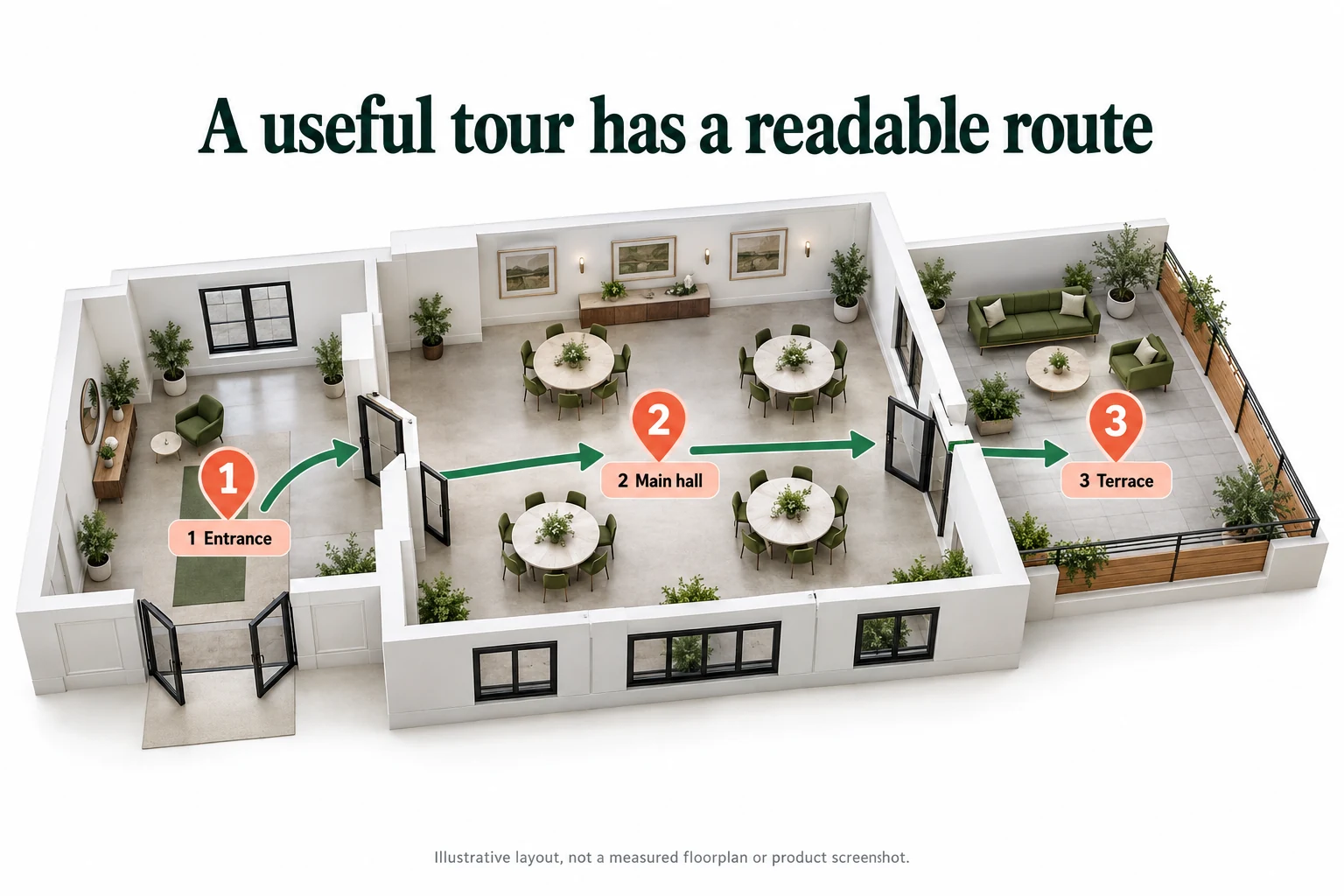
For a small event venue, start with the entrance, continue into the main hall and then show the terrace connection. Add another scene only when it explains a feature or a change in layout. More capture points are not automatically more informative. Several nearly identical views can slow the experience and make the visitor unsure whether they moved. The illustrative route below uses three positions to show a simple relationship; it is not a measured floorplan or evidence that a particular property has that layout.

Name scenes in the language a visitor uses. Main hall is clearer than panorama zero seven, and terrace entrance is clearer than final outdoor revision. Check the return route as well as the forward route. A viewer should be able to revisit a room without restarting the entire tour or opening a confusing menu. Keep movement icons consistent so an information hotspot is not mistaken for a doorway. The first-time visitor should not need a legend extensive enough to qualify as a separate brochure.

The sharing guide also allows a selected panorama to be the starting point. That can make a campaign link more relevant: a page discussing the terrace can open there, while the main venue page starts at the entrance. Test each link independently and keep its purpose documented. A targeted starting view is helpful only if the rest of the route remains coherent. Avoid creating a collection of entry points that land people in isolated scenes with no obvious way to understand the surrounding space.

Sources: Hotspot destinations and initial viewing direction; Sharing a tour at a selected panorama

Three camera positions connect a fictional venue entrance to its main hall and terrace
Illustrative route for a small venue, not a measured floorplan or a TeliportMe screenshot. Place viewpoints where they explain real connections between spaces.

Hotspots should answer questions, not decorate every surface

An information hotspot is useful when it supplies something the photograph cannot explain on its own. It might identify a room's function, link a current specification or show a close-up detail. The documented hotspot system can connect panoramas and supporting information. The editorial choice is deciding what deserves a click. If every chair, wall and window has an animated marker, the experience starts to resemble a desktop with too many notifications rather than a calm way to inspect a place.

For the venue example, useful information might include where the terrace connects, which room serves as a preparation area and where to request the current event package. Avoid attaching unverified capacity numbers or availability promises to a scene. Those details can change independently of the photography. Use a maintained destination for information that changes frequently, and give someone responsibility for checking it. A beautiful tour with an outdated package link can create more confusion than a plain page with accurate information.

Keep hotspot text short enough to scan, but make the supporting page substantial when the question needs detail. A person exploring a space should not be forced to read a full sales essay inside a tiny floating panel. Use labels that describe the result of the action. View terrace layout is more informative than click here. Check that the information does not cover the feature it is meant to explain, especially on a phone where a panel can occupy most of the screen.

Test with somebody unfamiliar with the property. Ask them to find two or three specific things without coaching and watch where they hesitate. Do they recognize the difference between moving and opening information? Can they close a panel and return to the scene? Do they understand what is current and what is merely illustrative? This small usability exercise can reveal more than adding another effect. The measure of a successful hotspot is whether it helps a real visitor answer a question, not whether it demonstrates that the editor has another option.

Sources: Hotspot destinations and initial viewing direction; TeliportMe product features and plan labels

A floorplan helps orientation; a model is not a survey

The floorplan tutorial describes uploading an image and connecting room markers to panoramas. This gives the viewer a spatial overview that individual scenes may not provide. The separate dollhouse feature offers a model-style presentation and is identified as a Business capability in the vendor's explanation. Neither fact means that a photographic tour automatically supplies verified dimensions or a professional measured survey. If a buyer's decision depends on a doorway width, usable area or another exact measurement, obtain that information from an appropriate verified source.

Use a plan that matches the space and the capture date. Label floors and rooms consistently with the scene names. Place markers where the camera position actually belongs, not simply where they fit attractively on the drawing. If the layout is schematic, say so. A navigation diagram can be extremely helpful without pretending to be a technical drawing. The problem is not simplification; it is allowing a simplified visual to imply a level of precision it was never intended to provide.

For multi-level spaces, test the transition between floors and the orientation after each move. A user should know whether they are looking at an upper level, a terrace or another building. Include only the areas you are authorized to show. A floorplan can reveal more about a property than the photographer intended, including private rooms or service routes that are irrelevant to the marketing purpose. Review the overview with the owner as carefully as the panoramic scenes.

Ask whether the model view helps this audience before paying for it. A complex venue may benefit from an overall spatial explanation, while a small showroom may need only a few well-connected scenes and a simple map. An impressive opening animation is not automatically a better buying experience. If the visitor's main question is whether the meeting room connects to the terrace, answer that clearly first. Additional presentation should support the decision, not become a prerequisite for understanding a straightforward space.

Sources: Uploading a floorplan and linking room markers; Vendor explanation of the Business dollhouse feature

Website embedding and Magic Embed are not interchangeable

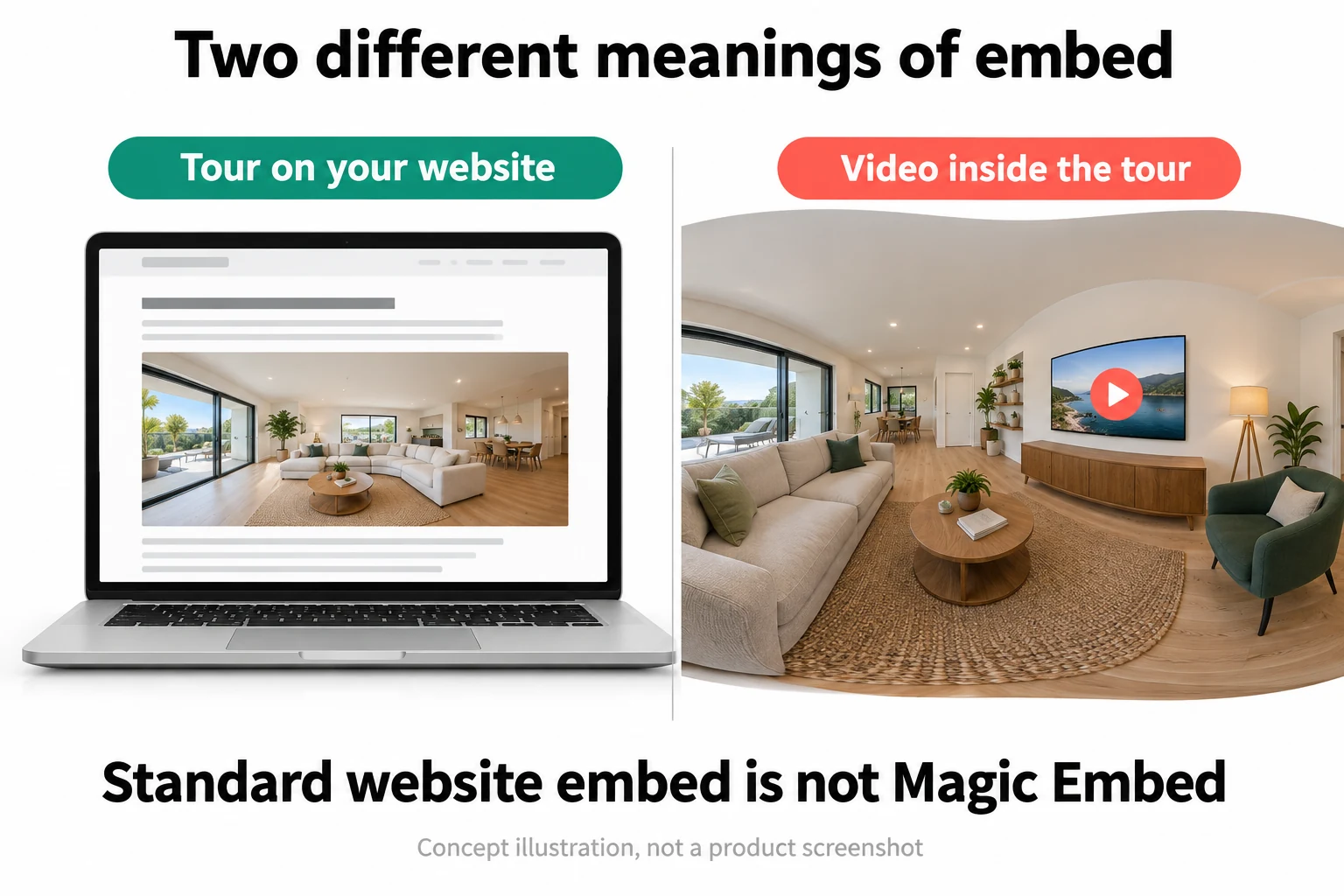
A normal website embed places the tour viewer inside a webpage. Magic Embed places an image or video within the panoramic environment, such as media appearing on a screen in the room. The help guide describes a four-sided polygon, and the founder's current explanation separates this Business feature from ordinary embedding in the Essential offer. Stacking more base-offer capacity does not by itself unlock that capability. The distinction is easy to miss because both names contain embed, but they solve different presentation problems.

For most first projects, placing a clear tour on a useful page is the more important job. Give the page a descriptive title, a brief explanation of the space and a straightforward contact or booking route. Keep ordinary photos and essential factual information available outside the interactive viewer. Some visitors want to inspect the room quickly rather than learn a new control scheme. An interactive tour should add another way to understand the property, not become the only way to obtain basic information about it.

If you do need media inside the scene, design one purposeful example before building the whole project around it. A showroom television might show a short product demonstration; an information point might explain a process that is not visible in a still image. Check the asset format, playback behavior, audio controls and loading cost on the target devices. Avoid assuming that a video which works on your fast desktop will behave identically in every mobile browser or embedded context.

Keep externally hosted media and destination links under clear ownership. A tour can remain online while a linked video disappears, a form changes or a domain expires. Record those dependencies and include them in periodic checks. Do not promise a self-contained permanent deliverable merely because the tour can be embedded on the client's website. The viewer, the source media and any linked services can have separate operating requirements. A good delivery agreement describes the actual arrangement instead of letting a convenient embed code imply more independence than it provides.

Sources: Magic Embed requirements and polygon media; Founder answers about feature upgrades and capture formats; Sharing a tour at a selected panorama

A whole tour embedded in a website differs from video placed on a television inside the scene
Two different jobs: embedding the viewer in a webpage and placing media within the panorama. Magic Embed is an advanced entitlement, not another name for ordinary sharing.

Judge the phone experience before adding more effects

TeliportMe describes a multiresolution viewing approach, while its sharing guidance warns that embedding too many full tours can slow a page. Those statements are useful context, not a performance benchmark for your project. The final experience depends on the source assets, the surrounding website, optional media and the visitor's connection. Test the actual public page rather than only the standalone viewer. An otherwise fast tour can still sit inside a slow page with several unrelated scripts and large images.

Start with one visible tour and a deliberate loading approach. Inspect the first meaningful view, the time until navigation responds and the behavior when moving to a second scene. Use a phone and a realistic connection, not only the office desktop where files may already be cached. Check whether controls remain easy to tap, whether labels fit and whether a landscape rotation disrupts the experience. A spinner that eventually finishes is not the same thing as a comfortable first impression.

Avoid unnecessary autoplay, aggressive rotation and overlapping callouts. Motion can help communicate direction, but it can also make inspection harder. Let the visitor pause, read and choose where to look. Provide a conventional route to essential information for people who cannot or do not want to use the interactive experience. This review does not certify the viewer's accessibility; the practical recommendation is to test the real page and preserve useful non-interactive alternatives instead of assuming visual sophistication equals universal usability.

Set a quality threshold before presenting the tour to a client. A reasonable acceptance exercise includes opening the page from a fresh browser session, reaching a named room, reading one information panel and completing the intended next action. Note the device and connection used so later comparisons are meaningful. If a particular effect causes trouble, simplify the experience before adding more infrastructure. The best technical result is not the most elaborate tour your laptop can render. It is the clearest tour your intended audience can comfortably use.

Sources: Panorama format and image specifications; Sharing a tour at a selected panorama

A 360 camera sees the things a normal photo leaves outside the frame

Privacy review starts before upload. A panoramic capture can include paperwork behind the camera, names on a noticeboard, a reflection in a mirror or a screen that was not meant to be published. Walk around the entire capture point and inspect the full resulting image. Do not rely on the opening view to hide sensitive information; the visitor can look elsewhere. For a commercial venue, agree on the areas and details authorized for publication before the photographer begins collecting material.

The product provides a password-protection block for controlled sharing during review. Use an appropriate password and test the resulting link from a separate signed-out session. Do not copy the simplistic sample password shown in a tutorial. Also do not treat an unlisted link as equivalent to a robust access boundary merely because it is not displayed in a public gallery. Confirm the actual behavior of the chosen visibility setting and keep sensitive source material out of a tour that does not need it.

The vendor's privacy policy covers a broad set of service and mobile-app data practices. A general privacy statement is not a substitute for checking whether a particular client's data-handling requirements are met. Avoid uploading confidential layouts or personal information solely because a marketing page uses a compliance label. For a sensitive project, resolve hosting, access, retention and contractual requirements with the responsible people before production. This is a due-diligence recommendation, not a legal conclusion about suitability for every organization.

Review again when the tour changes. A replacement panorama may introduce a visible document or a person who was absent from the first version. A new hotspot can link to information that was not part of the original approval. Keep the approved scope and the publication date with the project, and have a clear process for removing or correcting an issue. The advantage of an immersive view is that it shows more of the place. That same advantage is why a thorough privacy pass belongs in the normal production checklist rather than in the emergency checklist.

Sources: Adding password protection to a tour; Vendor privacy policy and data handling

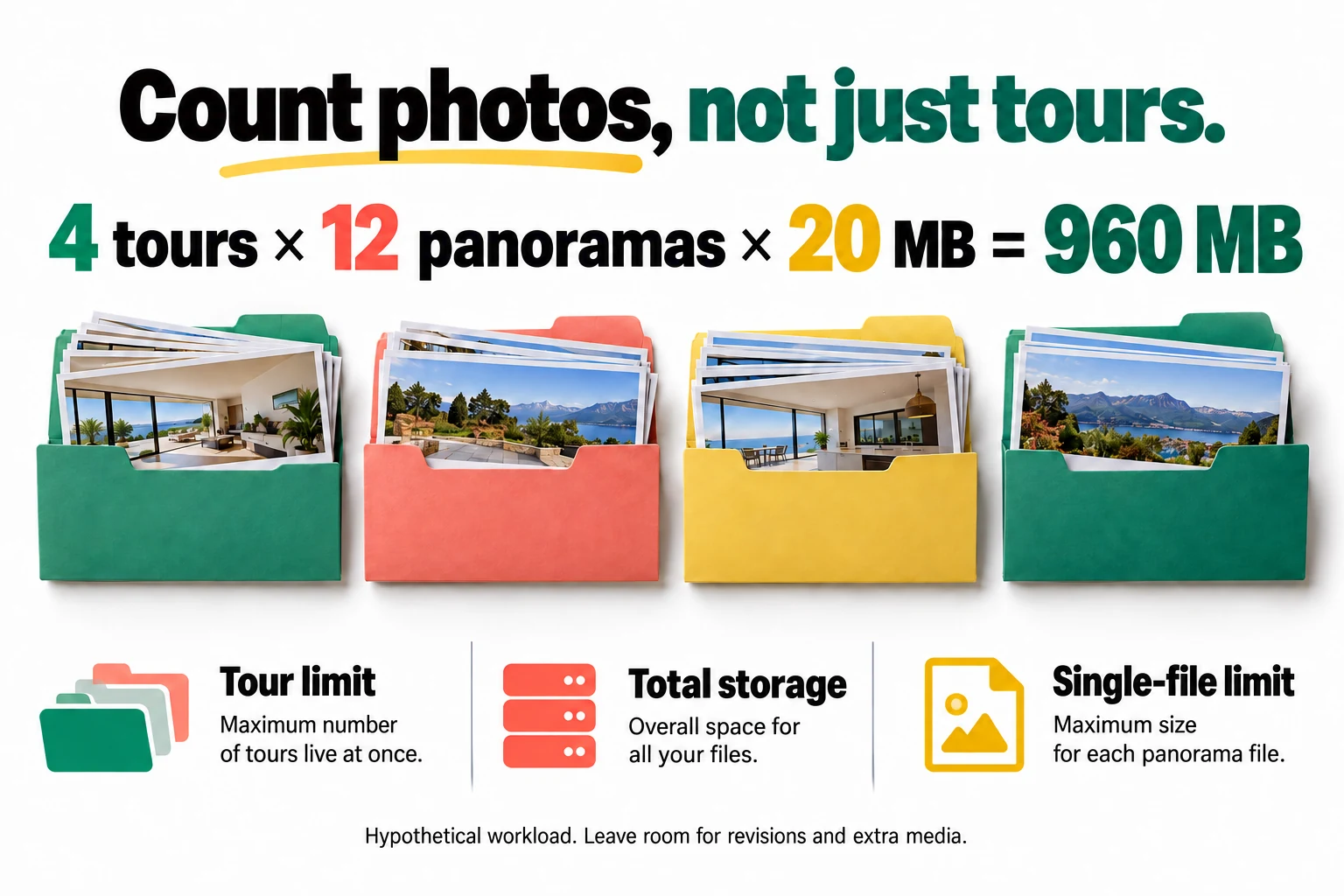
Budget three limits: live tours, total storage and each panorama

A tour allowance is not a storage allowance, and neither is the maximum file size. The archived package has separate constraints, while current direct subscriptions use a different commercial structure. Plan against the actual account rather than a broad phrase such as unlimited media. Ask how storage is counted, what happens when scenes are replaced and whether removing material releases capacity under your license. We did not verify storage-reclamation behavior in an account and will not turn an isolated comment into a definitive product rule.

Use a realistic workload estimate. Four tours with twelve panoramas each at twenty MB per panorama require 960 MB for those source files before extra images, video, revisions or other overhead. This is a hypothetical planning example, not a measurement of TeliportMe's internal storage accounting. It illustrates why a modest number of large projects can consume more room than many small tours. The infographic separates the three constraints so a buyer does not mistake a comfortable live-tour count for a complete capacity plan.

Leave headroom for revisions and overlapping projects. A photographer may need the current tour online while preparing a replacement, and a client may take time to approve the new version. Do not design a production workflow that requires deleting an existing deliverable before there is room to prepare its successor. Ask about available upgrades and their current price before the account is full. A low initial license cost can be misleading if the likely workload quickly needs a different package or additional storage.

Keep capacity decisions separate from backup decisions. Hosting only the smallest possible upload may be sensible for delivery, while retaining higher-quality originals elsewhere preserves future options. Record which files belong to each project and which media are shared across tours before removing anything. A tidy catalog helps with both cost and maintenance, but deleting files is not a substitute for understanding the provider's accounting. The practical buyer wants predictable room for the next project, not a theoretical maximum assembled from incompatible numbers on different pages.

Sources: Archived offer limits and seller clarifications; Current direct subscription pricing; Founder answers about feature upgrades and capture formats

Four hypothetical tours with twelve twenty megabyte panoramas each require nine hundred sixty megabytes before extras
Planning example only: 4 x 12 x 20 MB = 960 MB. Live-tour count, total storage and each file's upload ceiling must all fit; extra media and revisions need additional room.

Connect the tour to a real customer action

The product advertises lead-generation and analytics capabilities, but a tour interaction is not automatically a qualified inquiry. Decide what a successful visit should make easier. For a venue, the next action may be checking current availability or requesting a viewing. For a showroom, it may be opening a product page. Keep that action relevant to the scene and available without forcing the visitor through every room. The tour should support a decision, not turn the website into a compulsory sightseeing exercise.

For a hypothetical event venue, compare the questions arriving before and after the tour is introduced. Are prospects clearer about the layout? Do they ask more specific questions about their event? Are staff spending less time explaining basic room connections? These observations may be useful even before there is enough traffic for a meaningful conversion comparison. They do not prove increased revenue, but they help identify whether the visual asset is solving the problem it was commissioned to solve.

Keep booking, payment and availability claims tied to the systems that actually manage them. An attractive interactive room should not imply that a date is available or that a quoted package is current. Link to maintained information and test the destination. If the tour uses a form or another integration, verify that a legitimate test inquiry reaches the expected business inbox or CRM. Do not consider the project complete merely because the button is visible. A silent broken contact route can waste the value of otherwise excellent photography.

Interpret engagement cautiously. Long viewing time can mean interest, but it can also mean that somebody became lost or left a tab open. A popular scene may be attractive, confusing or simply the default entry point. Combine behavior with concrete inquiries and feedback instead of inventing a revenue story from rotations and clicks. The strongest business case is a clearer buying conversation or a demonstrable reduction in unnecessary work. The weakest is a dashboard number that increases while nobody can explain what a prospective customer learned.

Sources: TeliportMe product features and plan labels

Client delivery includes hosting and maintenance, not just a link

Before selling a tour service, decide who owns the account, who pays for hosting and how long the deliverable remains available. A client may hear lifetime software and assume permanent hosting, unlimited revisions and a transferable self-contained project. Those are separate promises. Do not make them without verified terms and a delivery method that supports them. The fact that a tour appears on the client's domain through an embed does not by itself mean the entire viewer and project are hosted independently there.

Keep a project handover record containing the approved scenes, public links, source-file location, linked assets and the person responsible for changes. If the property is renovated or a room's use changes, the tour needs a review. A dated but clearly labeled historical record may still be useful; an unlabeled outdated marketing tour can create incorrect expectations. Include a maintenance interval appropriate to the business and a way for the client to report inaccuracies without needing to understand the editor.

Ask explicitly about export and transfer if either is essential. We did not establish a self-contained offline export route from the sources reviewed, so this review does not promise one. Retaining your original panoramas is prudent, but originals alone do not automatically preserve every hotspot, model, style or integration. Document those settings in a practical form and test the supported handover procedure before a large client migration. A robust exit plan is a normal business requirement, not a prediction that the vendor will disappear.

Price the service around actual production work. Include preparation, travel where relevant, capture, image processing, navigation assembly, review, delivery and future obligations. The software license is only one line in that calculation. A tour business does not become profitable merely because its hosting tool was inexpensive. Start with a defined project and a buyer who values the outcome, then measure the work involved. TeliportMe can support delivery, but it cannot supply a viable service scope or a willing customer on your behalf.
Sources: Current direct subscription pricing; TeliportMe product features and plan labels

Our verdict: test one real space before committing the whole portfolio

TeliportMe's strongest fit is a business that needs people to understand a real space remotely and can provide good panoramic source material. The platform's flexible input and interactive presentation are useful foundations. The purchase is less convincing when the buyer expects software to compensate for poor capture, produce verified measurements or unlock every advanced feature through an old entry-level deal. Those expectations should be resolved before a project is sold, not after the client has approved a concept the account cannot deliver.

A practical pilot uses one small but representative location. Capture an entrance, a main room and a connecting area; prepare the images; build a clear forward and return route; add one meaningful information hotspot; and test a simple floorplan if it helps. Review the whole scene for private details. Then place the tour on the intended website, open it on a phone and verify the contact action. Ask an unfamiliar person to answer a layout question without assistance. Their confusion, if any, is useful evidence rather than a failure to appreciate the technology.

Our editorial assessment is 79 out of 100. We give strong credit for a clear spatial-information use case and the documented core builder. We reserve points for plan ambiguity, the production skill still required and the absence of our own device-performance or client-delivery benchmark. This number is not a copied marketplace rating and does not predict the profitability of a photography business. It reflects a capable-looking tool whose value depends heavily on the quality of the input and the discipline of the delivery process.

Proceed when the pilot answers the customer's real questions, the selected plan covers the required features and the hosting arrangement is understood. Stay with a smaller test or choose another approach when precise measurement, independent export or another essential requirement remains unresolved. Keep the finished tour focused, accurate and easy to leave for the next useful action. A visitor should come away thinking that they understand the place better, not that they have successfully completed a training course in virtual navigation. That is the standard worth buying for.

Sources: Hotspot destinations and initial viewing direction; Uploading a floorplan and linking room markers; Current direct subscription pricing

Frequently asked questions

Can I still buy the $89 offer shown on this archived page?

The source offer was marked sold out when checked. The historical price is retained for context, not as a current checkout promise. Compare available direct plans and confirm terms separately.

Does any normal phone photograph become a complete 360 tour?

No. A full navigable scene needs a suitable panoramic capture or render. The source must contain the surrounding view; software cannot recover real unseen parts of a room from an ordinary single photograph.

Is the floorplan a measured survey?

Not by itself. A navigation diagram helps explain room connections, but measurements and formal area claims need their own verified source. Do not infer dimensional accuracy from an attractive visual presentation.

Is Magic Embed the same as putting the tour on my website?

No. A normal website embed contains the tour viewer. Magic Embed places media inside the panoramic scene and has a separate Business requirement, so confirm the entitlement before designing around it.

Will ten available tours mean enough storage for ten large properties?

Not necessarily. Published-tour capacity, total file storage and maximum individual upload size are separate constraints. Estimate the actual panorama count and file sizes, then leave room for revisions and other media.

Current alternatives to TeliportMe Virtual Tours

Marketing & SEO

Inrō

A strong candidate for businesses already receiving relevant Instagram conversations. Start with a narrow, supervised flow and verify the plan's limits. It can improve response handling, but it does not create an audience or make every stored contact reachable.

$59 · checked Nov 14, 2026

Marketing & SEO

Nuwtonic SEO

Nuwtonic SEO monitors rankings, optimizes pages, and generates GEO-ready content for AI search, helping teams improve visibility in both traditional and AI-generated answer ecosystems. The product is designed for teams that need a repeatable marketing & seo process and want clearer control over the core task. It fits best when the buyer has a defined use case, realistic input data, and a way to judge output quality before rolling it out across a wider workflow.

$69 · checked Nov 14, 2026

Marketing & SEO

Skillplate

Skillplate uses an AI agent, Overmind, to help users build products, websites, checkouts, and marketing campaigns from a single platform. This aims to streamline the process of launching and growing an online business. The product is designed for teams that need a repeatable marketing & seo process and want clearer control over the core task. It fits best when the buyer has a defined use case, realistic input data, and a way to judge output quality before rolling it out across a wider workflow.

$79 · checked Nov 5, 2026

Marketing & SEO

SheetXAI

SheetXAI automates spreadsheet tasks using AI and natural language, eliminating the need for formulas or coding. It integrates directly with Excel and Google Sheets, streamlining data cleaning, content generation, and bulk operations. This tool is suitable for teams seeking to automate repetitive spreadsheet workflows, allowing them to focus on strategic tasks rather than manual data management.

$49 · checked Nov 6, 2026

Deal alerts

Get marketing & seo deal alerts by email.

SoftScout will send short buying notes when offers like TeliportMe Virtual Tours look worth checking or worth skipping.

Short buyer verdicts

Useful offers before checkout

Editorial note

Judge the viewer with your own representative panoramas on a phone, not only with a vendor showcase. Confirm storage and Business entitlements, keep original images separately and agree on hosting ownership before promising a client a long-lived tour.

For vendors

Have a better deal for TeliportMe Virtual Tours?

Send current partner terms, coupon limits, refund rules, and the best buyer fit. We review offers before adding them to SoftScout pages or Telegram alerts.

Submit terms