Back to deals
Business OperationsLifetime Deal

BreezeDoc Lifetime Deal: buy or skip?

BreezeDoc is a plausible choice for freelancers and small service teams that need an approved document signed without adding another large subscription. Its low price is attractive, but the real decision depends on document size, recipient handling, evidence retention and whether your workflow fits its straightforward controls.

Product overview

What BreezeDoc does

The product combines document preparation, reusable templates, signature requests and activity tracking, with invoicing and paid-plan team or API options. It is best evaluated around a real recurring agreement rather than a generic list of signature features.

This review explains the current free and paid allowances, the difference between delivery order and an approval restriction, and several easy-to-miss settings. It does not certify legal suitability or claim firsthand testing; important agreements still need the right content, authorized signers and appropriate professional review.

Read the full BreezeDoc review

Best for

  • Freelancers sending a modest number of routine client agreements
  • Consultants reusing an approved document with supervised recipient checks
  • Small teams that can work within the documented roles and API limits

Why we picked it

  • A free allowance makes a controlled workflow test inexpensive
  • Reusable field placement can reduce repetitive document preparation
  • Completed PDFs include a downloadable record of signing activity

Check before buying

  • Test the exact file type, page layout and recipient fields using a harmless document before sending a real agreement.
  • Confirm passcode support, recipient visibility and delivery order for the sending path you intend to use.
  • Keep a completed PDF and activity record, and get qualified advice where the document or transaction has material legal requirements.

Buy if

Your typical document fits the upload limit and survives conversion and field placement cleanly.

Verify first

Test the exact file type, page layout and recipient fields using a harmless document before sending a real agreement.

Skip if

You require a specific identity, approval, compliance or notarization capability that has not been confirmed for the product.

SoftScout sends you to the source after the risk checks, so you can verify live terms before buying instead of trusting stale coupon text.

Check Source Offer

Source transparency

Source
Source marketplace
Link type
Source page
Last checked
Oct 24, 2026

Buyer checklist

  • Test the exact file type, page layout and recipient fields using a harmless document before sending a real agreement.
  • Confirm passcode support, recipient visibility and delivery order for the sending path you intend to use.
  • Keep a completed PDF and activity record, and get qualified advice where the document or transaction has material legal requirements.

BreezeDoc: the buying decision

BreezeDoc gives a solo service provider a low-cost way to turn an approved document into a trackable signing request without adopting a much larger contract platform. Its appeal is strongest when preparation, recipient selection and record keeping remain simple enough for the sender to supervise personally.

Research-based review, not a hands-on test. Sources checked on 2026-10-24. The assessment below is our editorial judgment, not a customer rating. Editorial assessment: 78/100.

Consider it if

  • Your typical document fits the upload limit and survives conversion and field placement cleanly.
  • A supervised signing process meets your requirements without assuming email order is a hard approval control.
  • You can retain completed documents and activity records independently of the account and have checked the appropriate plan.

Skip it if

  • You require a specific identity, approval, compliance or notarization capability that has not been confirmed for the product.
  • Your automation depends on immediate webhooks or sending volumes beyond the documented API throttles.
  • Your current signing tool already fits a critical process and the only reason to migrate is a cheaper headline price.
Problem fit: 18/20
A focused, inexpensive signing workflow addresses a common administrative delay for solo providers who already have an approved agreement ready to use.
Capabilities: 15/20
Templates, multiple signers, passcodes and activity records cover routine needs, but upload limits and specialized workflow requirements constrain the broader fit.
Workflow fit: 13/20
Delivery order, template carryover, team roles and deadline behavior require careful sender supervision to avoid mistakes that the low price does not eliminate.
Evidence confidence: 15/20
Recent detailed vendor documentation supports specific operating claims, while independent signing, deliverability, security and legal suitability have not been tested here.
Value: 17/20
The free and one-time plans offer a low-cost entry point when the workflow fits, but integration and record-management work can outweigh the license expense.

BreezeDoc review: inexpensive signatures still deserve a careful process

The agreement is ready, the client is ready and the work is almost ready to start. Then somebody needs to print a document, find a pen and return a scan that looks as though it was photographed through a sandwich bag. BreezeDoc addresses that familiar administrative problem: prepare a document, send the right people their fields and follow the signing progress. For a small service business, that can be a useful job without requiring a much larger contract-management platform.

The appeal is straightforward, but the purchase should not be based on price alone. A signing tool handles information and commitments that deserve more care than a casual form submission. You need to know which document was sent, who received it, what the sender can change, how the completed record is retained and whether the process meets the requirements of the transaction. BreezeDoc's public guides provide several helpful specifics, including limitations that are easy to miss if you only read the plan comparison.

Our editorial assessment is 78 out of 100. We like the focused use case and low-cost way to evaluate it, while reserving points for workflow quirks and requirements that need account-level testing. This is a research-based review, not a report of our own completed signing transactions. We have not independently measured email delivery, audited the service or certified its legal suitability. The examples below are practical evaluation scenarios, designed to help a buyer determine whether the documented behavior fits the actual work.

The strongest buyer is a freelancer, consultant or small team with a repeatable document that has already been reviewed appropriately. The weaker buyer expects a budget signature product to supply sophisticated approvals, identity verification or a complete legal process by implication. Start with the document you send most often and the mistakes you most need to prevent. If BreezeDoc handles that small journey clearly, the price becomes a useful advantage. If it does not, a cheaper signing request is still the wrong signing request.
Sources: Getting started and included workflows; Current BreezeDoc pricing and document counting

Pick a plan by sends and workflow, not by the word unlimited

The current public options are Free with ten sent documents per month, Individual at $19 once with twenty, and Agency at $49 once with unlimited documents and team features. The paid choices are advertised as lifetime access rather than monthly subscriptions. Treat these as the terms checked on October 24, 2026, and confirm the current checkout before purchasing. Older accounts can have different legacy allowances, so the amount originally paid is not enough to identify what an existing account includes.

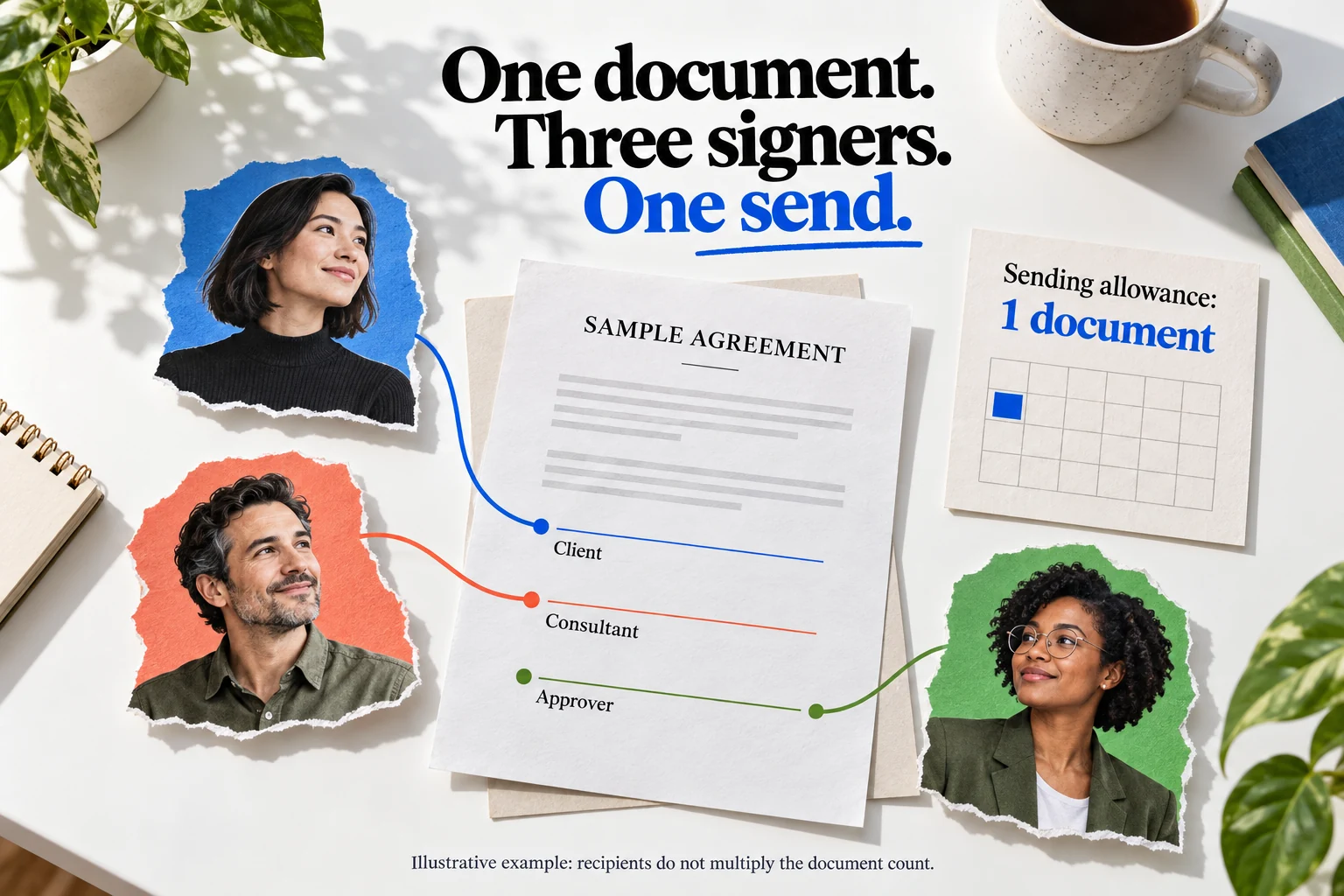
The unit is a sent document, not each signer. A shared agreement involving three people counts once; twenty separate customer agreements count twenty times. Uploading a draft or keeping a reusable template is different from sending it, and generating signing links also counts as sending. The illustration makes the distinction concrete. For a hypothetical consultant sending twelve client agreements monthly, the free allowance would not cover the regular workload, while twenty sends might. Add realistic room for separate replacement documents and busy months before choosing.

Capacity is not the only reason to upgrade. A sender may need the paid options for customized email, regular reminders or API access even at low volume. An agency may need shared team work and its own logo rather than simply more documents. Decide which of those capabilities removes a recurring inconvenience. There is little value in purchasing unlimited capacity to solve a branding issue if the actual sharing model does not fit the team. Equally, saving a small amount on a license can be false economy when staff repeatedly work around a missing function.

For an existing customer, inspect the plan shown in the account before changing it. The reference guide distinguishes legacy plans and says moving to a current plan is permanent. Compare the actual allowance and features, not an old article's recollection of the deal. Keep a record of what you are buying and why. A lifetime purchase is a license decision for a hosted product, not a guarantee that your business will never need another signing tool. The useful question is whether the confirmed plan serves the workload you can reasonably describe today.

Sources: Current BreezeDoc pricing and document counting; Current and legacy plan reference

One fictional agreement connects three illustrative signers to a monthly tally of one sent document
Original SoftScout illustration with fictional people and a sample agreement, not the BreezeDoc interface. One shared document can have several signers without multiplying its document count.

Prepare the document before asking software to collect signatures

BreezeDoc accepts common document and image formats, with a documented five-megabyte upload ceiling. That is a manageable boundary for many ordinary agreements but a potential issue for scanned bundles or image-heavy attachments. Test a representative file early. Do not wait until a client is watching to discover that the document needs compression, conversion or a different arrangement. If you reduce file size, inspect the result for readable text and intact pages; a smaller upload is not an improvement if important content becomes difficult to read.

Check the rendered pages before placing fields. Look at page breaks, tables, footnotes, dates and any content near the edges. A clean source file can still produce an awkward signing experience if the layout changes during preparation. Keep the approved source separately and give the signing copy a recognizable name. The recipient should not have to infer whether 'contract_final_v8_reallyfinal' is the version you intended. Include enough context to identify the engagement without putting unnecessary sensitive information into a filename or email subject.

Field ownership matters as much as field position. The editor assigns fields to a selected party, and required fields need to be configured intentionally. Walk through the pages as each intended signer: which information are they expected to enter, which signature belongs to them and which fields should remain someone else's responsibility? Avoid turning a blank line into an open invitation to change a commercial term that was already agreed. The software can collect an input; deciding who is authorized to provide that input is still part of your process.

Run a harmless two-party example before using a real agreement. Try it on a phone as well as a desktop and inspect the resulting PDF. Use deliberately obvious sample names and nonbinding test content so nobody confuses the exercise with a live commitment. The goal is to discover practical friction while it is inexpensive to correct: an overlooked required field, an unexpectedly small signing area or a page that is uncomfortable to read. Preparing the document well usually contributes more to a smooth signature than an elaborate follow-up sequence afterward.

Sources: Document preparation and supported uploads; Sending documents and sharing signing links

Signing order: the email queue is not a hard approval gate

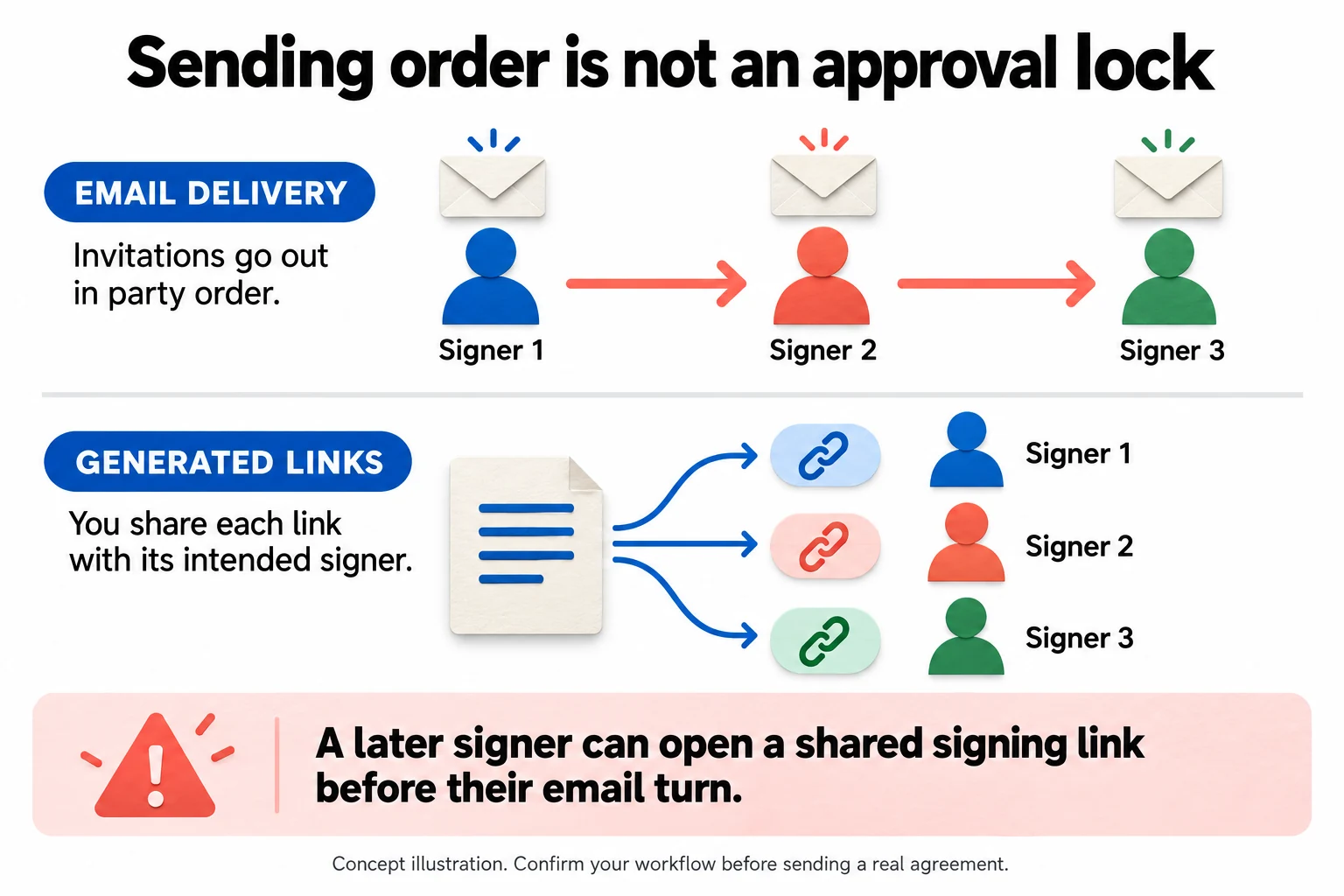
The documented email workflow sends the invitation to the first party and then moves to the next after signing. Generated links provide a different route: the sender receives individual signing links to distribute. This is a useful distinction for coordination, but it should not be mistaken for a fully enforced internal approval system. The guide explicitly says a later signer can open a manually shared signing link before their email turn. If your process depends on preventing that, verify an appropriate control rather than relying on the invitation sequence.

Consider a hypothetical consulting agreement that needs a client signature followed by an authorized company signer. The order may help avoid unnecessary messages to the second person before the first has finished. But an internal manager reviewing the terms is a different role from a party executing the agreement. Do not add a person as a signer simply because you want them to review something, and do not assume a CC recipient is an approver. Write down the required actions and authority before translating them into parties and delivery choices.

Decide the party arrangement before laying out a large document. The multi-party guide says the order follows how parties were added and is not rearranged by dragging them. Changing that structure can therefore involve more preparation than a user expects. A small rehearsal is particularly useful when the same agreement is used repeatedly. Confirm not only that everyone can sign, but that the right person sees the right fields and receives the correct final record. A successful first signature does not prove the whole sequence is complete.

Treat each signing link as intended for one specific person. When sending a link manually, verify both the identity of the recipient and the party associated with that link. Do not paste a collection of signer links into a group conversation for people to choose from. That may feel efficient for a moment, but it creates avoidable ambiguity around who is using which route. The diagram is a process explanation, not a screenshot or security certification. Its main lesson is simple: invitation timing and authorization are separate questions, and both deserve an answer.

Sources: Multi-party signing and delivery order; Sending documents and sharing signing links

Email invitations follow three signers in order while generated signing links branch to each intended signer
Conceptual workflow, not a screenshot. Invitation sequencing is different from enforcing an approval restriction; a manually shared link can reach a later signer before their email turn.

Templates save field placement, not the final preflight check

Reusable templates are attractive when the underlying agreement and signer roles are stable. BreezeDoc's template guide explains that a template creates a new document with the prepared fields and parties. That can remove repetitive setup, but it does not turn every new engagement into an identical transaction. Names, scope, commercial details and recipient choices still need attention. A template should preserve an approved starting point, not become an excuse to send yesterday's assumptions to today's customer with impressive speed.

Two documented details are especially practical: CC recipients and the template's expiration date do not carry into each new document. Set and review them at sending time. The guide also distinguishes creating a template from cloning an existing document; there is no simple conversion of an existing document into a saved template. Keep the original source file and a clear template naming convention so reusable material can be maintained deliberately. Otherwise, a team can end up with several almost-identical documents and no shared understanding of which one should be reused.

Give each production template an owner and a review date. When approved wording changes, update the reusable starting point and check which already-created drafts still contain the previous version. The documentation says template edits affect later documents, not existing ones. That is sensible separation, but it means changing the template is not a universal correction. Keep a small register of the agreements your business regularly uses and the circumstances in which each is appropriate. For consequential terms, get qualified review instead of treating a ready-made library document as tailored advice.

Before every send, perform a brief preflight: correct source version, correct parties, correct fields, correct recipients and correct deadline. Then check the CC list and any required protection. This need not become a long ceremony. A short, consistent review can prevent more trouble than a sophisticated automation built around an unverified template. The objective is to reduce repetitive preparation while preserving the human judgment that makes the document appropriate. Software should save you from dragging the same signature box fifty times, not save you from noticing who is about to receive it.

Sources: Reusable templates and what does not carry over; CC recipient visibility and attachments

Reminders and deadlines need to match the conversation

The paid reminder option runs about every three days, up to three reminders per signer, and the interval is not adjustable according to the notification guide. That can reduce routine chasing, but it is not a replacement for understanding why an agreement remains unsigned. Someone may have missed the message, need clarification or be waiting for an internal decision. Repeating the same request does not resolve all three situations. Use the activity information to choose an appropriate next step rather than escalating enthusiasm every time the calendar advances.

A short introductory message often helps more than a heavily decorated email. Explain what the document is, what the recipient needs to do and whom to contact with questions. Make sure the sender identity is recognizable. If a customer has raised a substantive concern, answer it before treating another reminder as progress. The useful role of automation is to handle ordinary forgetfulness. It should not become the colleague who keeps saying 'just circling back' while carefully avoiding the question that caused the delay.

Expiration has a separate technical detail: the guide says the selected date ends in UTC, not necessarily at the end of the recipient's local day. It defaults to ninety days, and all parties share one document deadline. For a time-sensitive request, communicate the actual intended cutoff clearly and test how it is displayed. Avoid promising that a customer has until local midnight if the configured link will close earlier. Also confirm what happens to partially signed work and how the team will handle an extension without creating competing versions.

The expiration warning and the recurring paid reminders are different mechanisms. The documentation describes conditions in which a warning is not sent, including a very short deadline or a later party who has not yet been invited. Do not use an expected reminder as the only safeguard for an important deadline. Assign a person to review outstanding documents and follow up when the context warrants it. A well-run signing process should be calm and predictable for the recipient, with the software doing the repetitive work and a human resolving the reasons it has not finished.

Sources: Reminder behavior and notification limits; Signing deadlines and UTC expiration

Passcodes and CC recipients change who receives the information

The passcode guide describes a separate code for each protected party, supplied by the sender rather than included automatically in the signing email. It is available in the manual email-send flow, but the guide says the generated-link settings and API sending path do not offer the same passcode setup. That is an important fit question for anyone planning to automate. A capability visible in one interface should not be assumed to exist in every integration path just because both ultimately produce a signing link.

For a sensitive document, decide how the intended person receives the code and how you will assist them if it is unavailable. Use an appropriate separate communication channel and avoid scattering codes through support requests or shared notes. Test the experience with controlled accounts first, including opening the document on a different device. A passcode is one access measure, not a complete identity-verification system or a guarantee that the recipient is authorized to execute the agreement. Match the required assurance to the actual transaction and seek specialist guidance when necessary.

CC behavior deserves its own review. The current guide says CC recipients receive a PDF when the document is first sent and another completed copy later. It also says the initial email exposes the CC addresses to one another. That may be suitable for an internal project group, but it is not an invisible filing mechanism. Do not add people to CC merely because they might be interested. Confirm that each should receive the document at that stage and that the shared recipient visibility is acceptable.

Keep the signer list, review list and record-keeping list conceptually separate. A person who needs to approve wording before release should not accidentally receive an unfinished agreement as a passive CC. A person who only needs the final record may not need the initial attachment. Build the simplest supported arrangement that matches those needs, and use a different controlled process where the product's behavior does not fit. The most important privacy setting is sometimes the decision not to send the document to someone who does not need it.

Sources: Signer passcodes and unsupported paths; CC recipient visibility and attachments

The activity log is useful evidence, not a universal legal guarantee

BreezeDoc records document activity and provides a downloadable log, with activity pages included in the completed PDF. The guide distinguishes sent, viewed and signed events and notes that email-open tracking stopped in late May 2026. That distinction helps avoid a common reporting mistake: a sent message is not proof of inbox delivery, and a view is not the same as agreement. Use each status for the event it actually describes. A sales process should not promote a document to completed merely because somebody looked at it.

Inspect the final artifact during your evaluation. Confirm the pages, fields, signer details and activity information, then store the completed copy where authorized people can retrieve it later. The documentation says exported activity PDFs partly hide IP addresses, while the account's metadata view can show more detail. Decide what records your organization needs and how they will be retained. We have not audited the evidentiary strength of the log, and an IP address by itself is not conclusive proof of a person's identity or authority.

For US readers, the federal electronic-signature statute generally prevents a record from losing legal effect solely because it is electronic. That is not a statement that every document, process or transaction is automatically valid. The statute preserves other requirements, addresses consent and retention, and has specific exceptions in a separate section. Important, unusual or regulated agreements deserve qualified legal review. This buying guide evaluates software workflow; it does not tell you that a particular agreement is enforceable or that a product feature satisfies every obligation attached to it.

Keep the completed document, its associated evidence and the approved source version organized by engagement. Give another authorized person a realistic retrieval task: find the agreement, identify its status and determine which version governs the work. If that requires logging into the original sender's personal account and searching several similar titles, the filing process needs attention. Low-cost signing is most useful when it also leaves a clear record. A smooth signature ceremony followed by months of uncertainty about where the signed copy went is only half a solution.

Sources: Document activity and downloadable audit log; US electronic-signature statute: general validity and retention; US electronic-signature statute: specific exceptions

Team roles are specific, and read-only still permits downloads

Agency introduces team collaboration, but the role names should be read literally through the permission table. An Editor can upload and prepare documents but cannot send them. A Sender can send, expire and delete documents but cannot upload a new one. A Viewer can inspect and download team documents. Those distinctions may support a useful preparation-and-release arrangement, but they are not interchangeable levels on a simple ladder. Choose roles according to the actions each colleague should perform, not according to how senior the label sounds.

Consider a small consulting practice where an assistant prepares approved material and a principal releases it. Test that the assistant can complete the preparation without obtaining broader control and that the principal can inspect the correct draft before sending. Then test what happens when the principal is absent. If everyone receives Owner access to avoid inconvenience, the intended separation has disappeared. Establish a practical backup arrangement while keeping responsibility clear. The workflow needs to survive an ordinary vacation, not only the demonstration performed by its creator.

Read-only access is still meaningful access when downloads are allowed. A Viewer who does not need to edit may still receive the underlying documents, so restrict membership to people with a genuine reason to see them. Check how personal and team materials are separated and where templates are created. The current guide describes four fixed roles and a ten-member limit per team, including pending invitations. Confirm the exact membership and account arrangement before assuming the plan will accommodate a larger or more finely segmented organization.

Offboarding should be rehearsed with a test member. Identify who owns shared material, who can maintain the team and how work continues after a person leaves. Keep access review tied to real responsibilities and client confidentiality requirements. A team plan saves money only if it supports a controlled process; sharing one person's credentials is not an equivalent collaboration model. The useful question is whether the documented roles let your colleagues do their jobs with understandable boundaries. A low license cost does not compensate for uncertainty about who can release or retrieve an agreement.

Sources: Owner, Sender, Editor and Viewer permissions; Current and legacy plan reference

API access is not the same as unlimited automated sending

The API guide documents personal access tokens and OAuth, with several distinct throttles: sixty requests per minute, one hundred document creations per day and twenty document sends per hour. It also says there are no webhooks and describes polling recipient status instead. These limits matter even when a plan advertises unlimited monthly documents. Monthly entitlement and short-term processing rate answer different questions. A workflow that works for a handful of supervised agreements may need a queue and reconciliation before it can handle a larger batch reliably.

Suppose a hypothetical business wants to send sixty onboarding agreements at once. The documented send throttle means the integration cannot treat that as one unrestricted burst. It must schedule work within the actual limits and make delayed or failed items visible. Do not solve a rate-limit response by repeatedly retrying every request immediately. Respect the server's retry information and separate validation failures from temporary problems. Keep enough status to determine whether a document already exists or has already been sent before attempting an uncertain operation again.

Polling also changes the design. Choose a sensible interval, record the last known state and make downstream actions occur only once for the intended verified transition. Do not equate a single party signing with completion of the whole document. If the next action creates a customer obligation or starts delivery, include a review boundary where appropriate. The API documentation is a starting point, not proof that a finished integration is correct. We have not tested its reliability under load or confirmed every behavior required for a production connector.

Keep credentials on the server and plan for their documented expiry or revocation. Confirm that the API supports any protection the manual workflow relies on, especially the passcode limitation discussed earlier. Include maintenance time in the buying decision. A custom connector can cost much more than the license even when the API itself is included. Automation is worthwhile when it removes a repeated, well-understood step and leaves a clear record of what happened. It is less worthwhile when it merely turns an occasional two-minute task into a permanent integration project.

Sources: API authentication, throttles and status polling; Signer passcodes and unsupported paths

What BreezeDoc can simplify, and what it should not be asked to replace

For a solo designer who sends a small number of approved service agreements, the useful improvement may be narrow: reuse field placement, send a recognizable request and retain the completed PDF. That is enough to justify evaluating the product. There is no need to pretend every small business needs a comprehensive contract operations department. If the current process is printing, scanning and manually checking which signatures are missing, a focused signing tool can remove friction without reorganizing the entire business around a new platform.

A larger team may be solving a different problem. Negotiation, clause approval, version comparison, identity requirements, procurement controls and retention policies can matter more than simply collecting a signature. This review does not establish that BreezeDoc supplies all of those capabilities. Write down the non-negotiable requirements and confirm them directly instead of assuming they are included under a general document-management label. An inexpensive product can be excellent at its intended job while remaining unsuitable for a particular organization's process.

Invoicing is also documented, with payment connections, but it should be evaluated separately from the signature journey. Decide whether combining those tasks actually improves your operation or merely duplicates an existing billing system. A signed agreement, an issued invoice and a settled payment are three different states. Keep the relationship between them explicit and reconcile with the records your business already trusts. Do not move a critical billing process solely because another feature happens to appear in the same navigation menu. A useful extra remains optional until it proves its value.

Compare the full cost of change, not just subscription prices. A team already using a reliable signing workflow should account for template rebuilding, training, record migration and customer familiarity. A new solo business has less migration cost and may value the free testing allowance more highly. These are different buying situations, and the recommendation should reflect that. Choose BreezeDoc when its focused workflow fits comfortably. Choose a more specialized or already-established process when the missing assurance or administrative control would require fragile workarounds around an otherwise appealing price.

Sources: Getting started and included workflows; Reusable templates and what does not carry over; Current and legacy plan reference

A practical buying test and our final recommendation

Prepare one harmless sample that resembles your normal agreement in length and layout, plus two or three controlled recipient identities. Do not use real customer commitments for an initial experiment. Upload the file, inspect every page and assign the fields deliberately. Send through the route you actually plan to use, then complete the recipient experience on a phone and a desktop. Record where people hesitate and whether the final PDF matches the intended document. This establishes more than a feature comparison because it tests the whole chain you would depend on.

Add a small number of exception tests: an omitted required field, a recipient who needs a corrected address, an optional CC and a deliberately short test deadline. Check the passcode flow if it is part of your requirement. Inspect what each participant receives and which information appears in the activity log. For a team, perform the preparation and release through the intended roles. For an integration, validate the limits and completion handling separately. These are suggested tests, not a claim that SoftScout has performed them in a live BreezeDoc account.

Buy when that representative journey works, the plan fits the volume and the required legal or organizational review is satisfied. The free option may be sufficient for a genuinely small workload; a paid option can make sense for the specific additional controls or capacity it documents. Skip the purchase when a critical requirement remains unconfirmed or when the price is doing all the persuasive work. The difference between a cheap tool and a good-value tool is whether it removes a problem without introducing a more consequential one.

Our overall view is cautiously favorable for supervised small-business signing. BreezeDoc's attraction is a modest, useful service at a low entry cost, not a claim to replace every part of agreement management. Its documentation gives buyers enough specific behavior to ask sensible questions, including several that ordinary promotional reviews overlook. Keep approved content, recipient judgment and durable records at the center of the workflow. When those are handled well, collecting the signature can become pleasantly uneventful, which is exactly what most people wanted before the printer became involved.

Sources: Document preparation and supported uploads; Multi-party signing and delivery order; Document activity and downloadable audit log; Current BreezeDoc pricing and document counting

Frequently asked questions

Does a document with three signers use three credits?

The current pricing explains that the document counts once, regardless of signer count. Separate documents sent to different customers are separate sends, even when all were created from the same reusable template.

Is email signing order an enforced approval workflow?

Do not assume it is. Invitations normally follow party order, but the documentation says a later signer can open a manually shared signing link before their email turn. Confirm the controls required by your process.

Can I add passcodes when sending through the API?

The passcode guide currently says the API sending path has no passcode option. If that protection is a requirement, confirm a supported workflow before integrating rather than assuming the manual interface and API have identical features.

Will a template retain every sending setting?

No. The guide specifically says CC recipients and the expiration date do not carry into each new document. Check those settings, the actual recipients and any passcodes as part of every send.

Does an electronic signature make every document legally valid?

No software feature establishes that for every transaction. US electronic-signature law includes conditions and exceptions, and other requirements can still apply. Use a qualified professional for important or unusual agreements rather than relying on a product's marketing claim.

More business operations deals

Business Operations

OkaySend

OkaySend helps businesses streamline client document collection, eliminating manual follow-ups and scattered emails. It provides secure, no-login client portals for structured intakes, automated reminders, and response tracking. This tool is designed for operations teams and service businesses that need to onboard clients faster and centralize file gathering, reducing administrative overhead and project delays.

$59 · checked Jul 6, 2026

Developer Tools

Context.dev

Context.dev combines web scraping, search, structured extraction and brand profiles behind one API. It makes sense for developers building research assistants, knowledge imports or company-aware onboarding. The catch is familiar: clean output is not automatically correct output. This review explains where the service can save engineering work, which limits matter, and how to evaluate it before committing to a subscription.

Extra 25% off · checked Oct 24, 2026

Marketing & SEO

Inrō

A strong candidate for businesses already receiving relevant Instagram conversations. Start with a narrow, supervised flow and verify the plan's limits. It can improve response handling, but it does not create an audience or make every stored contact reachable.

$59 · checked Nov 14, 2026

Sales & CRM

Dale

Sales and marketing teams often struggle to deliver personalized product experiences at scale. Dale addresses this by providing a no-code platform to build interactive, self-serve demos. It helps identify prospect intent, streamlining lead qualification and enabling sales reps to focus on ready-to-buy leads, optimizing the sales cycle.

$69 · checked Jul 13, 2026

Deal alerts

Get business operations deal alerts by email.

SoftScout will send short buying notes when offers like BreezeDoc look worth checking or worth skipping.

Short buyer verdicts

Useful offers before checkout

Editorial note

Start with a harmless test agreement and inspect the completed PDF before moving real work. Choose a plan for the features and capacity you need, not merely because the one-time price is low. Strict approval, identity or compliance requirements need separate confirmation.

For vendors

Have a better deal for BreezeDoc?

Send current partner terms, coupon limits, refund rules, and the best buyer fit. We review offers before adding them to SoftScout pages or Telegram alerts.

Submit terms