Back to deals
Design & CreativeArchived deal

Phygital+ deal archive

A promising creative workspace for people who need repeatable visual workflows, not just another prompt box. The archived offer is not available to buy here. Confirm the exact plan, credit treatment and content terms before relying on it for commercial production. This page is kept as a historical SoftScout archive entry, so readers can compare past terms, category positioning, and buyer-fit notes.

Product overview

What Phygital+ does

Phygital+ can be useful when a creative job involves several related steps: starting from a reference, exploring alternatives, correcting selected details and preparing a final asset. The canvas is valuable when it preserves those relationships and makes them easier to repeat.

This review is based on primary product pages and documentation checked October 24, 2026. It is not a hands-on image-quality benchmark. The illustrated workflows are our proposed evaluation methods, not screenshots or outputs attributed to Phygital+.

Read the full Phygital+ review

Best for

  • Designers exploring several treatments of an approved visual brief
  • Small creative teams building reusable image-to-deliverable workflows
  • Ecommerce teams willing to verify product details and commercial permissions before publication

Why we picked it

  • Connected nodes can keep intermediate creative work together
  • Templates provide starting structures for repeatable production tasks
  • A selective workflow can reserve costly motion generation for approved still images

Check before buying

  • This offer is archived and may no longer be available at the original price.
  • Use this page as historical research for design & creative buying context.
  • Check the vendor's current pricing, limits, and refund terms before making any purchase.

Archived offer

This page preserves the deal context for research and SEO, but the original discount may be closed.

Use it for

Compare historical design & creative pricing, positioning, and buyer fit before choosing a current tool.

Next step

Browse active SoftScout deals or check the vendor's current terms before spending money.

This archive page stays live for research. Use active SoftScout listings when you are ready to buy.

Check Source History

Source transparency

Source
Source marketplace
Link type
Source page
Last checked
Oct 24, 2026

Buyer checklist

  • Treat this as a historical deal page, not a live checkout recommendation.
  • Use the notes to compare the old offer against the vendor's current pricing.
  • If the original source still opens, verify all terms before buying.

Phygital+: the buying decision

Phygital+ puts connected creative steps on a shared visual canvas, making it possible to develop an idea through variations, selective editing and motion without treating every generation as an unrelated file. Its value depends on building a repeatable production path that preserves the brief, controls spending and produces approved assets.

Research-based review, not a hands-on test. Sources checked on 2026-10-24. The assessment below is our editorial judgment, not a customer rating. Editorial assessment: 76/100.

Consider it if

  • A trial on non-confidential material produces accepted assets through a workflow you can reproduce and hand to another person.
  • The vendor confirms the exact account cohort, model access, credit renewal and commercial conditions you need.
  • Your cost per approved deliverable improves after counting retries, human correction and final quality review.

Skip it if

  • You require confidential client production before the content-use and data-processing arrangements have been resolved.
  • You expect the archived lifetime price to purchase every newly advertised model without confirming entitlement.
  • Your work needs one simple generation occasionally and a connected canvas adds more administration than it removes.
Problem fit: 18/20
Connected visual production addresses a real need for designers who otherwise move references and intermediate results between several unrelated tools.
Capabilities: 18/20
Image generation, selective editing, templates, training and motion provide broad creative scope, subject to the exact model and plan available.
Workflow fit: 16/20
The canvas can support reusable production paths, but quality approval, version discipline and spending checks remain important human responsibilities.
Evidence confidence: 10/20
Public documentation offers useful detail but mixes older and newer systems, while content-use terms and entitlement conflicts require clarification.
Value: 14/20
The purchase can make sense for repeated accepted deliverables, but credit consumption, review labor and rights constraints prevent a universal savings claim.

A useful creative workspace needs more than a long model menu

Phygital+ is most interesting as a place to organize connected creative work. Imagine a designer starting with an approved reference, exploring several directions, correcting one small area and preparing a moving version of the best result. The point is not merely that several AI tools are available. It is that the relationship between those steps can remain visible instead of disappearing into a downloads folder with sixteen files named final.

That distinction shapes our recommendation. A visual canvas can help someone who repeats multi-step jobs and wants to understand how a result was produced. It may be unnecessary for someone who occasionally needs one image from one familiar model. More available buttons do not automatically create more usable work; sometimes they create a very well-equipped place to postpone choosing a direction.

Our assessment is positive about the workflow concept, but conditional about a purchase. The public material mixes generations of pricing and documentation, and commercial users need to read the content terms carefully. Those are not small details for an agency promising a client a certain output, budget and handling process. A beautiful experiment and an acceptable production system are different achievements.

This review uses current public product material and older documentation where clearly identified, checked on October 24, 2026. We have not run a paid Phygital+ account or compared its output quality against a controlled set of alternatives. The examples below are proposed buyer tests and our own editorial analysis. They are meant to help you make a practical decision without pretending that a feature list is a firsthand laboratory result.

Sources: Current Phygital+ positioning and free-plan commercial-use restriction; Node canvas, variations and starting workflows

The archived lifetime offer is history, not a current checkout

The historical listing checked for this review is sold out. Its entry license was $69 with 4,000 monthly credits and thirteen projects. Higher displayed tiers listed 8,000 credits and fifteen projects, 15,000 and seventeen, or 30,000 split into two 15,000 allocations with thirty projects. A dated founder update places Genie access in tiers three through five, not the entry tier.

Those details describe the source offer, not a promise that a new visitor can purchase it today. We keep this SoftScout page in the archive because the product can still deserve research and existing owners may need context. The old price should not be used as a headline comparison against a current subscription without explaining that the buying opportunity has changed.

If you already own a license, start from your receipt and the entitlement shown in your account. Ask support to identify the exact cohort and what happens when a newer model or charging system appears. A lifetime label is not a substitute for the scope of the purchased plan. The relevant question is which capabilities remain available under your agreement, not how many capabilities are now visible elsewhere on the website.

Keep a short record of the answer with the original purchase information. This is particularly useful when different people handle buying and creative work: the person designing a campaign should not discover the license boundary halfway through production. For a new buyer, compare the current direct offer on its own merits. For an existing owner, evaluate whether the account still solves a useful job before paying for an upgrade merely because a new panel has appeared.

Sources: Historical license tiers, sold-out status and dated founder updates

Current pricing needs a plan-by-plan reading

The direct page displays monthly Starter at $14.99 with 10,000 credits and twenty projects, Pro at $58.99 with 45,000 and thirty, and Teams at $119.99 with 90,000 and seventy. Annual equivalents and older Advanced, Premium and Plus material also remain on the page. That mixture makes checkout and written entitlement confirmation more reliable than combining attractive figures from different tables.

There is also a migration inconsistency: the credit-system explanation still says lifetime-offer users remain on the older system, while the historical offer itself now presents credit allowances. We would not silently resolve that contradiction in the vendor's favor or against it. Ask which rule applies to your actual account, whether changing plans changes grandfathered rights and whether a change can be reversed.

The free tier is useful for learning the environment, but the homepage excludes commercial use. Its displayed image-equivalent examples also differ between pages. Treat illustrative generation counts as examples rather than a guaranteed number of finished assets. A tool's advertised capacity is not a production quota if the work needs several attempts and a later editing stage.

Build your comparison around one realistic month of work. Specify the number of projects, people involved, types of assets and the models you truly need. Include any additional tools that would remain necessary for final layout, editing or approval. This avoids the common mistake of comparing a complete current workflow with only the cheapest entry price of a proposed replacement. A lower subscription can still produce a more expensive working day if the missing steps have to be reconstructed manually.

Sources: Direct pricing with current credit plans and legacy plan material; Credit system, legacy migration, model exception and renewal rules; Current Phygital+ positioning and free-plan commercial-use restriction

Credits should be budgeted around accepted work

The credit guide says launch costs are displayed and change with settings. Subscription credits expire after a month without rollover; on-demand credits have a three-month validity, and failed or cancelled generations are credited back under the stated policy. It also reserves Midjourney for Teams and Enterprise. Verify these rules for your cohort rather than interpreting general all-model messaging as an exception-free promise.

The useful calculation is broader than cost per click. Track the credits spent on drafts, corrections, upscale stages and discarded directions, then divide by the deliverables that actually pass your brief. A technically successful generation may still be commercially unusable. It can contain the wrong product shape, an awkward composition or a visual claim that the campaign cannot make. Those rejected outputs belong in the cost of the job.

Add human time as a separate line. Someone must write the brief, inspect results, make selections and prepare files for the intended channel. If the software creates ten options quickly but a designer spends an hour explaining why nine cannot be used, generation speed has not settled the business case. Count the review work honestly rather than hiding it inside a vague promise of creative acceleration.

Set a small spending ceiling for the pilot and stop when it is reached. Our suggested rule is to reconsider the brief or route after several unproductive attempts instead of repeatedly requesting the same uncertain result. A credit balance is a limit, not a creative strategy. The strongest workflow makes it easy to see where resources went and why the final choice was good enough to publish.

Sources: Credit system, legacy migration, model exception and renewal rules

Connected nodes are valuable when they explain the result

The quick-start documentation describes a node-based workspace with tools for generating, transforming and enhancing images, plus variations and ready-made workflows. Think of the canvas as a visible chain of decisions. A reference feeds one operation, its result feeds another, and an alternative can branch off without losing the starting point. That can be more useful than treating each prompt as an isolated conversation.

During a trial, create one deliberately small chain. Start with an approved reference, produce two distinct treatments, select one and make a single controlled correction. Then return the following day and try to explain the chain to someone else. If neither of you can identify the original input or the version that was approved, the problem is no longer model quality. The workspace needs clearer organization before it becomes a team process.

Use names that describe intent rather than excitement. A branch called dark-background-test explains more than awesome-version-three. Keep the approved reference separate from generated alternatives and record which settings mattered. These are workflow recommendations, not claims that Phygital+ supplies a particular version-control or approval feature. The goal is to make the creative process legible even when the original author is away.

A canvas should reduce repeated thinking, not preserve every abandoned thought forever. Once a job is complete, retain the useful path and the evidence needed to reproduce or understand it. A sprawling diagram with dozens of disconnected experiments may look productive while being hard to maintain. Evaluate whether the interface helps you move from exploration to a clean, reusable sequence, because that transition is where recurring value is most likely to appear.

Sources: Node canvas, variations and starting workflows

For ecommerce, the product must survive the creative treatment

Phygital+ promotes ecommerce workflows involving references, product imagery and new backgrounds. That is a plausible use case because a single item often needs several visual contexts. The important buying test is not whether the scene looks attractive in isolation. It is whether the item remains an accurate representation of what a customer will receive after paying for it.

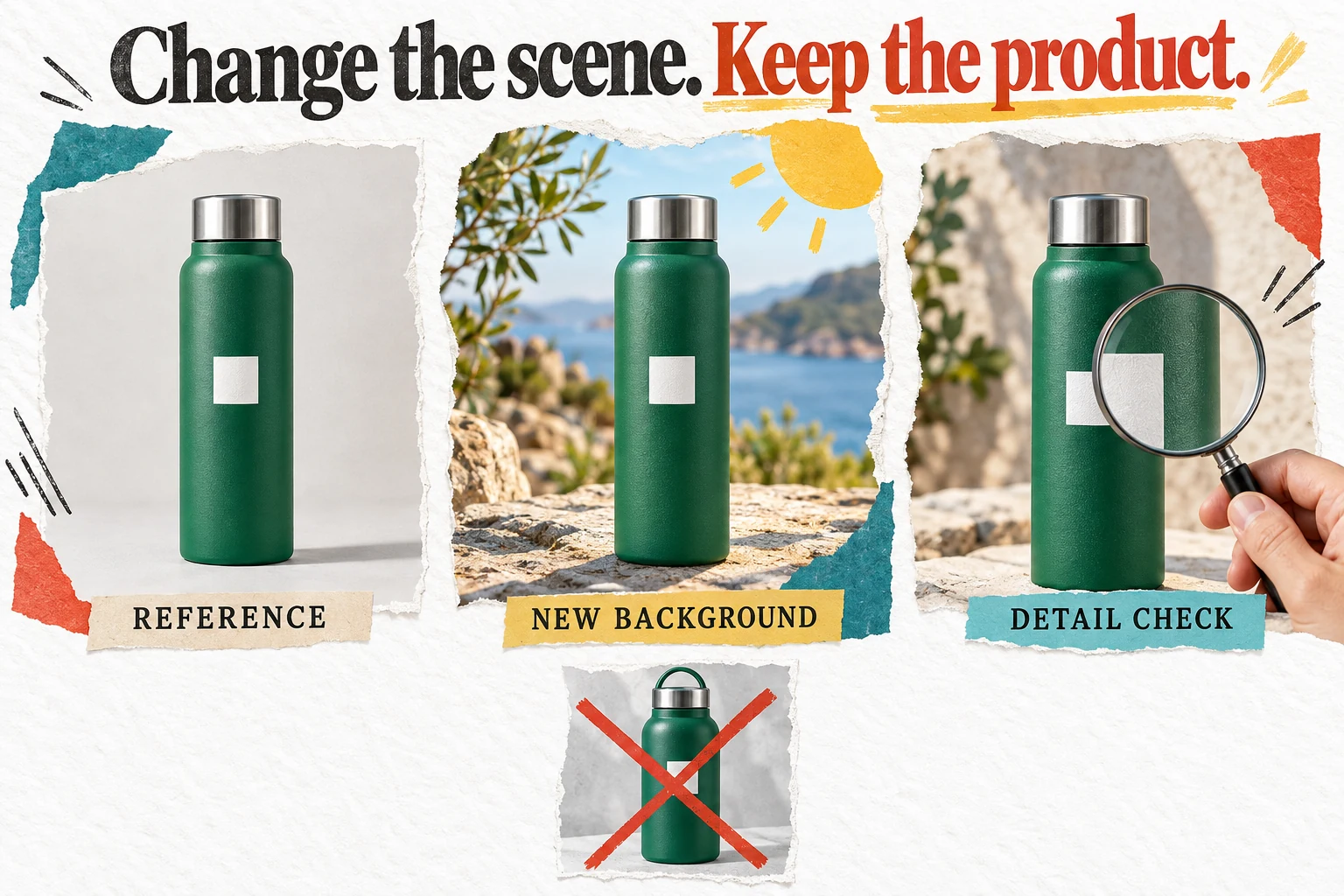
Use a real approved reference with details that are easy to inspect: label placement, cap shape, stitching, material, openings or a distinctive edge. Compare those details at useful viewing size after every major transformation. A model may produce an appealing object that is subtly different from the inventory. The difference can be small enough to escape a casual glance and large enough to mislead a buyer.

Our bottle illustration shows the principle rather than a Phygital+ result. The background changes while the product remains the anchor, and a visibly altered alternative is rejected. In an actual job, also check shadows, reflections and scale. A tiny item presented like a floor-standing appliance is not merely a bold art direction; it changes what the viewer may reasonably infer from the picture.

Separate exploratory imagery from factual product presentation. A stylized mood-board image can help a team choose a campaign direction, while the final product page may need stricter fidelity and conventional photography. Do not promote a concept automatically because it performed well in an internal creative review. The best result is an image that is both persuasive and accurate, not one that requires a customer-service explanation after the order arrives.

For a pilot, write a rejection list before generating anything. Include features that must not change and claims the picture must not imply. This makes evaluation less vulnerable to enthusiasm for a dramatic scene. It also gives the designer a clear stopping point: an image that violates the product brief is rejected even if everyone agrees it would make an excellent poster for a different product.

Sources: Product imagery and ecommerce use cases

Three views of the same green bottle compare an original reference a new background and a magnified detail check
Conceptual product-review workflow, not Phygital+ output: change the setting without silently changing the item being sold.

Templates are starting structures, not finished creative decisions

The template gallery covers several creative categories, including product treatments, reference-led imagery and motion-oriented workflows. A template can reduce the blank-canvas problem by showing a plausible sequence of operations. It does not establish that the sequence uses the best model, settings or rights assumptions for your particular brief. Treat it as a starting hypothesis that needs to earn its place.

Choose a template because its inputs and intended output resemble your job, not because its example is the most impressive image on the page. A dramatic showcase may depend on carefully selected references and many discarded attempts. Your ordinary production brief may be less glamorous and much more representative of the work the team actually needs to complete every week.

Before adapting a workflow, identify what each step contributes. Remove or replace stages that do not improve the accepted result. This is especially important when a template contains several generative operations: an extra stage can consume resources and introduce a new chance of changing something that was already correct. A shorter route that preserves the brief can be better than a visually elaborate route that is difficult to control.

Save a team-specific version only after it has produced repeatable value on more than one example. Document the type of input it expects and the conditions where it fails. That turns a borrowed starting point into a practical production aid. Otherwise the team may accumulate a gallery of promising workflows that nobody trusts enough to use when a client asks for an urgent revision on Friday afternoon.

Sources: Template gallery and creative-workflow categories

Selective editing should change only what needs changing

Older inpainting documentation describes editing a masked part of an image and expanding an image through a related workflow. It also includes a trained-model compatibility limitation. Because that documentation refers to an earlier tool generation, do not assume the same restriction or controls apply to every current model. Confirm the exact route you intend to use rather than merging instructions from different eras.

The practical principle remains valuable: isolate the correction. If the background needs adjustment, avoid restarting the entire product image unless there is a good reason. Every broad regeneration creates another opportunity to alter a detail that had already passed review. A controlled edit is useful when it preserves the accepted parts and makes the remaining change easier to inspect.

Prepare a before-and-after comparison at the same scale. Look at the boundary of the edited area as well as its center, because edges, lighting transitions and repeated textures can reveal an awkward repair. For commercial artwork, inspect nearby labels or other factual details even when they were outside the intended change. The brief describes what should remain invariant; the result still needs to demonstrate that it did.

Do not confuse a plausible edit with a documented event. An altered room, person or product scene should not be presented as evidence of something that actually happened. Within an ordinary design task, keep the source and edit history with the final file so the team understands what was changed. This is a production discipline, not an assertion about automatic provenance features in Phygital+. It helps keep creative flexibility from becoming accidental ambiguity in the published material.

Sources: Legacy inpainting documentation and model-compatibility caveat; Older FAQ covering project saving, masks and trained models

Training a style is not the same as guaranteeing consistency

The training documentation describes learning a subject or style from uploaded examples, with input preparation and model-specific settings. It is older material and names plan levels that may not match today's offer. We would use it to understand the concept, then confirm current access and compatibility in the account before buying a plan primarily for custom training.

A useful training dataset should represent the subject clearly and have permissions that cover the intended use. Repetition alone is not enough. If the references all show one angle or contain inconsistent labels, the resulting workflow may not support the variations your campaign needs. Write down what consistency means for the job: shape, palette, character identity, texture, composition or some combination of those properties.

Test the result on prompts that were not simply copies of the training examples. The aim is to find whether the learned concept remains useful under a new pose, background or layout requirement. Also inspect where it breaks. A style that works for a square concept image may become difficult when the final design needs an empty area for copy or a much wider composition.

Count training and evaluation in the total project cost. It can be worthwhile for a recurring subject, but less sensible for a one-off asset that conventional editing could finish quickly. Our accepted-work illustration is deliberately about selection: the valuable output is the smaller set that satisfies the brief. Producing many related images is interesting; producing a dependable family of usable assets is the commercial objective. The distinction should be visible in your trial results before a team standardizes on the workflow.

Sources: DreamBooth training instructions and input preparation; Older FAQ covering project saving, masks and trained models

A creative reviews many draft pictures on a light table and selects a smaller group of accepted deliverables
Count the work that survives review. The illustration does not represent measured acceptance rates or credit consumption.

Genie can organize a route, but someone must approve the journey

The August 19 product update describes Genie Flow Auto constructing and running a pipeline, with a manual alternative. That is an important behavioral detail for a credit-based creative system. A helpful assistant that assembles steps is different from an assistant that immediately spends resources executing them. Check the active mode before using an unfamiliar workflow.

Our recommended approach is to inspect the proposed route on a small non-confidential example. Ask what the input is, what each stage changes and where a human should approve a result before the next operation runs. If a route includes an expensive or unpredictable stage, make that boundary explicit in your working process. Do not rely on a friendly conversational description to reveal every consequential action.

A natural-language request can be underspecified in ways that matter. Make this more premium might mean lighting, typography, materials or a complete redesign. The assistant's interpretation could be visually coherent while contradicting the product brief. Give it a concrete target and protected details, then evaluate the actual steps rather than assuming that a polished explanation means the intent was understood.

Automation becomes useful after a process is understood well enough to repeat. For an unfamiliar job, a slightly slower manual route can teach the team where the important decisions sit. Once those decisions are stable, automation may remove routine handling without removing accountability. The sensible buying question is whether Genie helps create a clearer, more controllable workflow, not whether it can make the canvas look busy while the person responsible for the budget is making coffee.

Sources: Dated changes including Genie auto-run and expired-subscription downloads

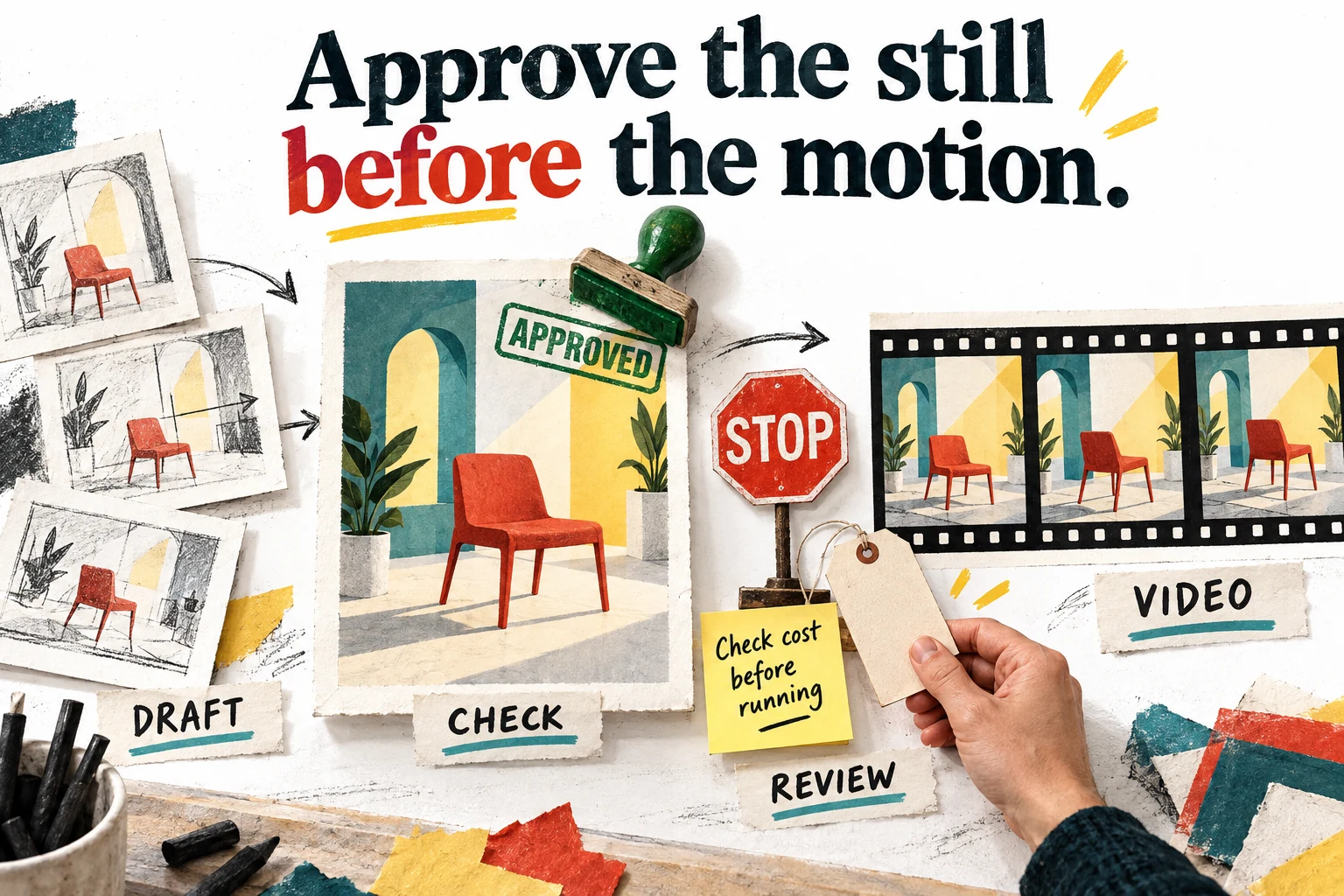
Approve the still image before paying for motion

Phygital+ positions video alongside image work, and recent updates include frame-extraction and batch-oriented tools. That makes a connected still-to-motion process worth evaluating. It does not mean that a good first frame guarantees a usable clip. Motion introduces another set of questions about continuity, movement, timing and whether the subject remains recognizable throughout the sequence.

Our suggested workflow is to settle the composition first. Approve the subject, background, factual details and intended framing as a still, then review the next stage's cost before running motion. This is not a promise that every model preserves an input perfectly. It is a way to avoid spending on a moving version of an image that the client would have rejected immediately anyway.

Inspect the complete clip, not just the thumbnail. Look for disappearing details, changing geometry, awkward transitions and movement that distracts from the message. For a product sequence, compare the item at the beginning, middle and end. For a short social asset, also view it at phone size and without sound. A technically impressive clip may still fail to communicate the intended idea in its actual placement.

Keep expectations modest for the initial evaluation. Choose one short, clearly defined motion brief and record how many attempts and corrections are needed before approval. Compare that with the existing production method. The illustration shows a deliberate pause between the approved still and the video stage because that pause can protect both the budget and the creative direction. It is a proposed discipline, not a measured claim about Phygital+'s output quality or rendering performance.

Sources: Dated changes including Genie auto-run and expired-subscription downloads; Current Phygital+ positioning and free-plan commercial-use restriction

Storyboard drafts lead to an approved red chair image followed by a spending check and a sequence of video frames
Our suggested approval sequence: settle the still image and check the next stage's cost before commissioning motion.

A shared canvas needs a clear handoff, not just shared access

The agency material emphasizes collaborative creative work and shared projects. That can help when several people contribute to one visual brief, but collaboration is more than being able to open the same workspace. A designer, account manager and final approver need to understand which version is current, what remains unresolved and who may authorize the next change.

During a pilot, hand the project to someone who did not build it. Ask them to locate the approved reference, identify the selected direction and export the intended final asset. Watch where explanation is required. Those moments reveal the documentation and naming conventions the team will need. A workflow that only its creator understands is a personal tool, even if the subscription contains several seats.

Separate experimentation from approved work. Keep exploratory branches clearly labeled and avoid presenting them to a client as equally final choices. Too many unfiltered variations can move the burden of creative judgment to the person who hired you to provide it. A useful presentation explains why a few options solve the brief differently rather than showing every output that happened to finish rendering.

Before committing a team, confirm practical account details such as project limits, seat scope, access removal and whether client handoff requires another paid account. We did not verify those behaviors in a live organization. Treat them as purchase questions, not assumed features. The objective is a workflow that remains understandable when responsibilities change, rather than a collection of impressive assets attached to a single person's login and memory.

Sources: Shared creative workflows and agency positioning

Commercial permission and exclusive ownership are different questions

The terms make users responsible for rights to their inputs. Section 5.5 grants the service a broad, enduring license to use generated content in connection with improving the service, including allowing third-party use for that purpose. It also disclaims assurances of non-infringement, uniqueness or copyrightability. These are material buying conditions; a general paid-plan commercial-use statement does not resolve them.

For routine public-facing experimentation, those conditions may fit the buyer's intended use. For confidential client concepts or work promised to be exclusive, the questions are more demanding. Do not upload first and ask the account manager to interpret the arrangement later. Get the relevant written clarification before bringing protected material into the process, and obtain professional advice where the contract or rights exposure warrants it.

Keep a record of the permissions attached to each reference. Owning a copy of a photograph is not the same as having permission to use it in every generative workflow. A client may also impose restrictions that are narrower than what the software provider permits. Your internal checklist should distinguish the source asset, the processing step and the intended final publication rather than treating them as one vague creative-use category.

Avoid promising that a generated image is legally exclusive simply because it looks original. Our recommendation is operational, not a legal conclusion about any individual output: align the tool's terms, the input permissions and the client's requirements before production. A bargain on software is not a bargain if it forces you to revise a commercial promise after delivery. The right plan is the one whose conditions fit the work, not merely the one with the most generous-looking creative allowance.

Sources: Terms including input responsibilities and generated-content license; Current Phygital+ positioning and free-plan commercial-use restriction

Private-looking work still needs a data-handling review

The privacy notice includes prompts, images and account-related information among the data collected. Its broad reassurance about access to history should not be read as a detailed guarantee of zero retention or no downstream processing. We did not establish the complete provider chain, retention schedule or an account-specific confidentiality arrangement from the public material reviewed.

For client-sensitive work, ask concrete questions about what is sent to each model provider, how long inputs and outputs remain available, who can access them and how deletion requests are handled. Ask whether an organizational agreement changes the standard terms and whether that arrangement covers the exact models your team will use. A generic answer about security may not answer the actual data-flow question.

Keep the initial trial deliberately low-risk. Use public or purpose-created references that you are authorized to process and avoid personal information that is unnecessary to evaluate the workflow. You can learn a great deal about composition, organization and credit consumption without uploading an unreleased campaign or a client's private portrait collection. This reduces the chance that a quick experiment becomes an unplanned data-handling decision.

Also decide what stays outside the platform. The approved brief, permissions, final exports and relevant client decisions should remain accessible in your own working system. That is not a criticism unique to Phygital+; it is a practical boundary for any hosted creative service. The platform can support production without becoming the sole repository for every piece of information needed to explain and deliver the job.

Sources: Privacy disclosure for prompts, images and account information; Terms including input responsibilities and generated-content license

Exported assets and reusable projects need separate backup plans

A July 23 update says generated assets can be downloaded after a subscription expires. That is helpful, but it is not a guarantee that every project, trained model or intermediate state remains recoverable forever. Older help material also stresses saving projects. Verify the current behavior in your account and keep an independent copy of anything the business needs to retain.

Think about two different recovery goals. One is delivering the finished image or clip again. The other is understanding or reconstructing how it was made. A final export may satisfy the first while doing little for the second. Retain the original reference, the approved brief, relevant prompts and settings, selected intermediates and a note identifying the final version when the job justifies that level of traceability.

Test the handoff package on a different machine or with another person. Check dimensions, file format, naming and whether the asset opens in the next tool used by the team. A file that downloads successfully is not necessarily ready for print, a product page or a video timeline. The requirements of the destination should be part of the brief before production begins.

Do not wait until cancellation or a deadline to discover which parts of the workflow are portable. Export a completed sample during the trial and ask support about any project or model components you cannot preserve. The aim is not to demand that every hosted feature becomes an offline application. It is to know what depends on continued service access and make that dependency an informed business choice rather than a surprise.

Sources: Dated changes including Genie auto-run and expired-subscription downloads; Older FAQ covering project saving, masks and trained models

Measure the bottleneck you are actually trying to remove

A creative team can lose time in many places: preparing references, exploring directions, making revisions, finding old files or waiting for approval. Phygital+ is only a good investment if it improves a bottleneck that matters in your workflow. A faster generation stage may have little business impact when the real delay is an unclear brief or a client who has not selected a direction.

Choose a baseline task that represents ordinary work rather than a showcase. Record how long the current method takes, what tools are involved and how many assets are accepted. Then run a comparable brief through the proposed workflow and count the same things. Keep differences in quality and scope visible. A smaller or less demanding deliverable is not a fair demonstration of lower production cost.

Include revisions in the comparison. Ask for one realistic change after the first approval and see whether the workflow preserves the parts that should remain fixed. Many tools are impressive at producing a first draft; fewer workflows remain economical when the client wants the same idea with a slightly different crop, product treatment or message. Repeatability under revision is often where professional value becomes clear.

Avoid attributing sales improvements to the tool from a single attractive campaign. Traffic, offer, placement and audience also affect results. At this stage, a defensible conclusion may simply be that the team produced an acceptable set of assets with less handling time or clearer version control. That is already useful evidence. There is no need to turn a promising production experiment into a sweeping revenue claim that the data cannot support.

Sources: Product imagery and ecommerce use cases; Shared creative workflows and agency positioning

A small pilot can answer the buying questions without becoming a hobby

Start with one job and a written acceptance standard. For example, prepare a small set of accurate product-background variations from an approved reference, with one later revision. Specify the protected details, output sizes, review owner and maximum spending. The narrower brief makes it easier to tell whether the platform is helping instead of getting distracted by every newly discovered tool.

First learn the basic route with non-confidential inputs. Next, repeat it on a second reference that introduces a realistic difficulty, such as a reflective surface or a more demanding composition. Then ask another person to inspect the results and repeat the final export. Those steps test different things: initial usability, robustness and handoff. A single successful image should not be expected to answer all three.

Record failures in plain language. Was the problem product accuracy, inconsistent style, unclear controls, unexpected spending or an unresolved permission question? Distinguishing them helps you decide whether to change the brief, choose another model, request vendor clarification or stop the evaluation. Repeating the same attempt without identifying the failure mode mostly proves that the generate button remains available.

Finish the pilot with a decision and a small evidence package. Keep representative accepted and rejected outputs, the actual costs and the remaining questions. Buy only if the result fits a recurring need and the unresolved conditions are acceptable. Otherwise keep the current method or evaluate a narrower alternative. The purpose of a trial is to reduce uncertainty enough to make a decision, not to create an indefinite collection of interesting experiments that nobody has time to turn into useful work.

Sources: Node canvas, variations and starting workflows; Direct pricing with current credit plans and legacy plan material; Credit system, legacy migration, model exception and renewal rules

Our verdict: promising production structure, conditional purchase

We rate Phygital+ at 76 out of 100 for the use cases and evidence considered here. The five components are problem fit 18, capabilities 18, workflow 16, evidence 10 and value 14, each out of twenty. This is our editorial assessment, not a donor-review average or a claim that the product has passed a controlled performance benchmark. The deductions are explained rather than hidden behind a recommendation badge.

The strongest reason to consider it is the possibility of a connected, repeatable creative process. If you routinely move from references to variations, selective edits and final assets, a visible canvas may reduce fragmented handling. That value is more durable than a particular model count because the useful question is how well the steps work together for your brief, not how many names fit in the menu.

The reasons to hesitate are equally concrete. Plan information needs clarification, accepted-output cost must be measured and content conditions may not fit every client relationship. Those issues do not make the product unusable. They mean the right recommendation is a controlled pilot with explicit boundaries, especially for commercial production. An inexpensive license cannot compensate for a workflow that creates uncertainty about the deliverable or the material used to create it.

For existing lifetime owners, revisit the actual entitlement and build one useful workflow before buying more capacity. For new buyers, evaluate the current subscription rather than chasing the archived price. Choose Phygital+ when it helps your team produce approved work with clearer organization and acceptable costs. Skip it when the canvas adds complexity, the terms do not fit or a simpler tool already handles the job. The goal is better finished work, not a larger collection of ways to start.

Sources: Current Phygital+ positioning and free-plan commercial-use restriction; Direct pricing with current credit plans and legacy plan material; Terms including input responsibilities and generated-content license

Frequently asked questions

Can I still buy the $69 lifetime offer shown on this archived page?

This page preserves the historical deal for reference. The checked source listing is sold out, so do not treat the old card price as an available checkout or a current subscription quote.

Does one credit equal one finished image?

No. Usage depends on the selected tool and settings, and a successful launch may still produce a draft you reject. Evaluate the total work required to obtain an accepted deliverable.

Is it suitable for product photography?

It may help explore backgrounds and treatments, but inspect the product itself carefully. A convincing scene is not useful if the output changes a label, proportion, material or feature that the customer relies on.

Can I assume client work is confidential because the project is not public?

No. Visibility, processing and contractual content rights are different questions. Review the applicable terms and obtain the necessary written clarification before uploading confidential references or unpublished client assets.

Does this review prove that Phygital+ produces better images than separate tools?

No. We researched its documented workflow and buying conditions, but did not perform a controlled output-quality comparison. Use the proposed trial to establish the result on your own representative brief.

Current alternatives to Phygital+

Design & Creative

Snappyit

Snappyit generates ghost mannequin, on-model, flat lay, and video assets from a single garment photo. It streamlines product photography for e-commerce listings. The product is designed for teams that need a repeatable design & creative process and want clearer control over the core task. It fits best when the buyer has a defined use case, realistic input data, and a way to judge output quality before rolling it out across a wider workflow.

$59 · checked Sep 8, 2026

Design & Creative

BackgroundCut AI Background Remover

BackgroundCut AI addresses the challenge of manual image background removal and editing at scale. It offers an AI-driven solution for one-click background removal, replacement, and photo editing, aiming to save time for creative professionals. This tool is suitable for individuals and teams who regularly process large volumes of images and seek to automate repetitive design tasks.

$99 · checked Oct 23, 2026

Developer Tools

Context.dev

Context.dev combines web scraping, search, structured extraction and brand profiles behind one API. It makes sense for developers building research assistants, knowledge imports or company-aware onboarding. The catch is familiar: clean output is not automatically correct output. This review explains where the service can save engineering work, which limits matter, and how to evaluate it before committing to a subscription.

Extra 25% off · checked Oct 24, 2026

Marketing & SEO

Inrō

A strong candidate for businesses already receiving relevant Instagram conversations. Start with a narrow, supervised flow and verify the plan's limits. It can improve response handling, but it does not create an audience or make every stored contact reachable.

$59 · checked Nov 14, 2026

Deal alerts

Get design & creative deal alerts by email.

SoftScout will send short buying notes when offers like Phygital+ look worth checking or worth skipping.

Short buyer verdicts

Useful offers before checkout

Editorial note

Our 76/100 assessment rewards workflow breadth but deducts for mixed-era plan information, unresolved cohort entitlements and important content-use conditions. It is a conditional recommendation for a controlled pilot, not a promise of cheaper or production-ready output.

For vendors

Have a better deal for Phygital+?

Send current partner terms, coupon limits, refund rules, and the best buyer fit. We review offers before adding them to SoftScout pages or Telegram alerts.

Submit terms