Back to deals
AI & AutomationLifetime Deal

Robomotion RPA Lifetime Deal: buy or skip?

A strong candidate for a repeatable process that crosses desktop or browser software without a suitable API. Budget for an available worker, maintenance and failure handling; the entry lifetime offer does not include cloud execution hours.

Product overview

What Robomotion RPA does

Robomotion supplies visual flows and different types of software workers, with scheduling, credentials, monitoring and AI-assisted steps around them. Its practical attraction is coordinating work across systems that do not fit a simple cloud-to-cloud integration.

This research-based review checks current documentation and offer terms, not a hands-on performance benchmark. It separates documented capabilities from a proposed pilot and flags ambiguous entitlement and diagnostic details that a buyer should verify.

Read the full Robomotion RPA review

Best for

  • Operations teams with a stable recurring browser or desktop workflow
  • Technical operators who can own a robot host and investigate failed runs
  • Small businesses combining spreadsheet data with an older application

Why we picked it

  • Visual flows can connect local work with browser and service operations
  • Published versions separate production execution from ongoing edits
  • Documented queues, alerts and credential tools support operational discipline when included in the selected plan

Check before buying

  • Run one authorized, low-risk process on the intended host and verify its real output, runtime, permissions and behavior after the host reconnects.
  • Exercise a failed step, repeated input and interrupted queue item, then confirm alerts and recovery without duplicating an external action.
  • Inspect the actual subscription entitlements and publish a named version, checking robot type, timezone, schedule summary and a documented rollback path.

Buy if

A recurring process genuinely needs browser or desktop interaction and a representative pilot finishes with correct outputs.

Verify first

Run one authorized, low-risk process on the intended host and verify its real output, runtime, permissions and behavior after the host reconnects.

Skip if

A native API integration or small existing script already solves the whole process with less operational effort.

SoftScout sends you to the source after the risk checks, so you can verify live terms before buying instead of trusting stale coupon text.

Check Source Offer

Source transparency

Source
Source marketplace
Link type
Source page
Last checked
Oct 24, 2026

Buyer checklist

  • Run one authorized, low-risk process on the intended host and verify its real output, runtime, permissions and behavior after the host reconnects.
  • Exercise a failed step, repeated input and interrupted queue item, then confirm alerts and recovery without duplicating an external action.
  • Inspect the actual subscription entitlements and publish a named version, checking robot type, timezone, schedule summary and a documented rollback path.

Robomotion RPA: the buying decision

Robomotion combines a visual workflow with workers that can operate local files, browsers and desktop software, making it relevant when an important business process cannot be completed through clean cloud APIs alone. Its value depends on pairing that reach with deliberate deployment, error handling and operational ownership.

Research-based review, not a hands-on test. Sources checked on 2026-10-24. The assessment below is our editorial judgment, not a customer rating. Editorial assessment: 81/100.

Consider it if

  • A recurring process genuinely needs browser or desktop interaction and a representative pilot finishes with correct outputs.
  • Your actual license covers the required robot type, scheduling interval, queue features and execution location.
  • A named operator can maintain credentials, monitor outcomes and recover interrupted work without duplicating business actions.

Skip it if

  • A native API integration or small existing script already solves the whole process with less operational effort.
  • You expect the lifetime price to include unlimited hosted execution, AI usage or maintenance by the vendor.
  • The workflow depends on bypassing access restrictions, fragile unapproved scraping or consequential actions without review.
Problem fit: 18/20
The ability to coordinate browser and desktop work addresses a genuine gap for businesses whose important applications lack practical integration endpoints.
Capabilities: 18/20
Visual flows, versions, robot types and documented operational controls offer useful breadth, although the exact license determines access to individual capabilities.
Workflow fit: 15/20
A workable automation still needs deployment, durable selectors, bounded errors and a responsible operator; visual construction does not eliminate that effort.
Evidence confidence: 14/20
Detailed current documentation supports evaluation, while a diagnostic inconsistency and untested account entitlements prevent stronger claims about production experience.
Value: 16/20
The entry offer can be attractive for proven recurring work, but hosting, maintenance and separate usage costs must fit the actual savings.

Robomotion RPA review: useful when the work lives between systems

Some business processes still involve downloading a file, opening a desktop application, copying a few values and checking a website that seems personally offended by the idea of an API. Robomotion is worth considering for that middle ground. It provides visual automation flows and software workers that execute them. The attraction is not merely replacing a click; it is making a recurring sequence understandable, repeatable and observable across tools that were never designed to cooperate.

Our preferred buyer is an operator with a specific task and an owner for the finished automation. Think of a daily reconciliation, a recurring report or an approved data transfer, not a vague ambition to automate the entire company before lunch. The clearer the inputs and acceptable outputs, the easier it is to decide whether the platform saves work. A process that changes its rules every day may remain expensive regardless of how attractive its flow diagram looks.

This assessment uses public product material checked on October 24, 2026. It does not report a completed Robomotion installation, a measured reliability benchmark or firsthand customer support experience. Examples below are proposed evaluation scenarios, with fictional records and explicit success criteria. That distinction matters because a source-supported capability is not proof that your particular application, login policy and workstation will behave well together in an unattended run.

The verdict is conditionally positive: 81 out of 100 for a capable automation platform whose real cost includes operations. Visual construction can make a process easier to inspect, but it does not remove dependencies, permissions or exceptions. The goal should be a boringly dependable result. If the dashboard looks exciting while someone still checks every output and repairs the same failure each morning, the automation has mainly changed the location of the work.

Sources: Robot types and single-flow execution; Product FAQ, learning requirements and diagnostic claims

Read the $119 offer as an entitlement, not unlimited labor

At the time of research, the entry lifetime offer was $119 and listed two users, two production robots, five application robots, 25 flows, a 30-minute scheduling interval and zero cloud execution hours. The terms included future Starter plan updates and activation within 60 days. Those are the relevant starting facts, not evidence that every feature on today's broader product website belongs to this particular license. Confirm the selected tier before committing money.

The direct subscription page uses a different arrangement: Solo was shown at $49 monthly and Pro at $129 monthly, with different worker categories and included consumption. A direct plan's cloud allowance should not be silently added to a lifetime license, and a development robot should not be counted as an unattended production worker. Treat the two offers as different packages. Comparing only their headline prices can produce a remarkably inexpensive plan for something it cannot actually do.

Write a short entitlement checklist around the intended process: how many independent jobs must run, how often, on which machines, with which queue and trigger capabilities, and whether any AI or hosted runtime is involved. The subscription documentation identifies separately metered resources and plan-gated queue access. Public comparison tables sometimes lose checkmark detail when rendered as text, so verify an essential feature in the real account or through a clear vendor answer.

Keep a dated record of the purchased terms and the activated account limits. That is more useful than assuming a product name will always map neatly to the same bundle. A low one-time price can be genuinely attractive when it covers a proven process. It is less attractive when the process immediately requires additional hosting, a higher scheduling frequency or a feature that was visible in documentation but absent from the entitlement you selected.

Sources: Current lifetime offer and license limits; Current direct subscription plans; Plan restrictions and separately metered resources

Flows are instructions; robots are capacity

A flow describes the work, while a robot performs it. Robomotion documents separate development, production and application robot roles. Development workers serve construction and testing rather than scheduled operation; application workers serve published applications; production workers support unattended workflows. These are not interchangeable labels for the same seat. Build the capacity plan around the type of work that must execute, then check the corresponding allowance instead of adding every robot count into one impressive total.

The robot concept page says a worker executes one flow at a time. Twenty saved flows therefore do not mean twenty simultaneous jobs. A hypothetical report that occupies a worker for 20 minutes leaves less room for another time-sensitive task during that period. Measure actual runtime on a representative workload, including waiting for external systems. A process with ten seconds of calculation and ten minutes of waiting still occupies an operational slot that someone must account for.

Separate urgency from volume. A nightly file cleanup may tolerate a delayed start; an internal report needed before a morning meeting may not. Give the important process sufficient worker availability rather than assuming all scheduled tasks will politely fit around each other. Also inspect the supported deployment arrangement for each worker. Do not infer that purchasing another robot automatically means two independent desktop sessions can safely share the same machine and application state.

Start with less concurrency than your imagination can purchase. One well-understood worker processing a measured queue is easier to diagnose than several workers competing for the same workbook or browser account. Add capacity when the observed backlog and deadlines justify it. The interesting number is completed correct work per operating window, not the number of robot licenses mentioned in a plan that has not yet met your actual files, permissions and morning workload.

Sources: Robot types and single-flow execution; Plan restrictions and separately metered resources

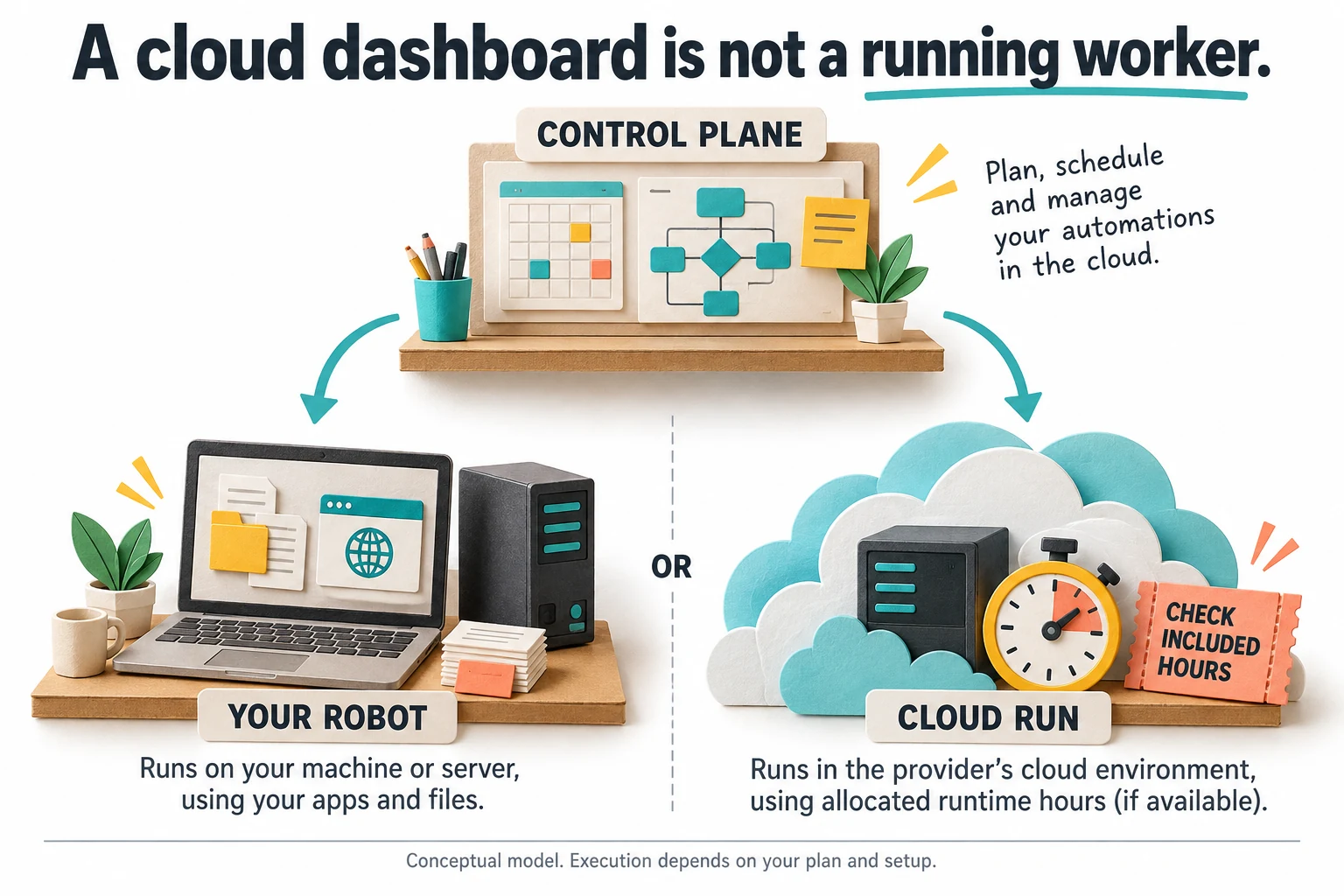
A cloud console does not keep a sleeping laptop working

The architecture distinguishes the control plane from execution. A hosted console can coordinate work while the actual robot runs on your machine or server; Cloud Run is a separate execution option. This distinction explains why a schedule can exist online while no useful work occurs after a laptop closes. For a local worker, power, connectivity, credentials and the required applications remain part of the service. They do not become the provider's responsibility merely because the schedule was created in a browser.

Choose the host according to the task. File processing and headless browser work differ from driving a visible desktop application. The deployment guide notes that graphical automation needs an interactive desktop, including an appropriate logged-on Windows session. A successful manual demonstration on your workstation does not establish that a background service on a server will have the same desktop, file paths, printer settings or access to a protected network drive.

The documented connection uses outbound TLS, so ordinary robot communication does not require exposing an inbound port. Keep that distinction when troubleshooting: a disconnected worker is not a reason to broadly open the firewall or disable certificate checks. Identify the actual workspace, package and task destinations required. Use a properly maintained host with limited privileges, and distinguish a supported network configuration from a collection of security exceptions added because the first connection attempt was inconvenient.

Rehearse restart and reconnection before relying on an overnight schedule. Can the worker recover after a routine update? Does the intended application still open under the right account? Can an operator tell whether the next run was missed? The best hosting choice is the simplest one that meets these requirements. A dedicated server is not automatically necessary, but an occasionally available personal laptop should not quietly become infrastructure for a promise made to customers.

Sources: Control plane, execution location and network requirements; Vendor security model and unattended robot identity

A cloud control station sends work to either a local robot or a separately allocated cloud worker
Conceptual architecture: managing a flow in the cloud does not mean cloud execution is included. Check the worker location and the selected plan's runtime allowance.

Browser automation needs stable targets and visible stop conditions

The browser tutorial shows how nodes share a browser-session identifier and locate elements with selectors. The recording and inspection tools can help establish a first working flow, but a selector that happens to work today is not a maintenance strategy. Prefer a stable identifier or meaningful page attribute when available, then verify that the selected element is the intended one. A long path through incidental layout containers is easy to generate and often difficult to trust after a redesign.

For a hypothetical reporting portal, identify the account, reporting period and download action separately. Confirm the selected period before saving the file, and inspect the downloaded result rather than treating a click as success. An unexpected login screen should stop the flow or take a defined recovery path. Otherwise a robot may confidently process an HTML sign-in page as though it were a report, proving that confidence is not a file format.

Use an authorized workflow and respect the target service's rules. A CAPTCHA, new consent screen or changed access requirement should trigger an appropriate human handoff, not an improvised attempt to defeat the protection. Where the service offers an approved export or API, compare that route first. Browser automation is valuable when it fills a genuine integration gap; it should not be selected merely because it can imitate a sequence of clicks more dramatically than a structured request.

Include cleanup and bounded waiting. Close the browser session after a run, release downloaded files and stop after a defined number of unsuccessful attempts. Check that a page is in the expected state before each consequential action. These measures are not glamorous, but they determine whether the same machine remains usable after a weekend of execution. An automation that leaves a small museum of browser windows behind is still asking someone else to finish the job.

Sources: Browser sessions, selectors and cleanup

Use spreadsheet data as data, not a screen to click

Robomotion documents an important package distinction. Its Excel package reads and writes spreadsheet files without requiring Microsoft Excel, while the Microsoft Excel package drives the Windows desktop application through COM. The latter can matter for workflows that need the actual application, such as macro execution. Do not introduce a desktop dependency when straightforward file processing will do. Conversely, do not assume a file reader reproduces every behavior of a workbook designed around Office-specific features.

Start by checking the table contract: expected columns, identifiers, dates, amounts and the meaning of blank cells. A workbook that opens successfully can still contain the wrong reporting period or a renamed column. Use a small fictional dataset with deliberately awkward cases: a missing optional value, a duplicate identifier, an unexpected header and a value formatted differently from the others. The point is to discover whether the flow understands the data rather than merely whether it can open the file.

Process the rows through clear transformations and preserve the original input until verification finishes. For a reconciliation task, compare the input count, output count and the identifiers accepted or rejected. A total alone is not sufficient when two opposite mistakes can cancel numerically. Keep exceptions available for review instead of silently dropping them because a clean final spreadsheet looks more reassuring. The output should explain what happened to the records, not simply provide a prettier place to store uncertainty.

Avoid writing over the only authoritative workbook during evaluation. Produce a separately named result, check it, then define how an approved production output replaces or updates the destination. Consider file locks and concurrent editors as ordinary operating conditions. If a colleague opens the workbook every morning, that is part of the environment, not an unreasonable interruption. The useful automation fits the working process instead of requiring everyone to stop touching the business until the robot feels comfortable.

Sources: Spreadsheet file processing versus desktop Excel

Scheduling deserves a timezone check, not just a green switch

The scheduling guide requires a published flow on an available production robot. It also contains a concrete editing warning: the flow and version must be selected again, and the timezone can reset to UTC-12:00. This is a documented warning, not a bug observed in our own account. Before saving an edit, inspect the actual schedule summary and intended zone. A perfectly correct process running at the wrong local hour is still an operational failure.

Choose the schedule from the business deadline backward. If a report is needed at 8:30, allow time for ordinary execution and a bounded recovery attempt before that deadline. Do not schedule it for 8:29 because the fastest demonstration took 40 seconds. Include the source system's data availability in the calculation. Running early is not useful when the upstream report has not yet finished, even if the robot itself is punctual and the dashboard looks healthy.

Clarify what happens when the worker is busy, offline or deliberately paused. The documentation distinguishes paused occurrences from pending missed schedules and notes that deleting a schedule removes pending work. Verify the behavior relevant to your process rather than assume every missed occurrence will replay or every restart will begin with a clean slate. For a periodic snapshot, the latest run may suffice; for individual transactions, silently skipping older work may be unacceptable.

Test a harmless scheduling change and inspect the resulting execution time before attaching the process to a deadline that matters. Record the timezone, version, robot and expected completion in the operating note. Include seasonal clock changes if the business deadline is tied to local time. Calendars are deceptively friendly interfaces for complicated rules. The extra minute spent checking the summary is usually cheaper than explaining why yesterday's report arrived during today's dinner.

Sources: Scheduling requirements and timezone editing warning

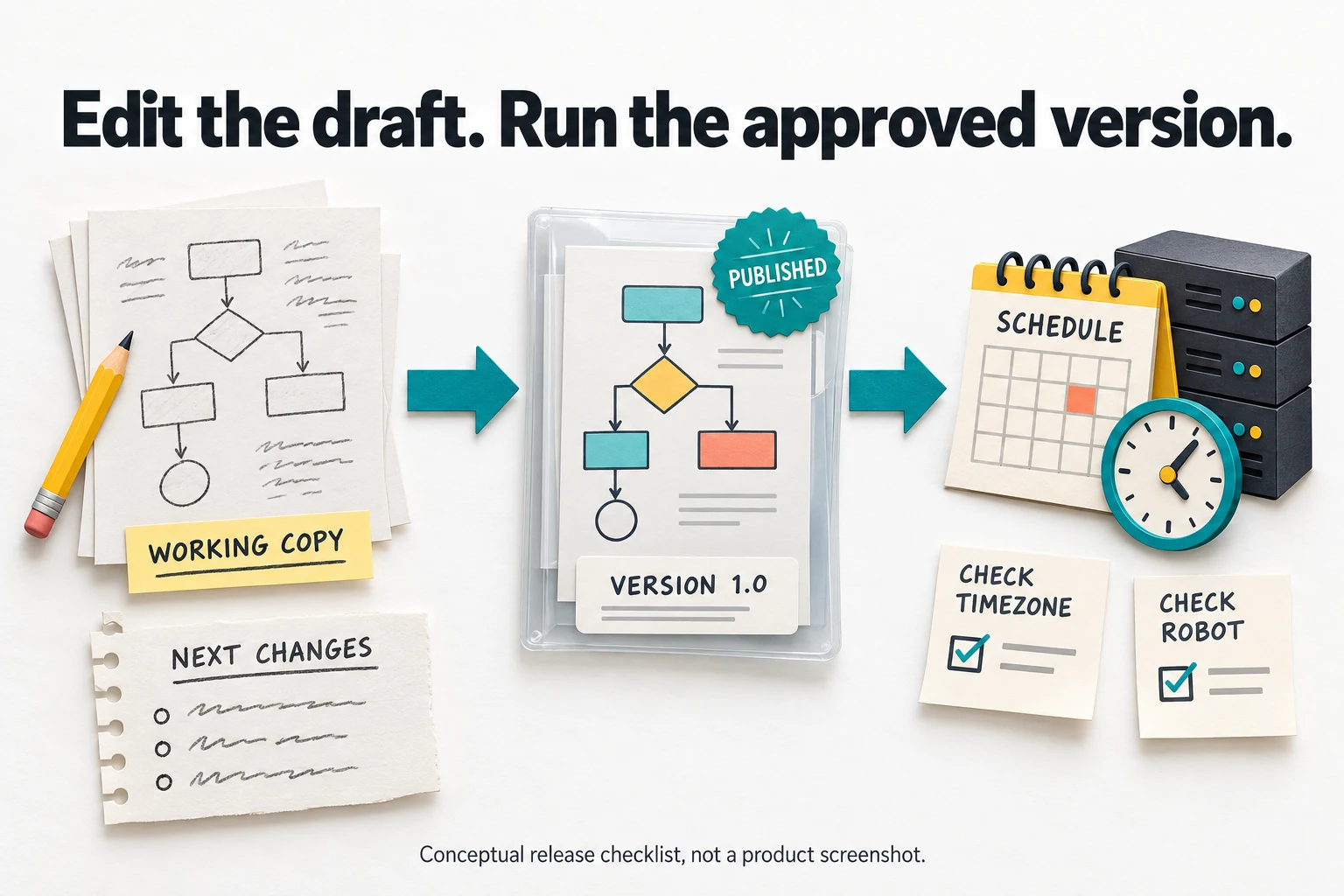
Keep the working copy separate from the released process

The versioning documentation describes immutable snapshots that can be published and selected by schedules, while the master working copy remains editable. That separation is useful because it allows improvement without silently replacing the process already running. Name a release so another operator can identify it, and include a short description of the change. A sequence of versions called final, final-new and final-really is an archaeological project waiting to happen, not a release policy.

Use the version boundary to preserve a tested state. Before changing a data mapping or login sequence, retain the known version and exercise the new working copy against non-production inputs. Compare the resulting records, not just the appearance of the flow. When the change is approved, deliberately select the intended published version in the schedule. Saving a canvas and changing production execution are different events and should remain different in the operator's mental model.

A rollback plan must also consider outside effects. Restoring an earlier flow does not unsend a notification, reverse a record update or restore a file overwritten by a prior run. Keep the release decision separate from the recovery decision. Identify which actions are reversible and which need reconciliation in the destination system. Version control protects the instructions; it is not a universal undo button for everything those instructions have already done.

Make the release note brief enough that someone will actually read it. State the input change, expected output change, verification performed and how to return to the previous version. Include any dependent package or account configuration that changed alongside the flow. This is especially valuable for small teams where the builder is also the operator. A readable note reduces the chance that a perfectly reasonable improvement becomes an unexplained difference discovered only when the next person opens the report.

Sources: Immutable versions, publication and scheduled releases

A working copy becomes a published fixed version before a schedule checks its robot and timezone
A suggested release checklist based on documented versioning. Editing the working copy should not be confused with changing the version selected for production.

Handle failures according to consequence

The failure tutorial distinguishes ignoring an optional error, catching an error to respond, and allowing a run to fail for human attention. That distinction is more useful than a generic promise of self-healing automation. A missing decorative attachment may be optional; a failed write to the authoritative system is not. Classify the steps by consequence so the flow cannot report overall success after skipping the very action the business expected it to complete.

Use bounded retries for genuinely temporary conditions, with an explicit final outcome. Repeatedly requesting the same unavailable page forever does not make the process resilient; it makes a worker permanently busy. A limited retry policy should say which errors qualify, how long to wait and who is notified when the budget is exhausted. Differentiate invalid input from a transient connection problem. Waiting longer rarely turns the wrong customer identifier into the right one.

Keep error handling close enough to the failing operation that the diagnosis remains meaningful. If every problem reaches the same generic branch, a missing file, an expired login and an invalid amount become indistinguishable. Retain a safe reference to the item and the stage that failed, without dumping credentials or whole private records into logs. The person investigating needs enough context to recover the work, not a complete copy of everything the automation could access.

Make a deliberately failed test part of acceptance. Disconnect a harmless test dependency or supply an invalid sample record, then observe the alert, state and recovery route. A buyer should be able to answer what happens next without improvising from the designer canvas. This is a proposed test, not a claim that Robomotion passed it here. Dependability is demonstrated by controlled failure as much as by a satisfying green check after one well-prepared sample run.

Sources: Failure handling and bounded retries

A queue tracks work, but does not finish your recovery policy

The queue documentation describes items moving through New, In Progress and terminal states such as Success or Failed. It also explicitly warns that a crash can leave an item In Progress if no final state is written. That item does not automatically become proof of completion or a fresh item for another worker. Confirm queue access in the selected plan, then design the state transitions around the actual business outcome rather than the convenience of the happy-path demonstration.

Give each item a stable identity and record what it represents. A row number alone may change when a spreadsheet is sorted; a customer name may not be unique. The correct identifier depends on the source system and operation. For a hypothetical report import, a combination of source account, reporting period and report identity may be appropriate. Define that identity before distributing work across robots, otherwise concurrency can make ambiguous records arrive faster without making them easier to reconcile.

Review stale in-progress items with the destination state in mind. A worker could stop before acting, after acting or after acting but before recording success. Those cases require different recovery decisions. Simply resetting every old item to New can repeat completed business actions. Establish a cautious operator procedure with enough evidence to distinguish them, and use a harmless test to learn what the platform records when the worker is interrupted at each relevant stage.

Track backlog age as well as item count. Ten new items may be normal for a batch that runs hourly, but one unresolved item from last week could be the important problem. Assign ownership of exceptions and define when to abandon, repair or retry them. A queue is valuable because it makes work visible and divisible. It becomes a source of confidence only when the team agrees what each state means and does not treat an unresolved state as someone else's future problem.

Sources: Queue states and interrupted work; Plan restrictions and separately metered resources

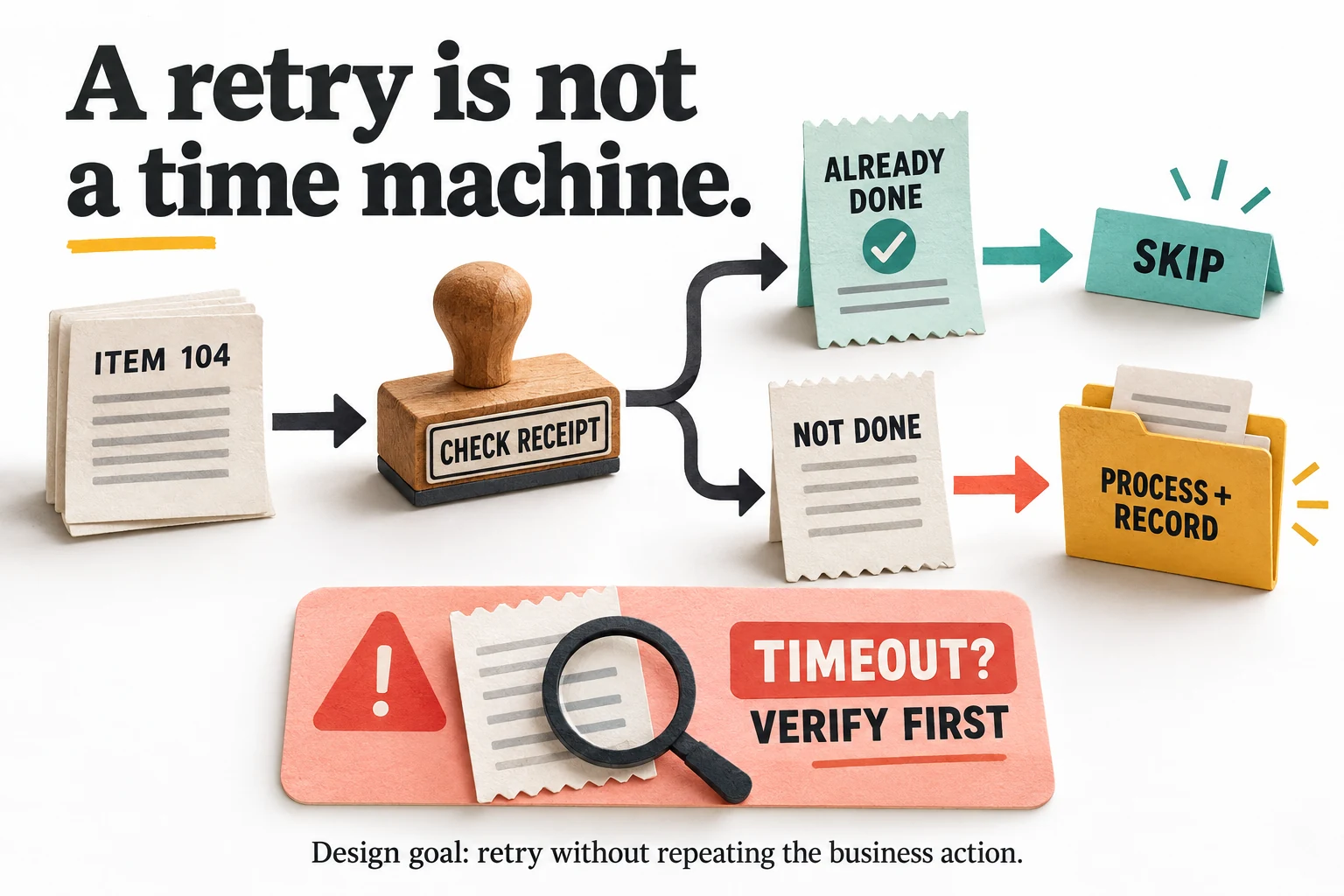
Rerunning a job must not repeat the business action

The Jobs page offers a rerun action, but replaying instructions is not the same as safely repeating their effects. Consider an internal notification sent just before a network timeout. The flow may lack confirmation even though the message reached its destination. Pressing rerun without checking could send it again. The same distinction applies to creating a record, uploading a file or posting a transaction. The platform cannot infer the business meaning of every external action automatically.

Where the destination supports an idempotency key or a reliable unique reference, use that documented mechanism. Otherwise build an appropriate receipt check and reconciliation path for the operation. A simple read-then-write check can still race when several workers act concurrently, so do not advertise it as an exactly-once guarantee. Choose a destination-side constraint or supported atomic operation when the workflow requires stronger protection. The right design depends on what the external system actually provides.

For a first low-risk pilot, prefer an output that can be independently inspected and safely regenerated, such as a report file in a test folder. Repeat the same input deliberately and compare the resulting files or records. Then simulate an ambiguous interruption and verify the destination before resuming. The exercise should reveal whether recovery can be performed from evidence rather than by hoping that the previous attempt probably failed before anything important happened.

Keep consequential actions behind explicit approval until the behavior is proven and appropriately authorized. A successful file export is not permission to extend the flow into purchases, bulk messages or destructive account changes. Automation expands the speed of both correct and incorrect actions. The useful question is not whether Robomotion can click the final button, but whether the process knows when that button should be clicked, whether it was already clicked, and who can stop the next attempt.

Sources: Job status, reruns and diagnostic limitations; Queue states and interrupted work

A repeated work item checks its receipt before skipping completed work or processing an unfinished action
Our duplicate-handling design goal, not a built-in exactly-once guarantee. After an ambiguous timeout, verify the external result before repeating the action.

Monitor missing outcomes as well as failed jobs

Robomotion documents offline and idle alerts, which address different problems: a disconnected worker and a connected worker that is not receiving useful work. Neither alone establishes that a required business result was produced. Define an outcome check for an important process, such as the presence of today's reconciled report with the expected period and a plausible record count. A healthy connection is encouraging, but it is not a substitute for the work the connection was meant to enable.

Set alert timing according to the process rather than the smallest available number. A normal maintenance restart should not create the same urgency as a missed deadline. Conversely, a daily task should not remain silent for several days because the robot still appears connected. Route notifications to a channel someone actually watches and identify the responsible person. An alert with no owner is merely a more brightly colored entry in the historical record of what went wrong.

There is a documentation inconsistency worth checking during evaluation. The Jobs guide says its table does not contain exception text and points to Designer output, while the FAQ describes errors and logs being available for failed jobs. Do not assume either wording fully describes the account you will use. Create a harmless failed run and verify the diagnostic information, retention and access available to the person who will troubleshoot it when the original builder is unavailable.

Keep the operating note focused on the first useful action: where to find the last successful result, how to identify the affected item and when a rerun is safe. Avoid a monitoring setup that produces a stream of reassuring activity without revealing missing work. The best alert is specific enough to support a decision. Robot online is a status; today's report was not delivered by the agreed deadline is a problem someone can actually resolve.

Sources: Offline and idle alerts and outcome monitoring; Job status, reruns and diagnostic limitations; Product FAQ, learning requirements and diagnostic claims

Credential vaults need an ownership and recovery plan

The vendor describes client-side encryption for vault items and a separate robot identity for unattended operation. These are useful architectural claims, not an independent security audit. Store credentials through the intended mechanism instead of embedding them in flow text, exported examples or screenshots. Also limit the underlying account permissions: an encrypted administrator password still gives the running automation administrator power. Encryption protects storage; it does not decide which operations should be allowed once the credential is used.

The vault administration guide highlights a practical consequence of its model. An administrator cannot simply grant themselves access, and an orphaned vault can be transferred only to someone who already has access. Plan continuity while an authorized key holder is available. A carefully approved second holder may be appropriate for a business-critical vault, but that is an access decision, not a reason to distribute every credential widely or assume that any colleague should receive it.

Document the recovery arrangement without placing secrets in the document. Identify who owns the password manager, how a worker credential is rotated and what happens when a contractor leaves. Test the procedure with a disposable non-production credential first. Losing access should not force the team to discover that the only person who could unlock a critical connection was an individual whose account was removed during otherwise routine offboarding.

Keep unattended credentials out of ordinary command histories and process arguments where they may be exposed. Use the supported secret-delivery mechanism and appropriate host permissions, then verify that logs do not repeat sensitive values. Separate development access from production access where feasible. The aim is not to make the setup ceremonially complicated; it is to ensure that the convenience of a robot does not quietly create a new permanent account with broader access and less supervision than any human operator.

Sources: Vault ownership, access and orphaned credentials; Vendor security model and unattended robot identity

Local execution does not mean no information leaves the machine

The deployment documentation says ordinary processed data can remain with the worker, while also identifying exceptions such as queue payloads, uploaded artifacts and logs. External services called by the flow create additional destinations. Treat data location as a map of the real process, not a slogan attached to the host. A locally running robot can still send a document to an AI provider, write private content into a queue or include it in a notification.

For each step, identify the minimum information needed and the destination receiving it. A failure alert usually needs an item reference and a stage, not the customer's entire record. A demonstration can use fictional data rather than a live export. Keep retention aligned with the business purpose and applicable obligations, and obtain appropriate advice for regulated workloads. This review does not certify any configuration as compliant merely because the product offers a private deployment option.

Be careful with debugging convenience. Printing the whole message object can expose fields that the failing node never needed, including credentials or private content carried from an earlier step. Prefer targeted diagnostic values and redact sensitive fields at the source. Also inspect screenshots and downloaded artifacts before sharing them in support requests. The easiest evidence to collect is not always the evidence appropriate to send outside the organization.

Choose private cloud or on-premises operation only when the actual requirements justify it and the team can support the responsibilities involved. Moving the control plane changes who operates infrastructure; it does not automatically remove every external destination from a flow. A clear data map is useful on any deployment. It allows a buyer to ask specific questions about storage, access and retention instead of accepting a broad privacy claim that may describe only one part of the system.

Sources: Control plane, execution location and network requirements; Vendor security model and unattended robot identity

Use AI for bounded judgment, not permission to improvise

Robomotion's current AI documentation describes combining deterministic flows with agent-assisted judgment. That can be a sensible arrangement: ordinary steps remain explicit while a limited classification or extraction task receives model assistance. A possible example is proposing a category for an unfamiliar support request, followed by validation and human review when needed. The benefit comes from a well-bounded role, not from giving an agent every available tool and hoping that the business context is obvious.

Treat model confidence as a signal to evaluate, not a calibrated guarantee of correctness. A confidently incorrect category is still incorrect. Build a representative test set with known expected outcomes and include difficult examples before choosing an automation threshold. For high-consequence actions, retain appropriate approval regardless of the model's self-reported certainty. Instructions and skills can describe a policy, but they do not replace technical limits on what the agent is permitted to read or change.

Inspect data and cost boundaries. Calling a model once for each row can turn a modest spreadsheet into many billable or credit-consuming operations. Use deterministic parsing or rules when they solve the problem adequately, and measure the actual consumption during the pilot. Local model support may change where inference happens, but still requires suitable hardware and evaluation. No deployment choice makes a generated answer reliable merely by changing the place where it was generated.

Review AI-built flows as proposed code. Check destinations, credentials, conditions, retry behavior and final actions before connecting real accounts. A generated workflow that looks complete can still omit the one exception that matters to your business. Ask the assistant to explain the uncertain assumptions and verify them against the actual system. The useful output is a process the owner can understand and maintain, not a diagram whose complexity discourages anyone from asking why it sends a message at step seven.

Sources: Deterministic flows, AI agents and tool boundaries; Plan restrictions and separately metered resources

Calculate savings after maintenance, not before it

Use a simple model with four parts: time genuinely removed, setup effort, continuing maintenance and cash costs. Suppose a fictional reporting task takes 30 minutes on 20 working days, or ten hours monthly. If reviewing outputs and maintaining the flow requires three hours, the net recurring saving is seven hours, not ten. That arithmetic is illustrative, not a Robomotion performance result. The purpose is to make the decision depend on your measured process rather than a large percentage on a sales page.

Include the worker host, application licenses, cloud runtime, AI consumption and any required upgrades. Existing infrastructure may reduce the cash cost, but it still has availability and support requirements. Count the initial build and the occasional source-site change. A process that runs perfectly until a portal changes every week may be less economical than a less impressive API-based integration. Choose the approach that reduces total operating effort, not the one that produces the most elaborate automation demonstration.

Value recovered time realistically. If the freed hours allow an employee to complete useful work, the benefit may be substantial. If the same person remains responsible for watching the process throughout every run, much of the supposed saving is supervision in a different chair. Also account for error reduction only when you can measure it. Automation can prevent repetitive manual mistakes, but it can also repeat a bad mapping consistently across an entire batch.

The lifetime offer is strongest when one or two specific recurring processes justify it without speculative future projects. It becomes weaker when the purchase depends on a list of imagined automations that nobody has scoped. During the evaluation, compare Robomotion with the native integration, an approved export and a small maintainable script already available to your team. The winner is the solution whose correct output costs least to sustain, even when that solution has fewer features to mention at a meeting.
Sources: Current direct subscription plans; Plan restrictions and separately metered resources

A useful pilot includes normal work, interruption and handoff

Select one authorized, low-risk process that crosses the systems you actually use. Define its input, expected output, deadline and acceptable exceptions in plain language. Use a small but representative set of fictional or appropriately sanitized records. Begin with an output that can be inspected without changing customer accounts or moving money. This keeps the experiment focused on suitability and makes an unexpected result a useful finding rather than an operational incident.

Run the process on the intended host, not only the builder's workstation. Measure elapsed runtime and manual intervention, then inspect the complete output. Exercise a missing file, expired session, duplicate item and temporary dependency failure where safe to do so. Confirm the final state and notification for each case. Record what the operator must do to recover, particularly when the external system may have completed an action before the worker lost confirmation.

Publish a named version and verify a scheduled run with the actual timezone and robot. Check the next expected execution and the delivered result. Then ask another authorized person to follow the operating note without coaching from the builder. They should be able to locate a failure, determine whether retrying is safe and identify when to escalate. That handoff test is especially revealing because a flow can be visually understandable while its surrounding assumptions remain entirely in one person's head.

Decide from evidence at the end of the pilot. Keep the product when it removes enough work, handles the important failure modes and fits the purchased entitlement. Delay when an essential capability or diagnostic path remains unclear. Stop when the process depends on fragile assumptions that are more expensive to maintain than the original task. A trial is not a ceremony whose only acceptable conclusion is purchase; it is the least expensive place to discover that a particular approach does not fit.

Sources: Scheduling requirements and timezone editing warning; Failure handling and bounded retries; Immutable versions, publication and scheduled releases

Our 81 out of 100 verdict: strong reach, real operating responsibility

Our independent score is 81 out of 100: 18 for problem fit, 18 for documented capabilities, 15 for workflow, 14 for evidence and 16 for value. It is not copied from customer ratings, and it does not measure uptime or successful runs in our environment. The positive assessment reflects the practical value of combining visual orchestration with workers that can reach browser and desktop processes beyond a straightforward cloud connector.

The main deductions concern the work surrounding automation. A host must be available, selectors must remain meaningful, queues need a recovery policy and credentials need continuity. Public documentation also leaves a diagnostic detail to reconcile between the Jobs guide and FAQ. None of those points makes the product unworthy of consideration. They explain why a buyer should judge it as an operating platform requiring ownership rather than as a one-time purchase of a permanently self-managing employee.

Choose it when a concrete pilot demonstrates correct, repeatable results and the actual account covers the required execution model. It is particularly relevant when local applications or browser-only workflows make an ordinary service integration inadequate. Skip or postpone it when the same task already has a simpler reliable route, when the organization cannot assign an owner, or when the economics depend on unlimited cloud execution that the selected offer does not include.

The most persuasive outcome is modest: a report arrives on time, a failed item is visible, a retry does not duplicate work and another person can understand the setup. Those are better buying signals than a dramatic flow chart or a promise to automate everything. Robomotion has a credible place in that practical approach. Its value grows when the buyer brings a clear process and accepts that making work automatic is not the same as making responsibility disappear.

Sources: Robot types and single-flow execution; Current lifetime offer and license limits; Job status, reruns and diagnostic limitations; Product FAQ, learning requirements and diagnostic claims

Frequently asked questions

Does the $119 lifetime offer run everything in the cloud?

No. The checked entry offer lists zero cloud execution hours. A hosted management console is separate from the worker running a flow. Confirm local hosting requirements or a separately available Cloud Run allowance.

Can one robot execute several flows simultaneously?

The robot concept documentation says one robot runs one flow at a time. Plan concurrency around actual worker capacity and the robot types included, not simply the number of saved flows.

Is programming completely unnecessary?

Simple flows can be assembled visually, but data handling, conditions and recovery still require logical thinking. The vendor notes that some JavaScript helps. Evaluate the complexity of your own process rather than a blanket no-code promise.

Will a queue automatically recover every interrupted item?

Do not assume that. The queue guide says an item may remain In Progress after a crash without a final-state update. Recovery needs explicit error handling and a check of whether the business action already happened.

Is the editorial score a customer-review average?

No. The 81 out of 100 score is our independent source-based assessment of fit, capabilities, workflow, evidence and value. It is not a measured uptime result or a claim of hands-on deployment.

More ai & automation deals

AI & Automation

BetterClaw

Build no-code AI agents with BYOK, 99+ one-click connectors, trust levels, and approval queues. The product is designed for teams that need a repeatable AI and automation process and want clearer control over the core task. It fits best when the buyer has a defined use case, realistic input data, and a way to judge output quality before rolling it out across a wider workflow.

$79 · checked Nov 9, 2026

AI & Automation

Tough Tongue AI

Tough Tongue AI helps teams automate and enhance communication by building and deploying AI agents. These agents can handle live calls, run demos, and coach sales reps. It's designed for organizations seeking repeatable AI processes and greater control over core tasks, fitting best when a defined use case and measurable output are present.

$69 · checked Nov 12, 2026

Developer Tools

Context.dev

Context.dev combines web scraping, search, structured extraction and brand profiles behind one API. It makes sense for developers building research assistants, knowledge imports or company-aware onboarding. The catch is familiar: clean output is not automatically correct output. This review explains where the service can save engineering work, which limits matter, and how to evaluate it before committing to a subscription.

Extra 25% off · checked Oct 24, 2026

Marketing & SEO

Inrō

A strong candidate for businesses already receiving relevant Instagram conversations. Start with a narrow, supervised flow and verify the plan's limits. It can improve response handling, but it does not create an audience or make every stored contact reachable.

$59 · checked Nov 14, 2026

Deal alerts

Get ai & automation deal alerts by email.

SoftScout will send short buying notes when offers like Robomotion RPA look worth checking or worth skipping.

Short buyer verdicts

Useful offers before checkout

Editorial note

Buy a working process, not the fantasy of unlimited unattended labor. Verify exact robot types, schedule frequency, queue access and execution costs, then test interruption and duplicate handling before using customer data.

For vendors

Have a better deal for Robomotion RPA?

Send current partner terms, coupon limits, refund rules, and the best buyer fit. We review offers before adding them to SoftScout pages or Telegram alerts.

Submit terms