Back to deals
Websites & No-CodeLifetime Deal

Stackby Lifetime Deal: buy or skip?

Stackby can replace an increasingly fragile web of operational spreadsheets with connected records and clearer working views. It is most convincing for a small team willing to design its own workflow; the main buying trap is assuming that every advertised module comes with the entry lifetime license.

Product overview

What Stackby does

The platform combines editable tables, relationships, forms and different views, with additional automation, app and integration capabilities depending on the plan and modules. That flexibility suits a tailored client or project tracker better than a buyer who expects a finished industry-specific system.

Our source-researched review separates the database from its optional extras, explains the current free-plan comparison and proposes a realistic agency pilot. It includes a full-cost example, migration checks and an independent editorial assessment, without claiming hands-on speed or reliability measurements.

Read the full Stackby review

Best for

  • Small operations connecting clients, projects and tasks across repeated spreadsheets
  • An internal workflow owner who can maintain fields, relationships and access rules
  • Teams prepared to price the necessary modules before committing to a lifetime license

Why we picked it

  • Linked records reduce repeated data entry when the underlying model is designed well
  • Forms and working views can organize intake around a shared set of records
  • API-connected columns offer a route to external data without writing a full application

Check before buying

  • Build a representative client, project and task model, including missing links and duplicate names, before importing the full dataset.
  • Ask for written confirmation of required module entitlements, additional costs and legacy account mapping before paying.
  • Test restricted-user access, CSV export and recovery with sample data, then document who maintains the production workflow.

Buy if

Your pilot demonstrates a useful linked-record workflow that is awkward to maintain in the existing spreadsheet.

Verify first

Build a representative client, project and task model, including missing links and duplicate names, before importing the full dataset.

Skip if

You want a ready-made CRM or operational system and nobody has time to design and maintain it.

SoftScout sends you to the source after the risk checks, so you can verify live terms before buying instead of trusting stale coupon text.

Check Source Offer

Source transparency

Source
Source marketplace
Link type
Source page
Last checked
Nov 7, 2026

Buyer checklist

  • Build a representative client, project and task model, including missing links and duplicate names, before importing the full dataset.
  • Ask for written confirmation of required module entitlements, additional costs and legacy account mapping before paying.
  • Test restricted-user access, CSV export and recovery with sample data, then document who maintains the production workflow.

Stackby: the buying decision

Stackby is useful when a small operation needs related records and several working views without commissioning a bespoke application. Its distinctive attraction is the combination of spreadsheet-like editing, linked tables and optional API-connected columns, provided the team can own the data model and verify the exact license modules.

Research-based review, not a hands-on test. Sources checked on 2026-10-24. The assessment below is our editorial judgment, not a customer rating. Editorial assessment: 76/100.

Consider it if

  • Your pilot demonstrates a useful linked-record workflow that is awkward to maintain in the existing spreadsheet.
  • You have verified the exact user, record, app, automation and permission allowances for the workspace you will use.
  • The complete license and module cost makes sense over a realistic period, with a named owner and a tested export route.

Skip it if

  • You want a ready-made CRM or operational system and nobody has time to design and maintain it.
  • Your decision depends on assuming all advertised AI, app, automation or security capabilities are included in the cheapest license.
  • You have strict performance, isolation or compliance requirements that the documentation and your own testing have not established.
Problem fit: 18/20
Connected operational records address a genuine problem for small teams whose spreadsheets repeatedly duplicate clients, projects and responsibilities across separate files.
Capabilities: 17/20
The documented database, forms, views and integration options cover a wide range of workflows, although important modules and capacities depend on licensing.
Workflow fit: 13/20
A flexible builder still requires someone to design relationships, maintain permissions, test imports and supervise automations instead of relying on a finished business process.
Evidence confidence: 14/20
Detailed vendor guides establish specific capabilities, but inconsistent plan presentation and untested account behavior leave entitlement and operational questions for a practical pilot.
Value: 14/20
One-time access can be economical for an established fit, while optional modules and a capable free tier make the entry price an incomplete value comparison.

Stackby review: a useful database, not a ready-made business

A spreadsheet usually becomes a business system by accident. First it tracks clients. Then somebody adds projects, another person adds deadlines, and eventually a color means something so important that only one employee remembers what it is. Stackby is aimed at the point where a flat file still feels familiar but the work now needs relationships, controlled views and repeatable intake. The attraction is not escaping rows and columns. It is giving those rows a more dependable structure before your operations depend on the sacred yellow cell.

Our assessment is 76 out of 100, with a qualified recommendation for small teams that can own their workflow. The database approach is useful, and the documented range of supporting features is broad. The qualification is substantial: product capability, plan entitlement and a working process are three different things. A feature shown on a product page does not prove it is included in your license, and a feature included in a license does not prove your team has configured it safely.

This review is based on the current pricing, documentation and published vendor answers checked on October 24, 2026. We have not run a production Stackby workspace or measured loading speed, support response time or integration uptime. The agency examples are deliberately hypothetical. They provide a concrete way to evaluate the software rather than a story about results we did not obtain. Where the published material leaves a purchasing ambiguity, the recommendation is to resolve it before paying, not to fill the gap with an optimistic assumption.

The best first question is narrow: which recurring decision becomes easier when these records are connected? For an agency, that might be identifying client projects waiting on approval. For a small service operation, it might be knowing which incoming requests have no owner. If the answer is simply that the new tool looks more powerful, pause. Stackby makes the most sense when the current spreadsheet has a specific structural weakness and a named person is willing to build the replacement around it.

Sources: Stackby workflow and database tutorials; Linking records across tables

The real upgrade is relationships, not prettier cells

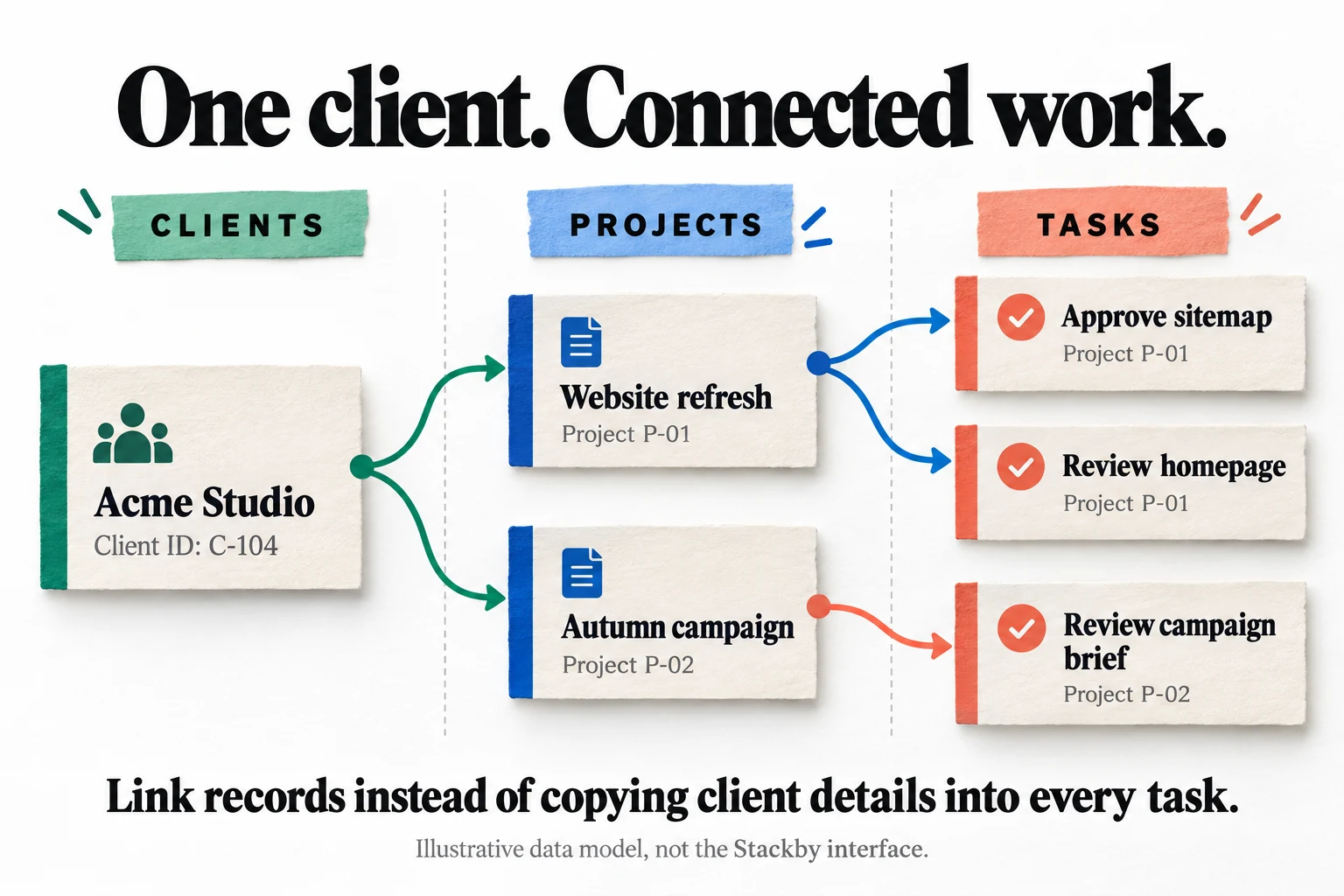
Stackby's link column connects records across tables; lookup and count columns can then use those relationships. The distinction matters because writing the same client name in two places is not the same as linking two records. A relationship gives the system a deliberate connection to follow. In an agency model, a client can relate to several projects, and each project can relate to several tasks. That is a better starting point than making a new sheet for every client and hoping everyone remembers which contact details are current.

Our illustration uses one fictional client, two projects and three tasks. The client record owns the durable client information. The project records own the agreed work and project-level decisions. The task records own individual actions. A task should not become another unofficial source of the client's address or billing contact. This arrangement reduces the number of places that must be corrected when something changes. It also makes questions such as which projects belong to this client easier to answer without searching through several unrelated files.

Design identifiers before importing. Two businesses can have similar names, a client can rename itself, and an employee can accidentally add a trailing space. A stable identifier helps you recognize the intended record even when a display name changes. This is a data-management recommendation, not a claim that Stackby automatically resolves every duplicate or ambiguous relationship. Keep a short description of what each table represents and which field identifies its records. Ten minutes spent defining a project can prevent ten slightly different meanings from appearing later.

The first test should include an awkward case, not only the neat demonstration. Give one client two projects with similar titles. Leave a task temporarily unassigned. Change a client contact and inspect the related views. Deliberately select the wrong project once so the team learns how to notice and correct it. A database does not make bad input impossible; it gives you a structure in which mistakes can be easier to identify. The useful improvement is controlled consistency, not the mere presence of connecting lines.

Sources: Linking records across tables; Lookup and lookup-count columns

One fictional client links to two projects and three tasks without repeating the client details
Illustrative agency data model, not a Stackby screenshot. Relationships preserve the connection between each client, project and task while avoiding repeated copies of the same client details.

Build one agency workflow from request to handover

Consider a hypothetical three-person design studio. It receives requests, agrees scope, produces work, gathers feedback and hands over completed files. Its current problem is not a lack of software. It is that each person keeps a different answer to the question 'What are we waiting for?' A sensible Stackby pilot would follow one request through those stages. It would not begin with an ambitious dashboard containing twelve charts and no trustworthy definition of completion.

Start with a small set of operational fields: client, project, owner, next action, due date and stage. Add a separate reason for a blocked item rather than turning the status field into a collection of sentences. Decide who is allowed to move work from internal review to client review. Keep the actual agreement and final deliverables in an appropriate document system, with references from the tracker if that fits your policies. The database should make the work legible, not become a miscellaneous drawer containing every file the business has ever touched.

Walk through the handoffs with the people who perform them. When a designer finishes a draft, what tells the account owner to review it? When feedback arrives, who checks whether it changes the scope? When a project closes, what confirms that the client received the agreed output? These are business rules you must define. Stackby's tutorials describe building views, reminders and linked data, but no tutorial can decide your approval responsibilities. Automation becomes useful only after the team can explain the manual version without contradicting itself.

Measure the pilot with a few observable outcomes. Count requests that have no owner, overdue next actions and projects whose stage is unclear. Record how long the weekly review takes before and after the experiment, using the same kind of work. Do not attribute every improvement to the software: cleaning the dataset and agreeing responsibilities can help even before the tool changes. Buy when the complete process is easier to maintain and explain. Otherwise you may simply have moved the confusion into a more impressive container.
Sources: Stackby workflow and database tutorials; Forms connected to a database

Views should answer different questions about the same work

The documented view options include grid, calendar, Kanban, list and gallery, with controls for assigning access to particular views. These are useful ways to present records for different jobs. A calendar emphasizes dates; a stage-based board emphasizes progress; a grid is convenient for checking several fields at once. The mistake is treating each view as a separate dataset with its own interpretation of the project. Your team should be able to explain what changes in the underlying record when someone updates a view.

For the studio example, create one view for today's decisions, one for work waiting on a client and one for unassigned requests. Give each a specific purpose and owner. An 'Everything' view can remain useful for administration, but it should not be the only screen a busy colleague sees. A focused view reduces scanning effort and makes missing information easier to spot. It should also have a meaningful empty state in the team's understanding: no items might mean no work is waiting, or it might mean a filter is wrong.

Test the latter possibility deliberately. Add a sample project without a due date and see whether the calendar hides it. Put an item in an unexpected stage and check whether it disappears from the board the team normally uses. If a record can fall outside all everyday views, add a reconciliation habit or an administrative exception view. A tidy screen is not proof of a tidy operation. Sometimes it is simply a very effective way of not seeing the problem.

Keep convenience and access control separate. Hiding a column for readability is not, by itself, evidence that a colleague cannot retrieve that information elsewhere. Confirm the relevant permission features and license, then test as a restricted user. Locked or personal configurations may also matter when colleagues repeatedly change filters that others rely on. Before adding more views, ask whether each one supports a decision that actually happens. Twenty nearly identical views can become a navigation problem rather than an operational improvement.

Sources: Managing individual view access; Powerups: exports, recovery and granular controls

Forms are useful when intake has an owner

Stackby's form offering connects submitted responses to database records and supports richer form behavior such as conditional fields and updatable forms, subject to the relevant configuration and entitlements. The product page also ties response capacity to the plan's record limits. This is important for a small operation because a form is not a separate unlimited inbox. If every submission becomes a record, the intake design and retention policy contribute directly to how quickly the workspace fills.

For a project request, collect only information needed to route the work: a contact method, a short description, a realistic deadline and the category of request. Avoid asking a prospective client to complete a miniature procurement exercise before anyone has spoken to them. Required fields should prevent genuinely unusable submissions, not satisfy every possible internal curiosity. A short form that reliably creates a reviewable request can be more valuable than a sophisticated form that people abandon halfway through.

Assign the resulting record to a review process. Somebody should check whether the request is legitimate, sufficiently clear and appropriate for the business. Use a distinct reviewed state rather than treating every submitted row as approved work. Test repeat submissions, missing optional information and an attachment that exceeds the applicable limit. Also decide what happens when a person asks to correct or remove their information. Those are operating responsibilities, not details that disappear because the form and database share a vendor.

A useful pilot includes the experience after submission. Does the person know the request was received? Does the team know who must respond? If a notification fails, can the pending request still be found during the next review? Do not add automated external messages until the content, recipient and trigger have been checked. Collecting a request efficiently is only half the job. The other half is making sure it does not spend the next week waiting quietly in a beautifully organized table.

Sources: Forms connected to a database

The lifetime license needs an entitlement check

At the checked offer, the $109 entry license lists one user, twenty stacks and 5,000 rows per stack. Crucially, the first four displayed tiers show zero internal automation runs and zero apps per stack. Optional modules are sold separately. That is the central buying caveat: the broad product demonstration is not an inclusion list for the cheapest license. Treat the actual allowance table and written confirmation for your account as purchasing evidence, not a headline about what the platform can build.

Make a short entitlement sheet before choosing a tier. In one column write the action your team needs, such as collecting a request, restricting a financial field or running a scheduled reminder. In the next write the exact plan or module that supplies it. In the third write its limit and cost. This is more reliable than asking whether a feature called automation is included, because different kinds of automation can have different allowances. A seller can answer a precise workflow question much more clearly than a broad question about everything.

Existing customers should inspect the workspace rather than assuming an old purchase maps neatly to today's presentation. In a September 2026 public answer, the founder offered to restore an eligible older plan after a customer reported seeing Free, and explained that newer modules can be separate additions. That response is not evidence that every older account has a problem. It is a reason to retain the original purchase record and resolve an unexpected entitlement before buying replacement access or importing important data.

If a required capability is unclear, ask a bounded question: 'Can this exact workspace perform this operation with these users, without another purchase?' Include the tier and module names, but do not send sensitive customer records just to demonstrate the issue. Keep the answer with the purchase decision. A lifetime license can be good value once its boundaries are understood. It is much harder to assess when the buyer is mentally including capabilities that the order never actually promised.

Sources: Current lifetime license matrix and add-on terms; Founder response about old licenses and additional modules

Free versus paid is not a simple ladder

The direct free plan currently lists five editors, 1,500 rows per stack, one app per stack and one hundred internal automation runs. The direct Economy subscription is displayed at nine dollars per seat per month when billed monthly. These are different packages from the lifetime offer. Compare the actual mix of collaboration, records and modules; do not assume that spending money moves every allowance upward. For a small pilot, the free plan may support the experiment you need even if it is not the right long-term capacity.

A one-person operation and a five-person team can reach different conclusions using the same feature list. The solo operator may care most about keeping several thousand connected records without a recurring database bill. A team may care more about allowing several colleagues to edit a modest dataset. Another buyer may need only a small amount of automated activity. The right comparison begins with the workload and people, not with the emotional satisfaction of owning a lifetime plan.

Test the free workspace with representative but non-sensitive data. Build enough of the model to understand whether relationships, field types and daily navigation suit the team. Keep a separate list of capabilities that are unavailable or uncertain. Do not mistake a free-plan limitation for a universal product limitation, and do not assume a trial temporarily enabled feature will remain after the trial. Before purchasing, verify which state your test account is in and which capabilities the destination license will actually retain.

The same discipline applies to a subscription comparison. Use the billing interval and seat count you would realistically buy, not the lowest number displayed somewhere on an annual pricing page. Include expected modules and external services on both sides. If your workload is changing quickly, the option to stop paying may be valuable. If the process is stable and the one-time license clearly covers it, the upfront purchase may be attractive. Flexibility has a cost, but so does paying in advance for a workflow you later abandon.

Sources: Stackby free and direct subscription plans

Automate a known rule, then test the exception

Stackby's scheduled-trigger documentation describes interval-based and one-time execution, a testing step and explicit activation. That supports useful routine work, but a schedule is only one part of a reliable automation. You also need to know which records qualify, what action occurs, whether it has already occurred and what happens when it fails. The fact that a rule can run every day does not establish that it should email every record every day.

For the agency pilot, a low-risk starting point is an internal reminder about projects awaiting a decision. Define a condition that the team can verify manually. Use sample records covering a normal project, a completed project, a missing owner and a duplicated request. Observe which records the test selects before connecting any external delivery. An automation that looks correct on one ideal record can still behave badly on the incomplete records that real colleagues inevitably create.

Prevent repeated actions deliberately. For example, a proposed reminder process might record the last reminder time and require a meaningful interval before another message. That is a design requirement to implement and test using the capabilities available to your account, not a claim that every Stackby template supplies it automatically. For destructive or customer-facing actions, keep an approval step until the process has demonstrated predictable behavior. The goal is to remove repetitive effort, not to automate an apology at a larger scale.

Estimate usage from the actual trigger and action model, then confirm how the service counts a run. Do not convert a monthly allowance into a promised number of customers without knowing how retries, multiple steps and repeated events are charged. Leave space for testing and occasional failures. Nominate somebody to inspect the run history and notice stalled work. A useful automation has an accountable owner and a way to recover; otherwise it is merely a process that can stop working outside everyone's field of view.

Sources: Scheduled automation trigger; Stackby workflow and database tutorials

API columns need freshness rules, not just a connection

One of Stackby's distinctive documented ideas is selecting fields from an API response through a cell data explorer and using them in columns. The guide also describes manual cell refresh and small batches of refresh requests. This can make external data approachable for a non-specialist, but it does not erase the external service's authentication, permissions, pricing or request limits. A successful connection proves that some data arrived at a particular moment. It does not prove the table will always contain the latest usable value.

Suppose a hypothetical marketing operation brings campaign statistics into a project table. Record what the metric means, its date range and the time it was retrieved. A number called spend can refer to today, a campaign's lifetime or a selected reporting period. Mixing those meanings produces a confident-looking comparison that is not actually comparable. Keep the raw reference information available to the person who investigates discrepancies. The attractive part of a connected column is convenience; the necessary companion is an understandable data definition.

Test missing and failed responses separately from zero values. An empty result should not automatically become zero revenue, zero cost or no activity. Decide how the team will recognize stale data and which decisions must wait for a fresh result. If a provider changes a field name or revokes a credential, a visible error is preferable to silently continuing with old information. These are integration acceptance tests the buyer should perform, not reliability guarantees established by the public documentation.

Keep credentials out of ordinary record fields and shared screenshots. Use the intended integration configuration and only the permissions needed for the job. Review who can change or trigger the connected workflow, particularly when a request can modify information rather than merely retrieve it. Before paying for an integration-related module, demonstrate the exact endpoint and response shape you need. A long list of connector logos is less useful than one boring, repeatable request whose failure behavior everyone understands.

Sources: Selecting and refreshing API response fields

AI fields are a separate cost and review decision

The AI field-agent page describes using your own provider key for models from services such as OpenAI, Anthropic or Gemini. It distinguishes these fields from the conversational builder and currently states Business and Pro availability for field agents. Image generation is still marked as coming soon on that page. Do not equate builder credits, field-agent access and the provider's usage bill. Those are different parts of the purchase and operating cost, especially for a lifetime account whose mapping needs confirmation.

A reasonable first use is helping classify a non-sensitive project request into a small set of proposed categories. Keep the original text and let a human confirm the suggestion before it affects a client commitment. Define an uncertain category so the model is not forced to sound confident about an ambiguous request. The value comes from reducing sorting effort while retaining an intelligible trail, not from replacing every decision with generated text simply because an AI field is available.

Evaluate a batch containing short messages, contradictory instructions, misspellings and requests that do not fit the business. Measure how often a reviewer changes the suggestion and how long that review takes. If checking the output costs more time than selecting the category manually, the feature is not helping that workflow. Treat content submitted by outsiders as data, not instructions authorizing the system to send messages or change permissions. A clever-looking response does not grant authority to perform a business action.

Check data handling before connecting a model provider. The relevant question is which fields leave the workspace, which service receives them and under what account settings. Keep unnecessary personal or confidential material out of the prompt. Set provider spending controls and begin with a limited sample. No-code configuration can make a large batch easy to launch, which is precisely why the first run should be small. A table full of generated answers is not evidence that the answers are correct, useful or economical.

Sources: AI field agents, model keys and availability

Permissions and recovery deserve their own rehearsal

Stackby publishes security practices including encryption, backups and account protections, recommends two-factor authentication and describes enterprise single sign-on. These are vendor statements, not an independent audit performed for this review. The practical purchasing question is whether the controls your team needs are available in its exact plan and configured correctly. A small business handling ordinary project information still needs sensible access boundaries; a sensitive or regulated workflow requires a more formal assessment than a software review can provide.

Create a sample restricted user before sharing real client data. Check what that person can see through the ordinary view, a linked record, a form and any export or shared link you intend to use. Test with two fictional clients so accidental cross-client visibility is obvious. Do not rely on a screen looking filtered while the underlying account retains broader access. Record the intended role and compare it with observed behavior. A permission test should be a specific scenario with an expected result, not a quick glance at a settings page.

Recovery also has layers. The Powerups catalog includes a recycle bin, snapshots and other controls, while the security page describes service-side backups. Those are not interchangeable promises about what a user can restore on demand. Ask which restoration method covers an accidentally deleted record, a mistaken bulk edit and a whole corrupted workflow. Confirm availability and retention for your license. A backup policy is useful, but it is not a substitute for demonstrating how your team would recover the mistake it is most likely to make.

Use harmless data for the rehearsal and keep an independent export before any bulk operation. Assign ownership of account administration, departure handling and periodic access review. If the person who built the workspace leaves, someone else should know which integrations exist and how to stop them. This is ordinary operational hygiene rather than evidence of a particular Stackby weakness. The flexibility that makes a no-code system useful also means the business must document the decisions it has embedded in that system.

Sources: Stackby published security practices; Managing individual view access; Powerups: exports, recovery and granular controls

Calculate the cost of the workflow you will actually run

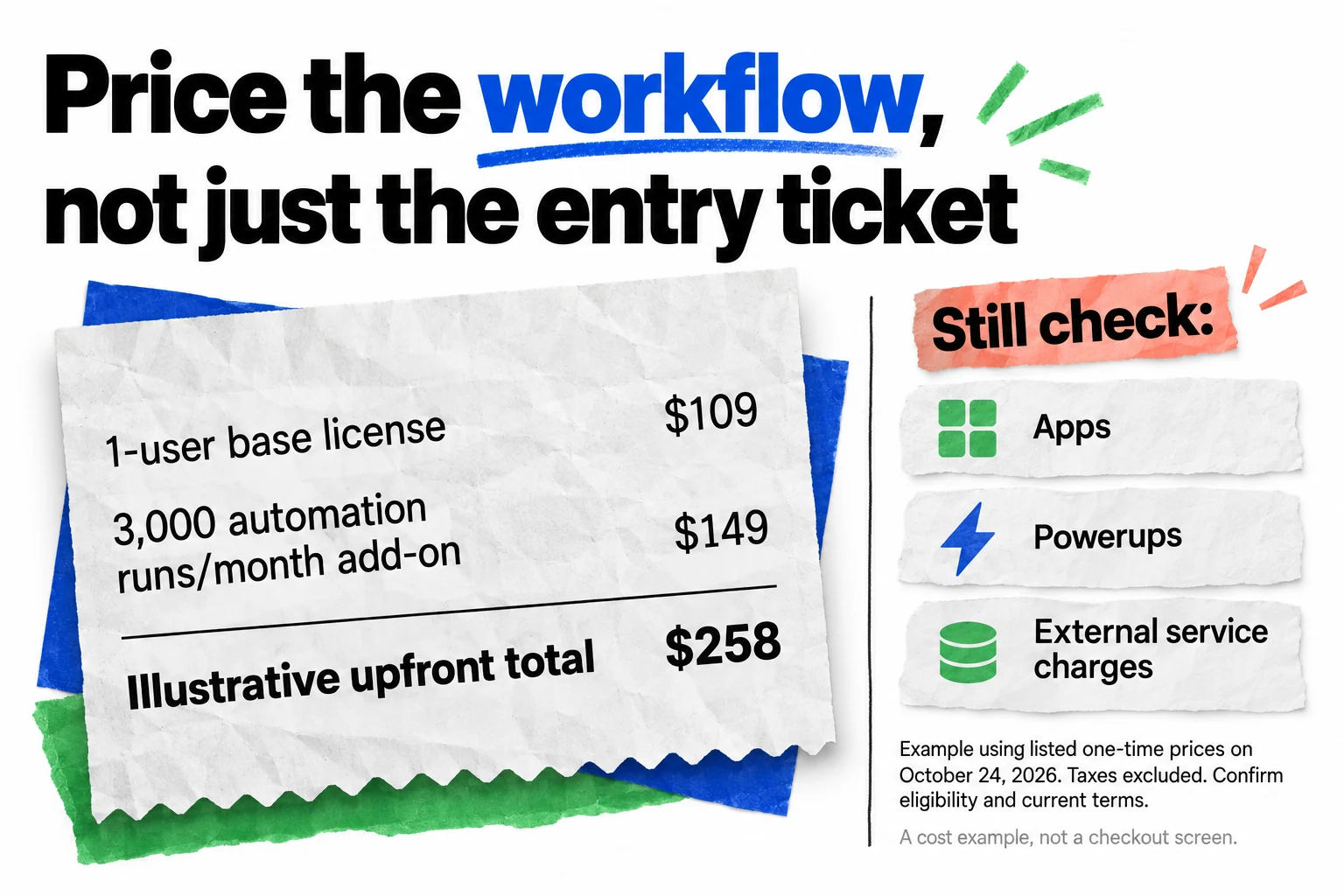
The illustrated example combines the listed $109 base license with a $149 one-time add-on for 3,000 automation runs per month: $258 before tax. It is not an all-inclusive quote. Apps, other modules and external service charges may still matter. Current terms list Powerups at $449 and Apps Marketplace at $499, illustrating why the entry ticket alone is not a useful budget. Confirm the current prices, eligibility and module dependencies before making a purchasing decision.

Create two honest scenarios: the minimum process you need now and the likely process you expect within a year. Avoid pricing a fantasy future with every possible module just to justify a larger purchase today. Equally, do not pretend a required permission or export function is optional because leaving it out makes the headline look attractive. Put setup time and recurring administration beside the cash cost. A tool that saves a modest license fee but requires an extra hour of weekly maintenance can be expensive in practice.

For a hypothetical team, suppose a workflow saves fifteen minutes each week. Over fifty working weeks that is twelve and a half hours, before accounting for training, corrections and maintenance. Whether that justifies the total purchase depends on the team's own value of time and the alternatives already available. This is an arithmetic example, not a forecast of Stackby savings. Measure the actual pilot rather than using a vendor's broad productivity claim as your business case.

Compare equivalent outcomes, not equivalent product names. A simpler existing spreadsheet might remain adequate if one person owns the work. A dedicated project system may cost more but remove configuration work. A flexible database may win when several related processes share information and the team genuinely uses that flexibility. Lifetime access is attractive after the fit is established. Before that point it can make an uncertain decision feel urgent, which is a poor reason to make it. The inexpensive option is the one you can operate successfully, not necessarily the one with the smallest first payment.

Sources: Current lifetime license matrix and add-on terms; Stackby free and direct subscription plans

Illustrative receipt combines a base license and automation add-on while flagging other possible module costs
Worked example from listed one-time prices checked October 24, 2026: $109 plus $149 equals $258 before tax. This is not an all-inclusive quote; confirm eligibility, required modules and current terms.

Migration is finished only when you can explain the exit

The export guide describes downloading table or view data as CSV, while the Powerups catalog identifies whole-stack export among its additional capabilities. Verify the exact route available to your account. A record export is valuable, but it is not a portable copy of the entire application you have built. Relationships, permissions, automation rules, views and attachments need their own checks. The presence of a download button should begin an exit test, not end it.

Import a small representative sample before the full history. Include a date near a month boundary, a decimal amount, an empty field, a duplicate display name and a record with several related tasks. Compare counts and inspect the values that matter operationally. Make sure a number has not become text or a date has not changed interpretation. Decide how old completed work should be retained before it consumes the same active capacity as current work. Do not delete historical records merely to fit a plan without considering the business's retention needs.

Export the sample and open it independently. Can another colleague identify the client and project without remembering the original screen? Can the relationship be reconstructed using stable identifiers? Are attachments included as files, references or neither in the route you chose? Does exporting a filtered view omit records you expected to retain? Document the observed behavior and keep the result somewhere appropriate. This exercise often exposes missing identifiers and unclear field meanings while there is still time to correct them cheaply.

Write a short operations note describing tables, important fields, external connections, permissions and recurring actions. Include the reason for any non-obvious rule. Avoid creating a system that works only because its builder remembers an undocumented exception. A good migration leaves the business less dependent on an individual's memory, not more dependent on the person who enjoys configuring software. The exit plan is not pessimism about the vendor; it is a practical check that the business still understands and controls its own information.

Sources: Exporting table or view data; Powerups: exports, recovery and granular controls

Our verdict: prototype first, then buy a precise fit

Stackby earns consideration when related operational records have outgrown a flat spreadsheet and the business has someone capable of maintaining a small no-code system. The strongest reasons to choose it are the data model and the ability to shape working views around real decisions. The weakest reason is a belief that one inexpensive license automatically supplies every feature shown in a platform demonstration. The product may be capable of the workflow while the selected package is not the package that enables it.

Use a staged acceptance test. First establish the client, project and task relationships with sample data. Next let the actual users perform a normal handoff without coaching. Then introduce a missing value, a duplicate name and a restricted account. Finally, test the export and the one automation that matters most. Note what worked, what required a workaround and what needed another module. This creates a buying decision based on observed fit rather than the pleasure of building a convincing demo.

The 76-point editorial assessment reflects that balance. We give substantial credit for a useful problem fit and broad documented capabilities. We reserve points for the configuration burden, account-level uncertainties and the difficulty of judging value from the entry price. It is not a performance benchmark or a prediction of vendor longevity. A team with a clear model and confirmed entitlements may find the product much more useful than a buyer who wants a fully assembled CRM with no administration.

Buy when the pilot solves a specific recurring problem, the required modules are confirmed and somebody owns the resulting process. Stay on a limited test or skip it when the plan boundaries remain unclear, the existing workflow is already adequate or the proposed system depends on unverified controls. Your business does not need a database merely because one is available at a discount. It needs a dependable way to know what is happening next. Stackby can be part of that answer, provided the team supplies the decisions that software cannot make on its behalf.

Sources: Stackby free and direct subscription plans; Founder response about old licenses and additional modules; Stackby workflow and database tutorials

Frequently asked questions

Is Stackby a spreadsheet or a database?

It uses familiar rows and columns while supporting relationships between records in different tables. That becomes useful when clients, projects and tasks need to remain connected instead of being copied repeatedly between independent sheets.

Does lifetime access include every optional module?

No blanket inclusion should be assumed. Compare the live license matrix and add-on terms, then confirm the exact app, automation, permission and export features needed by your workspace before purchasing.

Is the free version worth trying first?

Yes, particularly for a small proof of concept. Compare its actual collaboration and feature allowances with the paid option rather than treating every paid plan as a superset of free.

Does an AI field mean model usage is free?

The field-agent documentation describes using your own model-provider key. Account for that provider's costs and data handling separately, and do not confuse field agents with credits for the conversational builder.

Can a CSV export recreate my entire workflow elsewhere?

A CSV is useful for record portability, but it does not by itself recreate permissions, automations, interfaces or relationship behavior. Test the export and document those other parts before making the system business-critical.

More websites & no-code deals

Websites & No-Code

Foyer

Foyer adds an AI voice agent to your website to answer visitor questions, guide navigation, and capture high-intent leads. It integrates with popular CMS platforms to enhance customer engagement. The product is designed for teams that need a repeatable websites & no-code process and want clearer control over the core task. It fits best when the buyer has a defined use case, realistic input data, and a way to judge output quality before rolling it out across a wider workflow.

$59 · checked Oct 23, 2026

Websites & No-Code

Grigora

A promising fit for a compact business website that benefits from fewer systems. Verify the exact license and editor first: new AI workflows differ from legacy guides, shared email has limits, and exporting files does not move every hosted service.

$69 · checked Nov 8, 2026

Websites & No-Code

ShopLentor

Useful when an existing WooCommerce store needs repeatable layout control and several specific shopping features. Start with a focused staging test, not every module. A polished template is valuable only when customers can still pay, receive the right delivery option and see an accurate order.

$69 · checked Oct 24, 2026

Websites & No-Code

Blupry Bundle

Worth considering for a FlutterFlow builder who needs one or two specific patterns and can inspect and maintain them. It is a development shortcut, not a finished business. Confirm the exact files, license, compatibility and purchase-channel refund terms before buying.

$59 · checked Oct 24, 2026

Deal alerts

Get websites & no-code deal alerts by email.

SoftScout will send short buying notes when offers like Stackby look worth checking or worth skipping.

Short buyer verdicts

Useful offers before checkout

Editorial note

Prototype one complete workflow first. Verify automation, app, permission and export entitlements in the actual workspace, then compare the whole purchase with free and subscription options. A larger record allowance is not automatically a better plan for your team.

For vendors

Have a better deal for Stackby?

Send current partner terms, coupon limits, refund rules, and the best buyer fit. We review offers before adding them to SoftScout pages or Telegram alerts.

Submit terms