Back to deals
Business OperationsArchived deal

SuiteDash deal archive

SuiteDash can make sense for an agency or service business tired of chasing client information across separate tools. The opportunity is a more coherent client journey; the price is deliberate setup, testing and ongoing ownership. The old lifetime promotion is archived, so evaluate today's product and license separately from that historical price. This page is kept as a historical SoftScout archive entry, so readers can compare past terms, category positioning, and buyer-fit notes.

Product overview

What SuiteDash does

SuiteDash brings the customer record, client-facing workspace and several delivery and billing tools into one platform. It is a stronger candidate for repeatable service engagements than for someone who simply needs a prettier contact list.

The detailed review looks at roles, onboarding FLOWs, project templates, file exchange, payments and migration. It includes two practical illustrations and several documented edge cases, especially skipped onboarding steps and import behavior, that deserve attention before real clients are invited.

Read the full SuiteDash review

Best for

  • Small agencies delivering repeatable client projects
  • Consultancies that need a shared intake-to-billing process
  • Service teams with a named owner for portal configuration

Why we picked it

  • Client records and delivery work can share a coherent operating process
  • Branded client access with structured onboarding and file exchange
  • Reusable project and billing setup for recurring service patterns

Check before buying

  • This offer is archived and may no longer be available at the original price.
  • Use this page as historical research for business operations buying context.
  • Check the vendor's current pricing, limits, and refund terms before making any purchase.

Archived offer

This page preserves the deal context for research and SEO, but the original discount may be closed.

Use it for

Compare historical business operations pricing, positioning, and buyer fit before choosing a current tool.

Next step

Browse active SoftScout deals or check the vendor's current terms before spending money.

This archive page stays live for research. Use active SoftScout listings when you are ready to buy.

Check Source History

Source transparency

Source
Source marketplace
Link type
Source page
Last checked
Oct 24, 2026

Buyer checklist

  • Treat this as a historical deal page, not a live checkout recommendation.
  • Use the notes to compare the old offer against the vendor's current pricing.
  • If the original source still opens, verify all terms before buying.

SuiteDash: the buying decision

SuiteDash is most useful when a service business wants client intake, delivery and billing to share an organized home. Its value lies in reducing the handoffs between those jobs, provided someone takes responsibility for designing the process and checking what clients actually experience.

Research-based review, not a hands-on test. Sources checked on 2026-10-24. The assessment below is our editorial judgment, not a customer rating. Editorial assessment: 81/100.

Consider it if

  • You can describe one repeatable service journey that currently crosses several disconnected tools.
  • Someone on the team can own configuration, client testing and the exceptions after launch.
  • The current license, required add-ons and realistic setup cost still compare favorably with the tools you will actually retire.

Skip it if

  • You only need simple contact tracking or a small task list and already have a working client process.
  • You need an unverified specialist capability and are assuming a broad feature list means it is covered.
  • The decision depends on buying the archived $159 offer or receiving unlimited staff under its old terms.
Problem fit: 18/20
Connecting intake, delivery and billing addresses a recurring coordination problem for service businesses with repeated client engagements and fragmented administration.
Capabilities: 18/20
The documented CRM, portal, projects, file exchange and automation tools cover a broad and closely related set of practical service-business needs.
Workflow fit: 13/20
The breadth requires careful configuration, role testing and exception handling, and several documented behaviors can surprise an unprepared administrator.
Evidence confidence: 16/20
Specific public documentation explains important operational boundaries, but this assessment does not include independent account testing or a security audit.
Value: 16/20
Flat direct-plan pricing may reward consolidation, although migration effort, add-ons and the unavailable historical license materially affect the actual buying decision.

SuiteDash review: the old deal is gone, but the buying question remains

A service business can own an impressive collection of software and still spend Monday morning asking where the client put the brief. SuiteDash is interesting because it tries to connect the surrounding work: the contact record, the information request, the project, the conversation and the invoice. The attraction is not simply having fewer browser tabs. It is having fewer moments when someone must manually carry the same client context from one tool to another and hope nothing important falls out.

First, a necessary distinction: the $159 lifetime offer preserved on this page is archived. Its source listing says sold out as of our October 24, 2026 check. SuiteDash itself still has current direct memberships and documentation. We are reviewing the product's suitability today, not presenting an expired promotion as something you can purchase. Existing license holders should use their own entitlement as the starting point; new buyers should compare the current choices rather than build a budget around a historical headline.

Our editorial assessment is 81 out of 100. The connected scope is compelling for repeatable service work, and the documentation gives useful detail about how the pieces behave. The deduction is largely practical: setup is real work, broad functionality does not guarantee specialist depth, and several seemingly small settings have meaningful consequences. This is a source-researched evaluation, not a claim that we have run an agency inside SuiteDash or independently measured its performance, security or financial return.

The short recommendation is to investigate it when your main problem is coordination across a recognizable client journey. Pass, or postpone, when you only need one simple function or nobody can own the implementation. Buying an all-in-one platform without deciding how the business should operate tends to produce an all-in-one place to be confused. A successful adoption should make the next client engagement easier to run, not merely give your existing uncertainty a custom logo and a new login address.

Sources: Archived lifetime offer and license limits; Current direct membership pricing

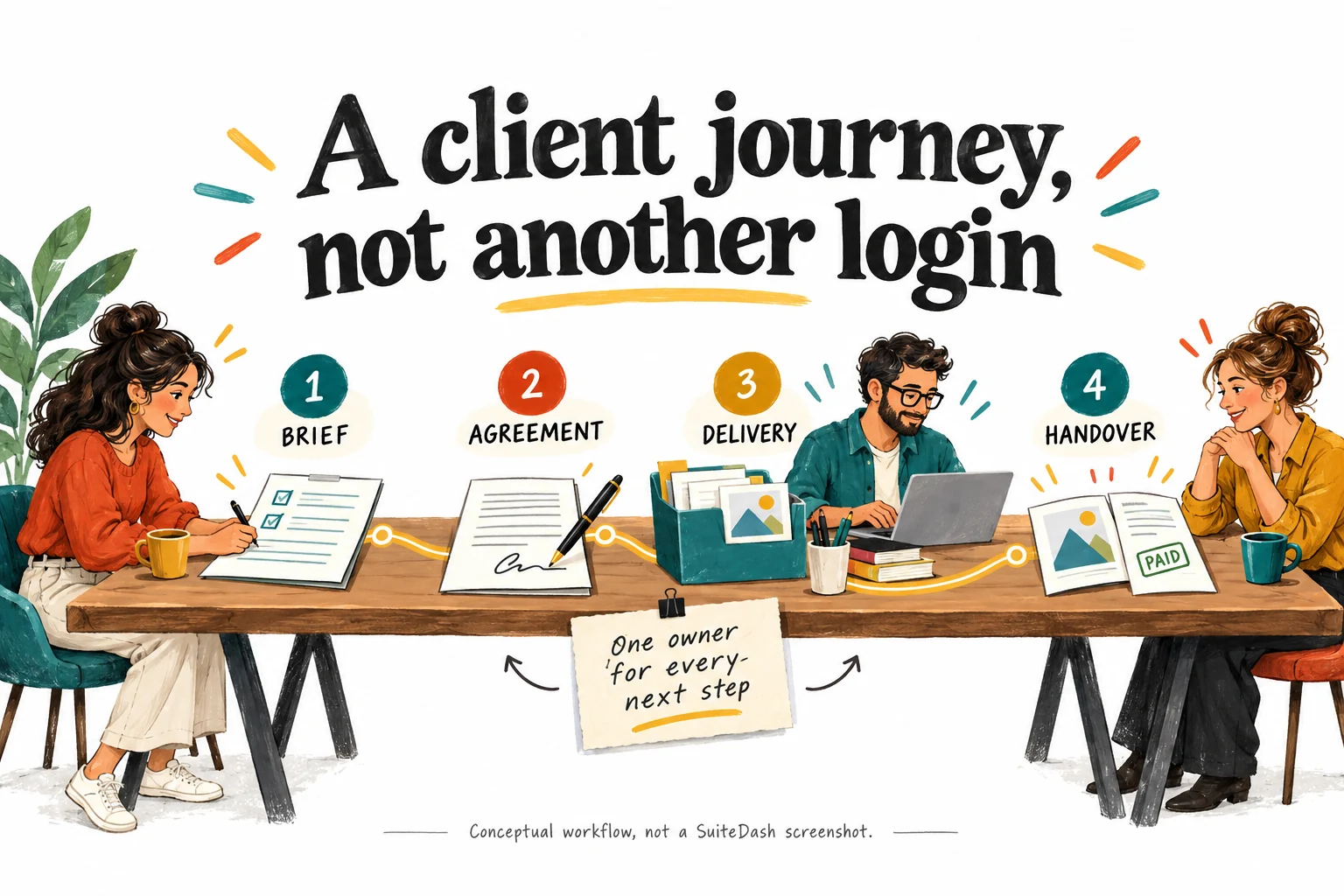
Follow one client from the first brief to the final handover

Imagine a small design studio selling a defined website package. Before work begins, it needs contact details, a clear brief, an agreed scope and the right assets. During delivery, it needs internal assignments, client decisions and a reliable place for current files. At the end, it needs a handover and a billing record that match what was actually delivered. This is a hypothetical evaluation scenario, not a report about a particular SuiteDash customer or a promise that every transition happens automatically.

Write that journey on one page before exploring all the modules. For each stage, identify the information needed, the person responsible and the observable condition that permits the next stage. 'Client onboarded' is too vague if it can mean anything from opening an email to supplying the final logo. 'Brief accepted by the project owner' is a more useful boundary. The software should reflect those decisions. It should not be asked to make them through a collection of defaults nobody has reviewed.

The integration opportunity comes from keeping related work attached to the appropriate client or company context. A reusable project structure may save repeated setup; a client workspace may reduce questions about where to upload material. But those benefits need to be demonstrated in your own process. Count the manual transfers you actually remove. If staff still copy the brief into another project system and maintain invoices somewhere else, the portal may improve presentation without delivering the consolidation you expected.

Evaluate the client's side of every handoff as carefully as the administrator's. Can the client tell what is required now, what is waiting on your team and where to ask a question? A complete internal dashboard is not necessarily a clear external experience. The illustration shows a deliberately short journey because a useful portal has priorities. Begin with the steps needed to deliver one service well. A course library, community area and elaborate dashboard can wait until they solve a real problem for that same customer.

Sources: CRM contact roles and portal access; Project templates, tasks and client visibility; Invoicing and supported payment gateways

Four illustrated service stages connect a client brief, agreement, project delivery and handover with a responsible owner for each next step
Original SoftScout concept illustration, not a SuiteDash screenshot. The useful unit of design is the complete client journey, with a clear owner at each handoff.

Contacts, companies and roles are operating decisions, not labels

SuiteDash distinguishes Leads, Prospects and Clients, and its CRM documentation says only Prospects and Clients can use the portal. That is a meaningful boundary, not just a different color on a contact record. Before importing a list, decide which people should have access and which are merely sales records. An address obtained through an inquiry should not automatically receive the same working environment as a paying customer with an active project. The classification needs to match the relationship you actually have.

Company-based work deserves a separate sketch. A company may have a commercial contact, a person supplying materials and someone approving invoices. Ask how your chosen setup represents those people and what each should see. Confirm the current company and contact behavior in a trial instead of assuming that one familiar word, such as client, means the same thing as it did in your previous CRM. Misunderstanding the record model can create confusion later in notifications, ownership and automation targets.

For staff, work backward from responsibility. A freelancer delivering one task should not need the same administrative reach as the person running the business. Check what each role can view, change and export, especially when several clients share the same internal team. The CRM settings include control over export permissions. Use that as one part of a broader access review, not as proof that every sensitive action is already constrained appropriately. An account that works for the administrator still needs testing from less privileged perspectives.

The documented Impersonate feature is useful for inspecting user views, but it is not a universal substitute for real testing. Its onboarding exception matters later in this review. Create a small set of controlled test identities that represent your actual roles and use them throughout the evaluation. Give the sample companies unmistakable names so their records cannot be confused with live customers. This slightly unglamorous preparation can prevent a much less enjoyable meeting about why a contractor saw something intended only for the account owner.

Sources: CRM contact roles and portal access; CRM settings and export permissions; User-view testing and its onboarding exception

Onboarding FLOWs: a skipped step can still trigger the next action

FLOWs are SuiteDash's guided sequences for collecting information or completing onboarding tasks. The documentation places them at the Pinnacle level and distinguishes first-entry onboarding from on-demand assignments later in the relationship. That can be useful when a service has a predictable set of requirements. It can also create a frustrating front door if the business makes every possible question mandatory before the client can reach the information they came to find. Design the sequence around a real outcome, not administrative curiosity.

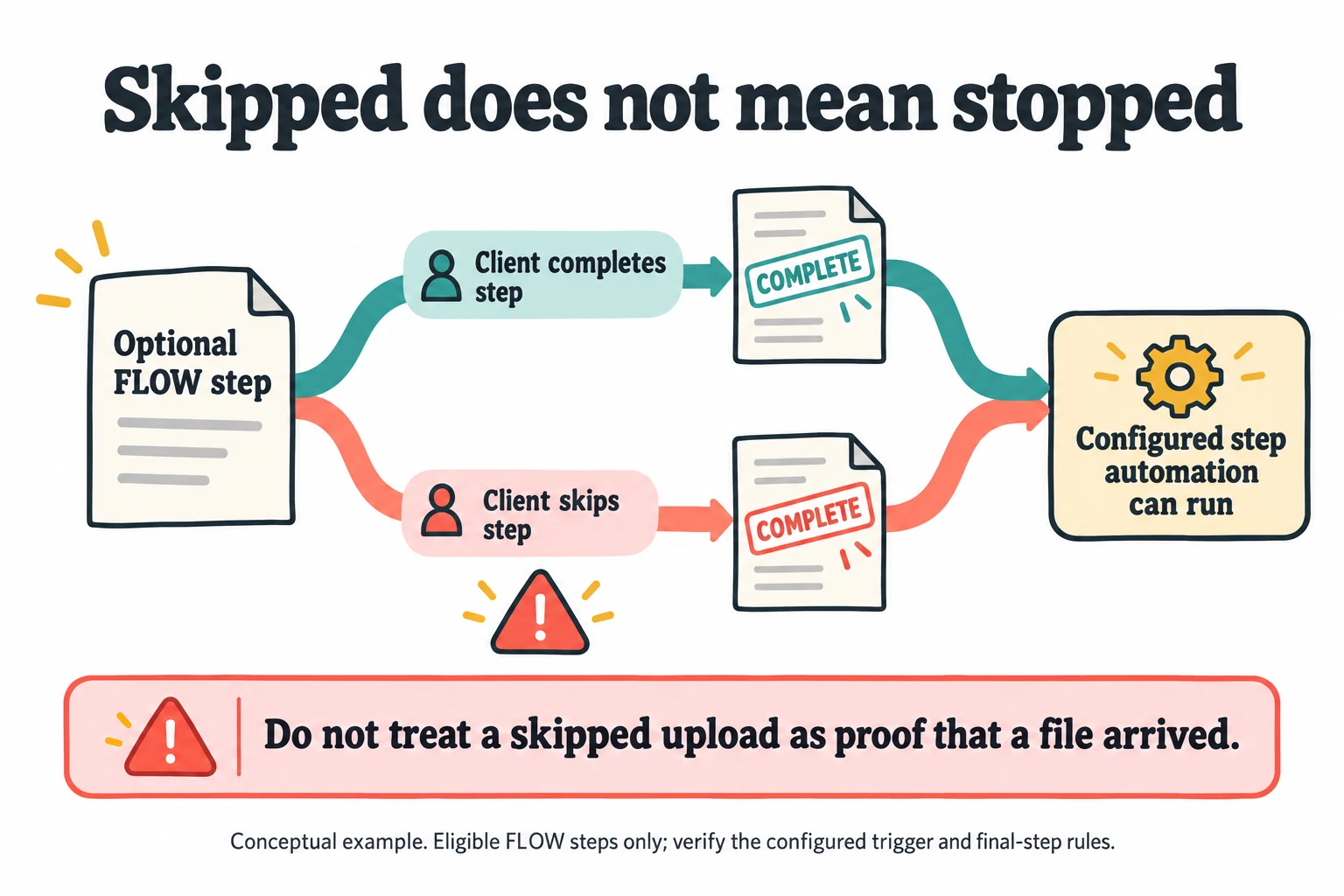
One documented detail deserves special attention: skipping an optional step marks it complete and can fire the automations configured for that step. Suppose, in a hypothetical workflow, an optional file-upload step is followed by an action telling the team that materials have arrived. A skip is not evidence of an upload. The configuration must distinguish the business condition from the step's completion state. Do not use a convenient status as proof of an event it does not necessarily represent. The accompanying diagram makes this risk explicit.

There are other boundaries to check without turning the setup into a guessing game. The guide treats whole-FLOW completion separately from the final step's automation handling, and a first-login onboarding FLOW does not appear through impersonation. Run the actual activation and sign-in path with a test contact. Then try completing, skipping and getting stuck at the relevant steps. Inspect the resulting messages and records. A preview that looks tidy is useful, but it cannot establish that the full event sequence behaves as intended.

Keep instructions short and provide a real help route. A client who lacks one document should know whether to pause, ask a question or continue without it. The business should know who receives that question and how work resumes. Avoid requiring clients to diagnose your workflow model while they are trying to send a brief. A good onboarding sequence feels like an organized colleague asking for the right things in the right order. A bad one feels like a paperwork obstacle course with enthusiastic branding.

Sources: FLOW assignment, skipped steps and completion rules; User-view testing and its onboarding exception

Completing or skipping an optional FLOW step both lead to a complete state and a configured automation that can run
Conceptual explanation of the documented optional-step behavior, not an interface capture. A skipped upload is not evidence that a file was received; check eligible-step and final-step rules in your actual configuration.

Automations need a precise trigger, target and failure plan

The no-code automation reference describes actions attached to supported events in different areas of SuiteDash. It also makes clear that the available actions depend on the context and target. A client-related event and a staff-related event do not automatically expose identical options. That matters when evaluating a proposed workflow: a platform having an automation feature does not prove that your exact trigger can perform your exact action on the intended record. Check the relevant configuration rather than inferring support from a broad feature name.

A useful planning sentence is: when this verified event happens to this record, perform this bounded action for this recipient. For the design studio, an approved brief might justify preparing an internal task. It does not necessarily justify charging a card, granting every portal permission or telling the customer that production has begun. Separate those consequences and decide which require review. Start with actions that are easy to inspect and reverse while learning how the system behaves in your particular setup.

Test the negative cases, not just the successful demonstration. What if the client changes their mind? What if a record is updated twice? What if the selected staff member has left? What if a generated project exists but the client cannot see the intended file? The vendor documentation explicitly separates an automation's action from the access rules of connected resources. A newly created item and a correctly accessible item are different outcomes. Your acceptance checklist should record both where that distinction affects delivery.

Give every automation an owner and an intelligible name. Keep a short description of its purpose, starting condition and expected result outside the administrator's memory. Review it when the underlying service changes. The goal is not to accumulate a heroic number of rules. It is to remove repeated work without creating silent mistakes that travel faster than the team can notice. A small set of understandable automations is often easier to trust than a sprawling chain whose creator remembers only that it worked during setup.

Sources: No-code automation targets and boundaries

Project templates are valuable when the service is repeatable

SuiteDash documents project generators, task templates, phases, time tracking and client-facing project information. These are most interesting when the business repeatedly delivers a similar service with controlled variations. A website package, monthly reporting service or structured consulting engagement can have a recognizable backbone. Reusing that backbone can reduce missed setup steps and make handovers easier. It is less useful when every engagement is fundamentally different and the team spends more time undoing the template than benefiting from it.

Build the first template from a real completed project, not an idealized process nobody follows. Include the tasks that protected quality and the decision points that prevented rework. Remove ceremonial steps that existed only because an old tool required them. For each task, distinguish internal completion from client approval. A designer finishing a draft does not mean the customer has accepted it, and a project moving to a new phase should not quietly erase that difference. The tool should make responsibility clearer, not merely make a list longer.

Decide what the client needs to see. An internal discussion about staffing or estimates may not belong in the same visible area as an approved deliverable. The project feature material describes configurable client visibility and private file arrangements. Verify those settings with controlled identities before using confidential work. For the client-facing view, favor a small number of meaningful milestones and clear next actions. Most customers want to know whether the project is moving and what you need from them, not inspect every internal subtask.

Time tracking adds another judgment call. Recording hours can help explain effort or support billing, but only if the team uses consistent categories and reviews the result. Do not assume that capturing more time entries automatically improves profitability. Test the path from a representative task to the intended invoice or report, then ask whether it provides information someone will use. A template earns its place when it makes the next engagement more dependable. It does not earn its place merely by producing an impressively populated screen.

Sources: Project templates, tasks and client visibility

File exchange should solve the final-final-version problem

The file-sharing tools include dedicated folders, file requests, shared access and version history. The documented request flow can collect an upload without making the recipient log in. That is a practical option for a client who only needs to send a document, but it should be configured deliberately. A convenient upload path and a carefully controlled shared workspace serve different purposes. Decide which experience the customer needs at each point instead of forcing every interaction through the most elaborate available route.

Use a simple folder convention that follows the service. For a design engagement, you might separate client-supplied originals, work in progress and approved deliverables. Those are example categories, not a prescribed SuiteDash structure. Make the status of a file understandable without opening five versions and asking which one counts. Version history helps preserve iterations, but the business still needs an approval convention. A folder containing 'final', 'final2' and 'actually-final' is a process problem wearing a very familiar filename.

Test a realistic file, not only a tiny sample document. Check the customer's upload experience, the destination folder, the staff notification and the recipient's ability to retrieve the result. Confirm the storage entitlement of the actual license and estimate how retained versions will affect it. A product describing large-file transfer does not mean that your account has infinite storage or that every customer's network will behave well. Keep a fallback for time-sensitive delivery and avoid making the portal the only place a crucial handover exists.

Also test the end of the relationship. Can the customer obtain the agreed deliverables in a usable arrangement? Can staff distinguish what should be retained from what should no longer be shared? The vendor describes folder downloads and version access, but you should verify the exact export you need. File exchange is successful when both parties know where the current material lives and can use it without repeated explanations. It is not successful just because the business has moved its old folder confusion into a branded website.

Sources: File requests, sharing and version history

Billing belongs in the workflow, but it still needs reconciliation

SuiteDash's billing material describes invoices and payment collection through the business's own supported gateway credentials, including Stripe, Braintree, PayPal and Authorize.Net. That can keep a client closer to the project context when paying. It does not mean the platform becomes the merchant, removes processor requirements or replaces every accounting function. Treat presentation, collection and bookkeeping as related but separate responsibilities. A payment button is the visible tip of a workflow that still has to make sense when something goes wrong.

Start with the billing pattern you actually sell. A fixed project with a deposit and final balance differs from a recurring retainer or variable time-based work. Map when an invoice should exist, who reviews it and which event permits collection. Avoid connecting a loosely defined project status directly to a financial consequence. A team member marking a task complete may not mean the client has accepted the scope or that every billable item is correct. The required approval should be explicit.

Test the awkward cases using the supported test arrangements for your gateway: a failed attempt, a partial payment where relevant, a corrected invoice and a cancellation. Check the customer message and the internal record, not only the success screen. We have not processed payments through SuiteDash for this review, so these are acceptance questions rather than verified transaction results. Keep any processor fees, external subscriptions and account-specific restrictions in the cost model. They do not disappear because the client sees one branded portal.

The Start documentation describes a one-way connection from SuiteDash to QuickBooks Online. That directional detail is important: do not assume that editing a record in either system produces identical changes everywhere. Agree on the authoritative record with the person responsible for bookkeeping, and verify how the relevant fields and statuses move. A sensible rollout can keep the existing accounting system while testing the client-facing improvement. Consolidation should remove duplicate effort after reconciliation works, not require abandoning reliable financial controls on the first day.

Sources: Invoicing and supported payment gateways; Start membership capabilities

Current pricing and the archived license are different comparisons

At the time checked, direct monthly memberships are Start at $19, Thrive at $49 and Pinnacle at $99. The corresponding annual prices shown are $180, $480 and $960. These are current public reference points, not a promise that a historical promotion can be purchased again. The direct pricing model advertises unlimited staff and clients, while the archived one-code license listed three staff members and 100GB storage. That difference alone is enough to make casual comparisons misleading for a growing team.

Choose around required capability rather than the most impressive discount percentage. If guided onboarding and the fuller automation toolkit are central to your intended process, confirm the appropriate tier instead of using the entry price in the business case. Conversely, a team that only needs the simpler tools should not pay for an elaborate future operation it has not validated. Ask for the exact plan, staff entitlement, storage and add-ons in writing when upgrading an existing promotional account. Similar product names do not establish identical rights.

The SuiteDreams documentation describes a separate package with $1,499 upfront and $49 per month, including Pinnacle and Power-Ups while excluding service subscriptions. That is not a one-time-only purchase. Decide whether those additional capabilities solve present needs before comparing it with a plain membership. Do not add the retail prices of tools you would never buy and call the total your savings. A bundle is economically useful when it replaces real expenditure or removes work worth more than its full ongoing cost.

For a hypothetical team, suppose the tools genuinely being retired cost $180 monthly and the proposed replacement costs $99 before extras. The subscription difference is $81 per month. If setup consumes twenty hours valued internally at $50 each, the $1,000 time cost takes roughly 12.3 months of that difference to recover, ignoring other changes. Those are illustrative inputs, not measured SuiteDash savings. Replace them with your numbers, include remaining tools and maintenance, and compare the result with simply improving your existing process. The cheapest invoice is not always the cheapest operating system.
Sources: Current direct membership pricing; Archived lifetime offer and license limits; SuiteDreams package and excluded services

Migration should begin with a few records, not the entire address book

The import documentation supports contact and company CSV workflows and includes warnings worth reading before any real migration. It says there is no undo for an import. It also warns that, when updating existing contacts, a blank mapped field can overwrite an existing value. That means a spreadsheet which looks harmless to its preparer can make consequential changes. Keep an untouched export of the original system and rehearse the mapping on a small controlled sample before considering the full customer list.

Choose representative cases, not merely the neatest rows. Include a company with more than one contact, a person with incomplete information, an existing record to update and a record that should not receive portal access. Decide which data belongs to the company and which belongs to the individual. Normalize names and identifiers carefully, then inspect the imported records rather than relying on a success count. A migration can technically finish while still putting the right information in the wrong place, which is a less obvious kind of failure.

Treat invitations and attached actions as separate launch decisions. The guide exposes an option to invite imported prospects and clients immediately. During a rehearsal, do not let a mapping exercise become an unexpected customer communication. Review any generators, audiences, onboarding assignments or other actions attached to the import before applying it. The right test demonstrates the intended data result without accidentally starting a live service journey. Keep a record of the settings used so the approved migration can be repeated deliberately.

After the sample passes, migrate in batches with a defined reconciliation checklist. Compare counts, required fields, company relationships, access and a few known records from each batch. Keep the previous system available for reference until the new workflow has been exercised successfully. Set a date and owner for the eventual cutover instead of allowing two competing sources of truth to persist indefinitely. A cautious migration is not an admission that the software is unreliable. It is recognition that your customer history deserves more care than a drag-and-drop experiment.

Sources: Contact and company import and export behavior

Permissions, exports and the exit plan need evidence of their own

A client portal may hold commercially sensitive files and correspondence, so review the vendor's current security material against your actual obligations before putting important data inside it. This review is not a security audit or compliance certification. Ask for the evidence your organization needs, including the relevant access, retention and contractual answers. Do not infer suitability for regulated information from a broad marketing statement or from the fact that another business in your industry uses a product with a similar feature list.

Within the account, test separation using ordinary permitted actions on records you control. Can a client see only the intended project? Does a shared folder include the right group? Can a departing staff member's access be removed without leaving a practical gap in ownership? Recheck these questions after changing templates or assignments. A correct initial configuration can become incorrect when the team adds a new service or copies an old project structure. Access review belongs to ongoing operations, not just the launch checklist.

Data portability needs a more specific question than 'Can I export?' The documentation provides CSV export for contact and company fields and a separate route for CRM notes. Neither statement proves that every project, conversation, invoice, attachment and automation can be reconstructed in a different system with relationships intact. List the records you would need to continue serving clients, then request and inspect representative exports. Confirm any gaps before committing, especially if the portal will become the only practical record of decisions made during delivery.

An exit plan can be modest and still useful. Keep the service definitions, important templates and operating instructions in an accessible format. Document which records are authoritative and who can retrieve them. Test a sample handover to someone who did not configure the account. The reason is ordinary business continuity: staff change roles, clients leave and software choices evolve. You do not need to predict a dramatic outage to justify keeping your business understandable outside one administrator's account. The ability to leave sensibly also makes staying a more deliberate decision.

Sources: Contact and company import and export behavior; CRM note export; CRM settings and export permissions; Vendor security overview

A branded portal succeeds only if clients use it

White labeling can make the client experience feel consistent with the business, but it does not create a reason to log in. A useful portal offers a clear benefit: find the latest deliverable, provide the requested information, approve a decision or understand the next milestone. If the customer still has to email the team to discover what matters, the branding has improved the wrapper without improving the service. Start with the client's most frequent question and make its answer easy to find.

Test on the devices and conditions your customers actually use. A client reviewing a short request on a phone has a different tolerance for navigation than an administrator building the system on a large monitor. Check text, document access, sign-in recovery and the path back to the relevant task. Do not assume that installing a branded app is a necessary or welcome part of every engagement. Offer the simplest supported route that accomplishes the job, and explain the reason for the portal in one practical sentence.

Keep notifications proportionate. A client should not receive three slightly different messages because one internal event touched several configured tools. Review the combined experience across portal, email and staff communication. Establish which channel carries the decision and which merely alerts the person that action is needed. For urgent exceptions, maintain a human contact path. A portal should reduce avoidable back-and-forth, not become an excuse for telling a confused customer to keep clicking until the business process eventually reveals itself.

Watch whether clients complete the intended actions without repeated coaching. Record common questions and revise labels, instructions or sequence accordingly. This is also where a narrower alternative may win: a well-organized shared folder and a clear email process can be sufficient for a very small engagement. SuiteDash becomes more persuasive when several repeated interactions benefit from sharing context. Do not make customers navigate a substantial platform merely to justify having purchased it. Their willingness to use the workspace is evidence the implementation must earn.

Sources: CRM contact roles and portal access; File requests, sharing and version history; Project templates, tasks and client visibility

A trial that answers the buying question, not just the feature question

Use the available trial to run one complete representative engagement with controlled data. The standard pricing page advertises a fourteen-day trial; confirm the current conditions when starting. Before that clock begins, prepare a short service outline, a sample brief, a few harmless files and the staff roles needed to deliver it. Choose an owner who can make decisions when the process is unclear. Otherwise, much of the trial can disappear into browsing settings while the actual buying question remains untouched.

In the first stage, establish the contact model and a minimal client workspace. Then run the first-entry experience through a real test login, not impersonation alone. Complete the required steps, intentionally skip the optional one and check what happened. Introduce one missing item and one client question. The system should make the next action and its owner clear in each case. Document any point where the administrator must intervene manually and decide whether that intervention is sensible or an unresolved configuration problem.

Next, create the project from the proposed template, share a representative file and inspect both the client and staff views. Walk through the intended billing sequence without making unintended live charges. Retrieve a sample export and ask a colleague to follow the workflow using the instructions you wrote. Record concrete results: setup time, repeated questions, manual transfers still required and missing capabilities. These observations are more valuable than a checklist saying the product has a CRM, projects and invoices, which was already evident before the trial.

At the decision point, separate fixable setup issues from structural mismatches. A confusing field label may be straightforward to change. A required specialist workflow that the product cannot support is a different matter. Obtain vendor clarification for unresolved licensing or behavior questions and keep those answers with the evaluation. Expand only after the small journey works. The trial has done its job even if the answer is to keep your existing tools. Discovering that before migration is a useful result, not a failure to be enthusiastic enough.

Sources: Current direct membership pricing; FLOW assignment, skipped steps and completion rules; User-view testing and its onboarding exception; Project templates, tasks and client visibility

Our verdict: buy the operating improvement, not the promise of fewer apps

SuiteDash deserves a serious look from a small service team whose daily friction occurs between tools rather than inside one highly specialized task. Its strongest argument is continuity: the people, information, delivery steps and billing context can be organized around the same client relationship. The documented breadth gives an administrator substantial room to build that experience. It also asks the administrator to make decisions that a simpler single-purpose product might make on the buyer's behalf. That tradeoff is central to the recommendation.

The best candidate has a repeatable service, enough recurring administration to justify consolidation and a named person willing to maintain the setup. The weakest candidate wants an instant transformation, has no stable process or needs one narrow capability that is already handled well elsewhere. Our score rewards the coherent scope while recognizing the learning and testing burden. It does not claim that more features always produce more value, and it does not treat a favorable promotional price as evidence of product quality.

For an existing lifetime customer, begin by checking what the account actually includes and whether a focused implementation can solve today's problem. Do not abandon a usable license just because current direct plans have different packaging. Equally, do not assume the old license includes every new service or unlimited staff. For a new buyer, disregard the archived price when calculating affordability. Evaluate the currently available membership, required extras and the cost of the work needed to adopt it responsibly.

A worthwhile outcome is easy to describe: the next client knows where to go, the team knows what happens next, important information reaches the right person and billing follows the agreed work. That is a better goal than winning an internal competition for the fewest subscriptions. Keep the deployment small enough to understand, preserve the parts of your existing operation that already work and expand only when the evidence supports it. The portal should make the business easier to run. It should not become the business's most demanding new client.

Sources: Current direct membership pricing; Archived lifetime offer and license limits; No-code automation targets and boundaries

Frequently asked questions

Can I still buy SuiteDash for the archived $159 price?

The source listing checked for this review says the offer is sold out. That figure is historical, not an available checkout price. Review the current direct membership terms or a newly verified promotion before making a purchase decision.

Does the old lifetime license include unlimited staff?

Do not assume that. The archived one-code offer listed three staff members, while the current direct pricing uses a different unlimited-staff model. Existing owners should check their actual account entitlement and original purchase terms.

Is SuiteDash a complete replacement for accounting software?

This review does not establish that. Invoicing and accepting payments are not the same as every accounting requirement. The documented QuickBooks Online connection is one-way, so confirm reconciliation and record ownership before changing your financial workflow.

Can I test onboarding by impersonating a client?

Impersonation helps inspect much of the client view, but the documentation says it does not trigger the first-login onboarding FLOW. Use a controlled test contact and the real activation path to verify that part of the journey.

What should I automate first?

Choose a small, reversible handoff with an obvious owner and outcome, such as preparing an internal task after a verified event. Add customer messages, access changes and billing consequences only after their conditions and exceptions are understood.

Current alternatives to SuiteDash

Business Operations

OkaySend

OkaySend helps businesses streamline client document collection, eliminating manual follow-ups and scattered emails. It provides secure, no-login client portals for structured intakes, automated reminders, and response tracking. This tool is designed for operations teams and service businesses that need to onboard clients faster and centralize file gathering, reducing administrative overhead and project delays.

$59 · checked Jul 6, 2026

Business Operations

BreezeDoc

BreezeDoc is a plausible choice for freelancers and small service teams that need an approved document signed without adding another large subscription. Its low price is attractive, but the real decision depends on document size, recipient handling, evidence retention and whether your workflow fits its straightforward controls.

$19 · checked Oct 24, 2026

Developer Tools

Context.dev

Context.dev combines web scraping, search, structured extraction and brand profiles behind one API. It makes sense for developers building research assistants, knowledge imports or company-aware onboarding. The catch is familiar: clean output is not automatically correct output. This review explains where the service can save engineering work, which limits matter, and how to evaluate it before committing to a subscription.

Extra 25% off · checked Oct 24, 2026

Marketing & SEO

Inrō

A strong candidate for businesses already receiving relevant Instagram conversations. Start with a narrow, supervised flow and verify the plan's limits. It can improve response handling, but it does not create an audience or make every stored contact reachable.

$59 · checked Nov 14, 2026

Deal alerts

Get business operations deal alerts by email.

SoftScout will send short buying notes when offers like SuiteDash look worth checking or worth skipping.

Short buyer verdicts

Useful offers before checkout

Editorial note

The archived offer is not currently available at its historical price. Consider the product after a complete client-journey trial, with written confirmation of the license and any add-ons you need. A limited, well-run rollout is more persuasive than a portal containing every possible feature.

For vendors

Have a better deal for SuiteDash?

Send current partner terms, coupon limits, refund rules, and the best buyer fit. We review offers before adding them to SoftScout pages or Telegram alerts.

Submit terms